

The top scheduling software in 2026 includes Calendly and Acuity Scheduling for streamlined appointment booking, alongside Cal.com and Setmore for customizable and budget-friendly scheduling. Businesses using integrated payment and business management tools can consider Square Appointments and Zoho Bookings, while Doodle is useful for coordinating group availability. Service businesses can also explore SimplyBook.me, Jobber, and Housecall Pro, while workforce-focused platforms such as Connecteam, Homebase, and Deputy support employee and shift scheduling.
Scheduling software helps individuals, businesses, and teams organize appointments, meetings, shifts, and other time-based activities through centralized digital tools. Depending on the platform, scheduling systems can provide online booking pages, calendar synchronization, automated reminders, team availability management, payment processing, client self-service, and integrations with other business applications.
The right scheduling software depends on the type of scheduling you need, team size, booking volume, integrations, automation requirements, and budget. Before choosing a platform, businesses should consider calendar synchronization, automated reminders, appointment availability, time-zone support, team scheduling, integrations, payment options, customization, and ease of use.
What are the Best Scheduling Software in 2026?
Our Top Picks are:
- Calendly — Best for Simple Self-Service Appointment Booking
- Acuity Scheduling — Best for Service Businesses & Custom Client Intake
- Cal.com — Best for Open-Source & Highly Customizable Scheduling
- Setmore — Best for Small Businesses & Affordable Online Booking
- Square Appointments — Best for Local Service Businesses & POS Integration
- Zoho Bookings — Best for Zoho Ecosystem Integration
- Doodle — Best for Group Scheduling & Availability Polls
- SimplyBook.me — Best for Multi-Staff Service Businesses
- Jobber — Best for Field Service Scheduling & Job Management
- Housecall Pro — Best for Home Service Scheduling & Dispatch
- Connecteam — Best for Deskless & Hourly Workforce Scheduling
- Homebase — Best for Employee Scheduling & Payroll Management
- Deputy — Best for Shift Scheduling & Workforce Management
- YouCanBookMe — Best for Branded Appointment Booking Pages
- Appointy — Best for Growing Businesses & Multi-Location Scheduling
What is Scheduling Software?
Scheduling software is a digital tool that helps users organize, manage, and automate time-based activities such as appointments, meetings, employee shifts, classes, services, and bookings. Instead of coordinating availability manually through calls, emails, spreadsheets, or messages, users can manage schedules through a centralized platform.
Modern scheduling software can connect with calendars, display available time slots, allow customers or employees to book themselves, and send automated confirmations and reminders. Depending on the platform, it may also support payments, client information, staff availability, recurring appointments, time-zone management, reporting, and integrations with CRM or business-management tools.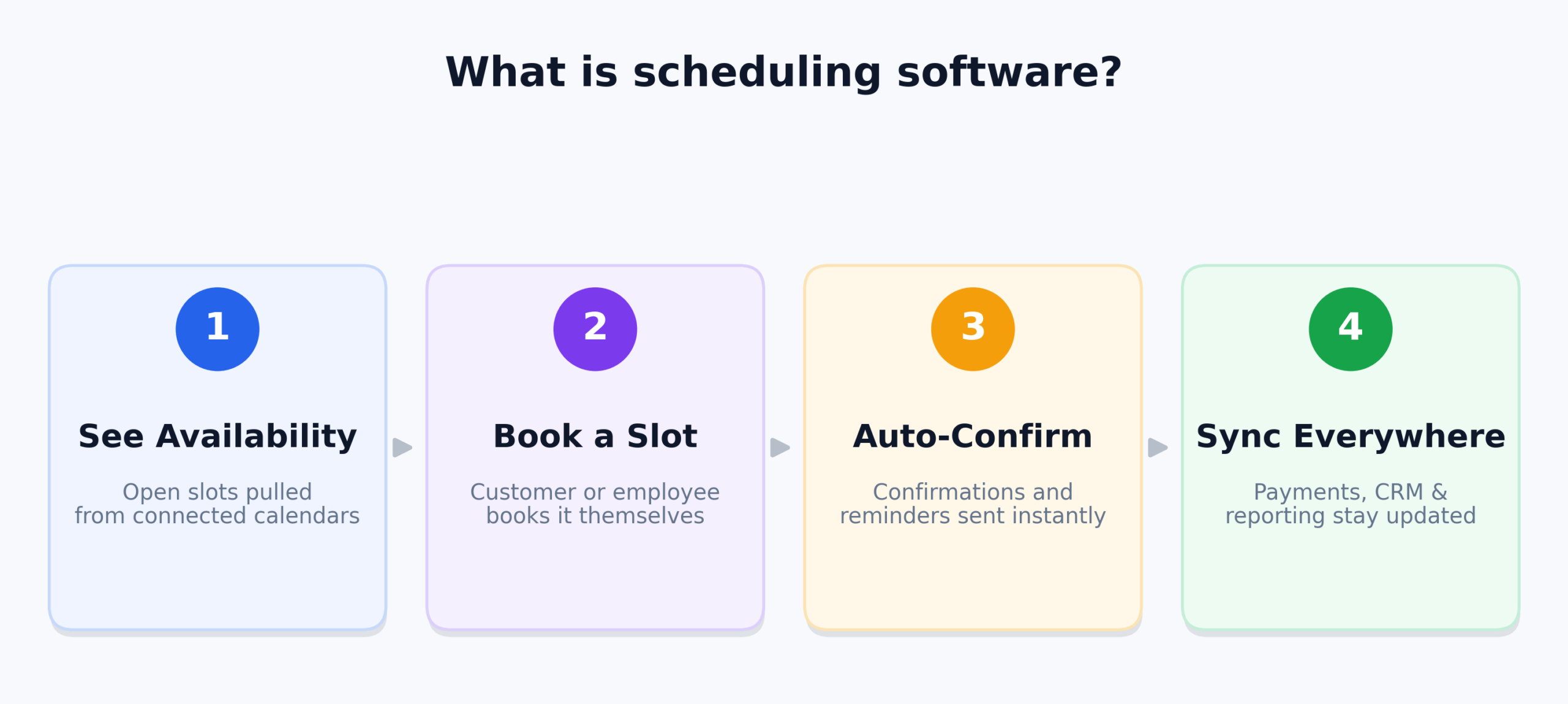
What are the Types of Scheduling Software?
Scheduling platforms can be grouped into several categories depending on who is being scheduled and what type of workflow the business needs:
1. Appointment Scheduling Software
Appointment scheduling tools are designed for businesses that allow customers to book services or meetings online. They typically provide booking pages, availability management, calendar synchronization, automated confirmations, and reminders.
2. Employee & Shift Scheduling Software
Employee scheduling platforms help businesses create work schedules, assign shifts, manage availability, track time, and coordinate hourly or deskless employees. These tools are particularly useful for restaurants, retail businesses, healthcare teams, and field-service organizations.
3. Meeting & Team Scheduling Software
Meeting scheduling tools simplify the process of finding suitable times for individuals or groups. They can connect with personal calendars, automatically identify availability, and allow participants to select or agree on meeting times.
4. Field Service Scheduling Software
Field service scheduling software combines scheduling with job management. It can help businesses assign technicians, organize appointments, manage routes, track jobs, and coordinate field teams.
5. Multi-Service Business Scheduling Software
These platforms support businesses that manage multiple services, employees, locations, or appointment types from one system. They often include staff calendars, booking pages, customer management, payments, and business integrations.
Why Do Businesses Need Scheduling Software?
Businesses use scheduling software to reduce manual coordination and make appointments, meetings, and employee schedules easier to manage.
- Online Self-Service Booking: Customers can view available times and book appointments without contacting staff manually.
- Calendar Synchronization: Scheduling tools can connect with calendars to reduce conflicts and keep availability updated.
- Automated Reminders: Email, SMS, or other notifications can remind customers and employees about upcoming appointments or shifts.
- Better Team Coordination: Managers can organize staff availability, shifts, appointments, and assignments from a centralized system.
- Reduced Administrative Work: Automated scheduling, confirmations, rescheduling, and notifications can reduce repetitive coordination tasks.
- Payments and Business Integrations: Some platforms connect scheduling with payment processing, CRM systems, POS tools, video-conferencing platforms, and other business software.
What Matters When Reviewing Scheduling Software
When comparing scheduling software, focus on the features that directly affect booking, availability, team coordination, and day-to-day administration.
Booking and Availability Management
Look for flexible booking pages, customizable availability, buffer times, recurring appointments, cancellation rules, and support for different appointment types. These features determine how easily customers or employees can schedule time without creating conflicts.
Calendar and Time-Zone Support
Reliable calendar synchronization is important for avoiding double bookings and keeping availability accurate. Businesses serving customers or teams in different locations should also check how the platform handles time zones and working hours.
Automation and Notifications
Automated confirmations, reminders, follow-ups, rescheduling, and cancellation notifications can reduce manual communication. Check which notification channels are available and whether automation is included in the selected plan.
Team and Workforce Scheduling
Businesses with multiple employees should examine staff calendars, shift management, availability rules, permissions, and resource allocation. Field-service businesses may also need dispatching, job assignment, and route-management capabilities.
Integrations and Payments
Scheduling software becomes more useful when it connects with the tools a business already uses. Consider integrations with Google Calendar, Microsoft Outlook, Zoom, CRM platforms, payment processors, POS systems, and business-management software based on your workflow.
Customization and User Experience
A scheduling platform should be easy for both administrators and customers to use. Check whether booking pages, forms, notifications, branding, services, and appointment rules can be customized without requiring extensive technical work.
15 Best Scheduling Software in 2026
Below is an in-depth breakdown of 15 scheduling software platforms for 2026, covering appointment booking, calendar management, team scheduling, workforce management, online payments, and service-business workflows.
1. Calendly — Best for Fast, Simple Self-Service Booking
Company Overview
| Detail | Information |
|---|---|
| Founded | 2013 |
| Headquarter | Atlanta, Georgia, United States |
| Software Type | Meeting Scheduling and Appointment Booking Software |
| Core Features | Booking Pages, Calendar Sync, Team Scheduling, Automated Notifications, Routing |
| Deployment | Cloud-based |
| Pricing Model | Subscription |
| Free Plan | Available |
| Free Trial | Available on selected paid plans |
| Supported Platforms | Web, Mobile, Calendar and Productivity Integrations |
Calendly is one of the most recognized scheduling software platforms, particularly for professionals and businesses that want to eliminate back-and-forth emails when arranging meetings. Its core scheduling workflow lets users share availability and allow invitees to choose an available time without requiring manual calendar coordination.
As scheduling software, Calendly is particularly suitable for sales teams, consultants, recruiters, educators, and professionals who regularly arrange one-to-one or group meetings. Its combination of booking pages, calendar synchronization, automated workflows, and team scheduling makes it a practical option for organizations looking for a streamlined online scheduling process. Calendly says its platform is used by more than 50 million people across 240+ countries and territories.
Key Features
- Online Booking Pages: Create shareable scheduling pages where people can select available meeting times.
- Calendar Synchronization: Connect supported calendars to automatically reflect availability and help prevent conflicts.
- Team Scheduling: Coordinate meetings across multiple users with routing and shared scheduling workflows.
- Automated Workflows: Automate reminders and other scheduling-related communications.
- Meeting Integrations: Connect scheduling workflows with video conferencing, CRM, and productivity tools.
Pricing
- Free: $0.
- Standard: $10/seat/month annually or $12 monthly.
- Teams: $16/seat/month annually or $20 monthly.
- Teams Plus: $24/seat/month annually.
- Enterprise: From $15,000/year for 50 seats.
2. Acuity Scheduling — Best for Service Businesses & Client Appointments
Company Overview
| Detail | Information |
|---|---|
| Founded | 2006 |
| Headquarter | New York , United State |
| Software Type | Appointment Scheduling Software |
| Core Features | Online Booking, Client Management, Payments, Calendar Management, Automated Reminders |
| Deployment | Cloud-based |
| Pricing Model | Subscription |
| Free Trial | 7 days |
| Starting Price | $16/month when billed annually |
| Supported Platforms | Web, Mobile and Website Integrations |
Acuity Scheduling is one of the strongest scheduling software options for service businesses in 2026, especially businesses that need more than a basic meeting-booking link. The platform is designed around client appointments and allows customers to book, reschedule, and cancel appointments online while businesses control availability and booking rules. Acuity was founded in 2006 and became a Squarespace company after its 2019 acquisition.
For appointment-based businesses, Acuity combines scheduling with client intake, payments, reminders, staff management, and calendar controls. This makes it particularly relevant for professionals such as personal trainers, consultants, salons, and other service providers that need a structured client-booking workflow.
Key Features
- Online Appointment Booking: Let clients book available appointments and services online.
- Client Management: Collect client information and manage appointment-related details.
- Payments and Deposits: Accept payments through supported payment processors during booking.
- Automated Reminders: Send automated appointment confirmations, reminders, and client communications.
- Staff and Calendar Management: Manage multiple calendars, availability, and staff scheduling.
Pricing
- Starter: $16/month when billed annually or $20/month when billed monthly.
- Standard: Higher-tier plan supporting up to six calendars and additional client-management features.
- Premium: Higher-tier plan supporting up to 36 calendars and advanced business features.
- Free Trial: 7-day trial is available without a credit card.
3. Cal.com — Best for Open-Source & Customizable Scheduling
Company Overview
| Detail | Information |
|---|---|
| Founded | 2021 |
| Headquarter | San Francisco, California, United States |
| Software Type | Scheduling and Booking Infrastructure |
| Core Features | Calendar Sync, Booking Pages, Team Scheduling, Routing Forms, APIs |
| Deployment | Cloud and Self-hosted |
| Pricing Model | Free and Subscription |
| Free Plan | Available |
| Starting Price | Free |
| Supported Platforms | Web, Mobile, Browser Extension and API |
Cal.com is one of the most flexible scheduling software options in 2026 for users who want control over how their booking system works. Unlike a basic appointment scheduler, Cal.com combines hosted scheduling with developer-focused customization and integrations, making it particularly useful for technical teams and businesses with specific scheduling workflows.
The platform is especially relevant when scheduling needs extend beyond a simple booking page. Its team scheduling, routing forms, APIs, calendar integrations, payment support, and self-hosting capabilities allow organizations to build scheduling experiences around their own workflows.
Key Features
- Flexible Booking Pages: Create event types and booking experiences for different meeting requirements.
- Calendar Synchronization: Connect multiple calendars and synchronize availability.
- Team Scheduling: Support shared availability, round-robin scheduling, and team event types.
- Routing Forms: Route bookings to the appropriate person or team based on submitted information.
- Developer Integrations: Use APIs, webhooks, integrations, and self-hosting options for customized workflows.
Pricing
- Free: $0/month for individuals with unlimited event types and calendars.
- Teams: $12/user/month when billed annually.
- Organizations: $28/user/month when billed annually.
- Enterprise: Custom pricing.
- Free Trial: 14-day trial for paid team and organization plans.
4. Setmore — Best Budget-Friendly Scheduling Software
Company Overview
| Detail | Information |
|---|---|
| Founded | 2011 |
| Headquarter | Portland, Oregon, United States |
| Software Type | Appointment Scheduling Software |
| Core Features | Online Booking, Payments, Reminders, Calendar Sync, Team Collaboration |
| Deployment | Cloud-based |
| Pricing Model | Free and Subscription |
| Free Plan | Available |
| Starting Price | $0/month |
| Supported Platforms | Web, iOS and Android |
Setmore is one of the more accessible appointment scheduling software options for small businesses, particularly for businesses that want to start with a free scheduling system. It combines online booking with payment collection, reminders, booking pages, and mobile apps, allowing service providers to manage appointments without adopting a complicated platform.
For small teams and independent service providers, Setmore provides a straightforward way to publish availability and let customers book appointments online. Its free plan supports up to four users, while the paid option adds features such as SMS reminders, two-way calendar synchronization, recurring appointments, and additional team capabilities.
Key Features
- Online Booking Page: Give customers a branded page where they can view services and book appointments.
- Payment Collection: Accept payments through supported payment options.
- Appointment Reminders: Send email and, on supported plans, SMS appointment reminders.
- Calendar Synchronization: Synchronize scheduling information with supported calendars.
- Team Scheduling: Provide collaboration tools for teams managing shared appointments.
Pricing
- Free: $0/month for up to four users.
- Pro: Pricing currently starts around $5/user/month with annual billing on the displayed offer.
- Monthly Pricing: Higher pricing may apply depending on billing frequency and current plan configuration.
- Trial: Setmore provides a Pro trial and currently advertises a 30-day money-back guarantee.
5. Square Appointments — Best for Booking & Point-of-Sale Integration
Company Overview
| Detail | Information |
|---|---|
| Founded | 2009 |
| Headquarter | San Francisco, California, United States |
| Software Type | Appointment Scheduling and POS Software |
| Core Features | Online Booking, Staff Calendars, Payments, Deposits, POS Integration |
| Deployment | Cloud-based |
| Pricing Model | Free and Subscription |
| Free Plan | Available |
| Starting Price | $0/month |
| Supported Platforms | Web, Mobile and Square Hardware |
Square Appointments is one of the leading scheduling software choices for businesses that need appointment booking alongside payments and point-of-sale functionality. It is particularly relevant to salons, wellness businesses, retailers, and other appointment-based businesses already using the Square ecosystem.
Its scheduling system goes beyond calendar management by connecting online booking with deposits, payments, staff calendars, and Square’s broader business tools. Businesses can create booking websites, embed booking widgets, collect deposits, and manage multiple staff calendars from the platform.
Key Features
- Online Appointment Booking: Create booking websites, buttons, QR codes, and embedded booking options.
- Staff Calendars: Manage unlimited calendars and organize availability by employee or service.
- Deposits and Prepayments: Collect deposits or require advance payment for selected services.
- POS and Payments: Connect appointment scheduling with Square’s payment ecosystem.
- Schedule Reporting: Monitor metrics such as schedule utilization, retention, and prebooking.
Pricing
- Free: $0/month per location.
- Plus: $49/month per location in the US.
- Premium: $149/month per location in the US.
- Free Trial: Square Plus and Premium include a 30-day free trial.
6. Zoho Bookings — Best for Zoho Ecosystem Integration
Company Overview
| Detail | Information |
|---|---|
| Founded | 1996 (Zoho Corporation) |
| Headquarter | Chennai, India |
| Software Type | Appointment Scheduling Software |
| Core Features | Appointment Booking, Calendar Sync, Team Scheduling, Payments, Zoho Integrations |
| Deployment | Cloud-based |
| Pricing Model | Subscription |
| Free Plan | Available depending on current offering |
| Starting Price | Varies by current plan and region |
| Supported Platforms | Web and Mobile |
Zoho Bookings is a strong scheduling software option for businesses already using Zoho applications in 2026. Rather than functioning as an isolated booking tool, it fits into the broader Zoho ecosystem, making it useful for organizations that want scheduling connected with CRM, meetings, payments, and other business workflows.
For businesses already invested in Zoho, the main advantage is workflow continuity. Appointment scheduling can become part of a broader customer-management process rather than remaining a separate calendar activity.
Key Features
- Online Appointment Booking: Allow customers to schedule available services and meetings online.
- Calendar Synchronization: Coordinate availability with supported calendar services.
- Team Scheduling: Manage appointments across employees and teams.
- Business Integrations: Connect scheduling workflows with other Zoho applications.
- Payment Support: Enable payment collection as part of supported booking workflows.
Pricing
- Free/Trial Options: Zoho offers limited free or trial access depending on the current offering.
- Paid Plans: Pricing varies according to selected Bookings features, users, and billing region.
- Enterprise Features: Advanced requirements may require higher-tier plans or additional Zoho services.
7. Doodle — Best for Group Scheduling & Availability Polls
Company Overview
| Detail | Information |
|---|---|
| Founded | 2007 |
| Headquarter | Zürich, Switzerland |
| Software Type | Group Scheduling and Meeting Coordination Software |
| Core Features | Group Polls, Booking Pages, Calendar Sync, Meeting Scheduling, Sign-up Sheets |
| Deployment | Cloud-based |
| Pricing Model | Free and Subscription |
| Free Plan | Available |
| Starting Price | $0/month |
| Supported Platforms | Web and Mobile |
Doodle is one of the best-known group scheduling software tools for 2026, especially when several people need to find a mutually convenient meeting time. Its polling model makes it different from traditional schedulers that primarily expose one person’s availability through a booking page.
Doodle is particularly useful for workshops, group meetings, interviews, and events where participants may have different schedules. The platform offers free group meetings and booking pages, while Doodle Professional adds advanced scheduling features, calendar synchronization, tracking, branding, and an ad-free experience.
Key Features
- Group Scheduling Polls: Let participants indicate which meeting times work for them.
- Booking Pages: Create pages where others can schedule available times.
- Calendar Synchronization: Connect calendars to improve availability management.
- Sign-up Sheets: Organize participation for events and activities.
- Scheduling Management: Track responses and coordinate meetings from a centralized workflow.
Pricing
- Free: $0/month for basic scheduling.
- Professional: $15/month in the US when billed monthly.
- Professional Annual: $132/year in the US.
- Regional Pricing: Prices can vary by country and billing method.
8. SimplyBook.me — Best for Multi-Service Appointment Businesses
Company Overview
| Detail | Information |
|---|---|
| Founded | 2009 |
| Headquarter | Limassol, Cyprus |
| Software Type | Online Appointment Scheduling Software |
| Core Features | Booking Website, Booking Widget, Payments, Staff Management, Custom Features |
| Deployment | Cloud-based |
| Pricing Model | Free and Subscription |
| Free Plan | Available |
| Starting Price | $0/month |
| Supported Platforms | Web, Mobile and WordPress |
SimplyBook.me is one of the more flexible appointment scheduling software platforms for 2026, particularly for service businesses that need customizable booking pages and support for multiple providers. The company says its headquarters are in Cyprus, with additional offices in Iceland and Ukraine.
The platform is designed for businesses that may need more than basic appointment booking, including payments, client apps, staff management, custom features, and integrations. Its plan structure scales according to booking volume, providers, and enabled features, making it relevant to both smaller practices and larger service operations.
Key Features
- Online Booking Website: Provide customers with a dedicated booking website and scheduling interface.
- Booking Widget: Embed scheduling functionality into an existing website, including WordPress sites.
- Staff Management: Manage multiple providers and their appointment availability.
- Payments and Deposits: Support online payments, deposits, tips, and related booking transactions.
- Custom Features: Add specialized functionality according to the selected plan.
Pricing
- Free: $0/month with 50 included bookings.
- Basic: $11.90/month annually or $13.90/month monthly.
- Standard: $24.90/month annually or $29.90/month monthly.
- Premium: $49.90/month annually or $59.90/month monthly.
- Enterprise: Custom pricing.
- Free Trial: 14-day trial available.
9. Jobber — Best for Field Service Scheduling
Company Overview
| Detail | Information |
|---|---|
| Founded | 2011 |
| Headquarter | Edmonton, Alberta, Canada |
| Software Type | Field Service Management and Scheduling Software |
| Core Features | Job Scheduling, Online Booking, Dispatching, Client Management, Invoicing |
| Deployment | Cloud-based |
| Pricing Model | Subscription |
| Free Trial | Available |
| Starting Price | $29/month with annual billing |
| Supported Platforms | Web, iOS and Android |
Jobber is one of the most relevant scheduling software platforms for field service businesses in 2026, particularly contractors that need to schedule jobs rather than simple meetings. The platform combines scheduling with client management, quotes, invoicing, payments, and field-service workflows. Jobber’s official information identifies 2011 as its launch year and lists Edmonton and Toronto offices.
For plumbers, landscapers, cleaners, HVAC companies, and other service professionals, scheduling is connected directly to the job lifecycle. Businesses can receive requests or online bookings, turn approved work into jobs, schedule crews, and manage customer information from the same system.
Key Features
- Job Scheduling: Schedule service jobs and organize work across teams and crews.
- Online Booking: Allow customers to request or book services through online forms and client tools.
- Crew Scheduling: Group employees into crews and assign work based on team availability.
- Client Management: Store customer information and connect it with scheduled work.
- Job and Payment Workflow: Connect scheduled work with quotes, invoices, payments, and job management.
Pricing
- Core: Starts at $29/month with annual billing.
- Connect: Starts at $99/month with annual billing.
- Grow: Starts at $149/month with annual billing.
- Plus: Starts at $399/month with annual billing.
- Free Trial: Available without a credit card.
10. Housecall Pro — Best for Home Service Scheduling & Dispatch
Company Overview
| Detail | Information |
|---|---|
| Founded | 2013 |
| Headquarter | San Diego, California, United States |
| Software Type | Field Service Management Software |
| Core Features | Scheduling, Dispatching, Invoicing, Customer Management, Mobile Field Tools |
| Deployment | Cloud-based |
| Pricing Model | Subscription |
| Free Trial | 14 days |
| Starting Price | $59/month annually for Basic |
| Supported Platforms | Web, Android and iOS |
Housecall Pro is one of the strongest scheduling software options for home service businesses in 2026, especially contractors that need scheduling connected to dispatching and field operations. The platform was founded in 2013 and is built for industries such as HVAC, plumbing, electrical, cleaning, landscaping, and other home services.
Its scheduling functionality is part of a larger field-service workflow that includes dispatching, invoicing, customer communication, payments, and mobile access. That makes Housecall Pro more appropriate for businesses scheduling technicians and service visits than for professionals looking only for meeting-booking software.
Key Features
- Job Scheduling: Create and manage customer appointments and service jobs.
- Dispatching: Assign scheduled work to field technicians and organize daily routes.
- Customer Management: Keep customer information and service history connected to jobs.
- Invoicing and Payments: Connect completed jobs with invoicing and payment collection.
- Mobile Field Management: Give technicians access to schedules and job information through mobile tools.
Pricing
- Basic: $59/month billed annually or $79/month billed monthly.
- Essentials: $149/month billed annually or $189/month billed monthly.
- MAX: $299/month billed annually or $329/month billed monthly.
- Free Trial: 14-day trial with no credit card required.
11. Connecteam — Best for Employee & Shift Scheduling
Company Overview
| Detail | Information |
|---|---|
| Founded | 2016 |
| Headquarter | New York, New York, United States |
| Software Type | Workforce Management and Employee Scheduling Software |
| Core Features | Job Scheduling, Time Clock, Shift Management, Forms, Workforce Communication |
| Deployment | Cloud-based |
| Pricing Model | Subscription |
| Free Trial | 14 days |
| Starting Price | $29/month for the first 30 users on Operations Basic when billed annually |
| Supported Platforms | Web, iOS and Android |
Connecteam is one of the most capable employee scheduling software platforms in 2026 for businesses managing deskless, hourly, or distributed workers. Instead of focusing primarily on client appointments, Connecteam is designed around workforce operations, including shifts, time tracking, tasks, communication, and employee management.
Its Operations Hub combines job scheduling with time clocks, forms, and tasks, making it useful for companies that need to coordinate employees across locations or shifts. The platform also supports repeating shifts, schedule templates, geofencing, auto-assignment, and other workforce scheduling functions on higher plans.
Key Features
- Employee Scheduling: Build and manage employee shifts and work schedules.
- Time Tracking: Combine scheduled work with time-clock and attendance management.
- Shift Templates: Create repeating schedules and reusable shift templates.
- Geofencing: Use location-based controls for workforce time and scheduling workflows.
- Workforce Automation: Automate shift assignments, reports, and operational tasks on higher plans.
Pricing
- Operations Basic: $29/month for the first 30 users when billed annually.
- Operations Advanced: $49/month for the first 30 users when billed annually.
- Operations Expert: $99/month for the first 30 users when billed annually.
- Enterprise: Custom pricing.
- Free Trial: 14-day free trial with no credit card required.
12. Homebase — Best for Hourly Employee Scheduling
Company Overview
| Detail | Information |
|---|---|
| Founded | 2014 |
| Headquarter | San Francisco, California, United States |
| Software Type | Employee Scheduling and Workforce Management Software |
| Core Features | Shift Scheduling, Time Tracking, Team Communication, Payroll Integration, AI Scheduling |
| Deployment | Cloud-based |
| Pricing Model | Free and Subscription |
| Free Plan | Available |
| Starting Price | $0/month per location |
| Supported Platforms | Web, iOS and Android |
Homebase is one of the more practical employee scheduling software choices for hourly teams in 2026, especially restaurants, retail businesses, and other organizations that manage shifts. Its scheduling system connects employee availability with time tracking, team communication, payroll integrations, and labor-management tools.
For small businesses, Homebase offers a free Basic plan for one location with up to 10 employees. Higher plans add advanced scheduling, AI-powered scheduling, PTO controls, departments, permissions, and broader workforce-management capabilities.
Key Features
- Employee Shift Scheduling: Build schedules and organize employee shifts by location.
- Availability Management: Manage employee availability, time-off requests, and shift changes.
- Time Tracking: Connect scheduled work with employee time clocks and timesheets.
- AI Scheduling: Use AI-powered scheduling features on supported plans.
- Payroll and POS Integrations: Connect scheduling workflows with payroll and point-of-sale systems.
Pricing
- Basic: $0/month per location for one location and up to 10 employees.
- Essentials: $30/month per location, or $24/month with annual billing.
- Plus: $70/month per location, or $56/month with annual billing.
- All-in-One: $120/month per location, or $96/month with annual billing.
- Trial: 14-day All-in-One trial is available.
13. Deputy — Best for Workforce Shift Scheduling
Company Overview
| Detail | Information |
|---|---|
| Founded | 2008 |
| Headquarter | Sydney, Australia |
| Software Type | Workforce Management and Employee Scheduling Software |
| Core Features | Shift Scheduling, Time Tracking, Demand Forecasting, Compliance, Payroll Integrations |
| Deployment | Cloud-based |
| Pricing Model | Subscription |
| Free Trial | Available |
| Starting Price | $5/user/month |
| Supported Platforms | Web, iOS and Android |
Deputy is one of the leading workforce scheduling software options for 2026 for businesses that need to manage employee shifts, labor requirements, and time tracking. Its focus is different from appointment-booking platforms because it is designed around workforce operations and employee availability.
Deputy’s higher-tier scheduling capabilities include auto-scheduling, demand forecasting, labor optimization, micro-scheduling, and wage budgets. This makes it relevant for businesses where scheduling must account for staffing requirements and labor costs rather than simply finding an available appointment slot.
Key Features
- Employee Shift Scheduling: Create and manage employee schedules across teams and locations.
- Auto-Scheduling: Automate parts of the scheduling process based on workforce requirements.
- Demand Forecasting: Use demand information to help plan staffing levels.
- Time and Attendance: Combine schedules with timesheets and clocking tools.
- Labor Compliance: Support scheduling workflows with labor-law compliance tools.
Pricing
- Lite: $5/user/month.
- Core: $6.50/user/month.
- Pro: $9/user/month.
- Enterprise: Custom pricing.
- Billing: Plans can be billed upfront or in monthly installments; applicable taxes are extra.
14. YouCanBookMe — Best for Customizable Booking Pages
Company Overview
| Detail | Information |
|---|---|
| Founded | 2011 |
| Headquarter | Bedford, United Kingdom |
| Software Type | Online Scheduling and Booking Software |
| Core Features | Booking Pages, Calendar Sync, Custom Forms, Payments, Scheduling Automation |
| Deployment | Cloud-based |
| Pricing Model | Free and Subscription |
| Free Plan | Available |
| Starting Price | $0/month |
| Supported Platforms | Web and Calendar Integrations |
YouCanBookMe is one of the more customizable online scheduling software options in 2026 for individuals and businesses that want branded booking experiences. The platform was launched in 2010 and has focused on simplifying online scheduling and booking workflows.
Its strength is customization: users can tailor booking pages, availability, forms, reminders, branding, meeting locations, and payment workflows. This makes it useful for professionals who want more control over the appearance and behavior of their scheduling pages without building a scheduling system themselves.
Key Features
- Custom Booking Pages: Create branded booking pages with customized text, images, and layouts.
- Calendar Availability: Connect supported calendars to manage real-time availability.
- Booking Forms: Collect customized information from clients during the booking process.
- Automated Notifications: Configure confirmation, reminder, and follow-up communications.
- Payment Collection: Accept payments through Stripe during the booking process.
Pricing
- Free: $0/month with one calendar connection and one booking page.
- Individual: Paid tier with additional calendars, booking pages, and customization.
- Professional: Adds automation, analytics, integrations, and additional booking controls.
- Team: Adds team management, roles, round-robin scheduling, and centralized billing.
- Billing: Monthly, annual, and two-year billing options are available.
15. Appointy — Best for Growing Appointment-Based Businesses
Company Overview
| Detail | Information |
|---|---|
| Founded | 2006-2007 |
| Headquarter | Bhopal, India |
| Software Type | Appointment Scheduling and Booking Software |
| Core Features | Online Booking, Calendar Sync, Payments, Staff Scheduling, Multi-Location Management |
| Deployment | Cloud-based |
| Pricing Model | Free and Subscription |
| Free Plan | Available |
| Starting Price | $0/month |
| Supported Platforms | Web, Mobile and Website Integrations |
Appointy is one of the flexible appointment scheduling software platforms for 2026 for small and midsize businesses that need online booking alongside staff and service management. It supports businesses that want to move from basic appointment coordination toward a more structured booking system.
The platform scales from a free plan for individual users to paid plans that add unlimited services, payment integrations, staff accounts, resource scheduling, and multi-location functionality. This makes Appointy relevant to businesses that expect their scheduling requirements to grow as their operations expand.
Key Features
- Online Appointment Booking: Let customers book services through online scheduling pages.
- Calendar Synchronization: Connect scheduling availability with supported calendar systems.
- Payment Processing: Accept payments through supported providers such as Stripe and PayPal.
- Staff and Resource Scheduling: Coordinate employees, services, and bookable resources.
- Multi-Location Management: Support businesses operating across multiple locations on higher plans.
Pricing
- Free: $0/month for one staff member, five services, and up to 100 appointments per month.
- Growth: $19.99/month when billed annually or $29.99/month monthly.
- Professional: $49.99/month when billed annually or $59.99/month monthly.
- Enterprise: $79.99/month when billed annually or $99.99/month monthly.
- Free Trial: 14-day trial on paid plans.
Comparison of the Best Scheduling Software in 2026
| Scheduling Software | Best For | Starts At | Free Trial / Plan | Standout Feature | Primary Trade-off |
|---|---|---|---|---|---|
| Calendly | Fast self-service scheduling | Varies by current plan | Free plan available | Simple booking pages and automated scheduling | Advanced features require paid plans |
| Acuity Scheduling | Service businesses | Varies by current plan | Trial available | Intake forms, appointment scheduling, and client management | Primarily focused on appointment-based businesses |
| Cal.com | Developers and technical teams | Free/self-hosted options available | Free option available | Highly customizable and open-source scheduling | Requires more technical knowledge for advanced customization |
| Setmore | Small businesses | Free plan available | Free plan available | Appointment booking, reminders, and payment options | Advanced capabilities require paid plans |
| Square Appointments | Local service businesses | Free plan available | Free plan available | Scheduling integrated with Square payments and POS | Some advanced features depend on the Square ecosystem |
| Zoho Bookings | Zoho users | Varies by current plan | Trial/free options may vary | Integration with Zoho’s broader business ecosystem | Best value may depend on using other Zoho products |
| Doodle | Group availability | Free option available | Free option available | Poll-based scheduling for groups | Less focused on full business appointment management |
| SimplyBook.me | Multi-staff service businesses | Varies by current plan | Free plan/trial options available | Flexible booking website and service management | Feature availability varies by plan |
| Jobber | Field service businesses | Varies by current plan | Trial availability varies | Scheduling combined with field-service workflows | More specialized than general-purpose schedulers |
| Housecall Pro | Home service companies | Varies by current plan | Trial/demo options vary | Scheduling, dispatching, and customer management | Primarily designed for home-service operations |
| Connecteam | Deskless and hourly teams | Free plan available | Free plan available | Employee scheduling combined with workforce management | More workforce-focused than appointment scheduling |
| Homebase | Hourly teams | Free plan available | Free plan available | Employee scheduling, time tracking, and payroll integrations | Primarily designed for hourly workforce management |
| Deputy | Shift-based businesses | Varies by current plan | Trial availability varies | Workforce scheduling and demand-based planning | More complex for very small teams |
| YouCanBookMe | Branded booking pages | Varies by current plan | Trial/free options vary | Customizable booking pages and calendar integrations | Less comprehensive than full business-management platforms |
| Appointy | Growing appointment-based businesses | Varies by current plan | Free/trial options vary | Online booking with multi-location and business-management features | Pricing and features depend on the selected plan |
How to Choose the Right Scheduling Software
Choosing scheduling software depends mainly on what you are scheduling, who needs access to the calendar, and how much automation your workflow requires.
Match the Software to Your Scheduling Needs
First, determine whether you need one-on-one meetings, customer appointments, group scheduling, employee shifts, or field-service appointments.
A meeting scheduler such as Calendly serves a different purpose from workforce platforms such as Deputy or Homebase. Choosing according to your actual scheduling workflow prevents unnecessary complexity.
Check Calendar and Booking Integrations
Look for integrations with the calendars and business applications your team already uses.
Google Calendar, Microsoft Outlook, Zoom, payment platforms, CRM systems, and other integrations can reduce manual scheduling and prevent duplicate data entry.
Evaluate Automation Features
Useful scheduling automation can include automatic reminders, time-zone detection, recurring appointments, booking confirmations, availability rules, and calendar synchronization.
The right level of automation depends on how frequently your team handles bookings and how much manual coordination you want to eliminate.
Consider Team and Staff Management
Businesses with multiple employees should check whether the software supports team calendars, staff availability, round-robin scheduling, multiple locations, permissions, and shift management.
These features become particularly important when several employees share appointment or shift responsibilities.
Review Pricing and Scalability
Compare the available plans based on users, calendars, locations, appointments, and premium features rather than looking only at the advertised starting price.
A free plan may be sufficient for an individual, while growing businesses may need paid features for additional users, automation, integrations, or administrative controls.
Check Client Experience
For customer-facing scheduling, review the booking page, mobile experience, reminders, intake forms, cancellation rules, and payment options.
A straightforward booking experience can reduce back-and-forth communication and make it easier for customers to select available times.
Frequently Asked Questions (FAQs)
What is scheduling software?
Scheduling software is a digital tool that helps individuals and organizations manage availability, appointments, meetings, shifts, and bookings. Depending on the platform, it can also automate reminders, calendar synchronization, payments, booking pages, and staff scheduling.
What is the best scheduling software in 2026?
The right scheduling software depends on the type of scheduling you need. Calendly is focused on meeting scheduling, Acuity Scheduling and SimplyBook.me are designed around appointments and services, while Deputy, Homebase, and Connecteam focus more heavily on employee and workforce scheduling.
Is there free scheduling software?
Yes. Several scheduling platforms offer free plans or free options, although their limits vary. Calendly, Setmore, Square Appointments, Cal.com, Connecteam, and Homebase are examples with free options available, subject to their current plan restrictions.
What scheduling software is best for small businesses?
Small businesses should compare platforms based on their specific workflow. Appointment-based businesses may look at Setmore, Square Appointments, Acuity Scheduling, or SimplyBook.me, while businesses primarily scheduling meetings may prefer a simpler meeting-focused platform.
Can scheduling software integrate with Google Calendar and Outlook?
Many scheduling platforms support integrations with major calendar services, including Google Calendar and Microsoft Outlook. However, the specific calendars and synchronization features available depend on the software and subscription plan.
Does scheduling software send automatic reminders?
Many scheduling platforms provide automated email or SMS reminders. The availability, number of reminders, and messaging limits vary between providers and subscription plans.
Conclusion
The top scheduling software in 2026 covers several different use cases, from simple meeting bookings to customer appointments, employee shifts, and field-service scheduling. Calendly and similar meeting-focused platforms can simplify individual and team bookings, while tools such as Acuity Scheduling, Setmore, and SimplyBook.me provide broader appointment-management capabilities.
For workforce scheduling, platforms such as Deputy, Homebase, and Connecteam provide features built around employees, shifts, and operational management. The right choice ultimately depends on your scheduling type, number of users, required integrations, automation needs, and budget.
