
The best social media management software includes Hootsuite, Sprout Social, Buffer, Metricool, Agorapulse, Later, SocialPilot, Zoho Social, Loomly, Sendible, SocialBee, Sprinklr, Canva, MeetEdgar, and Emplifi. These platforms help businesses, creators, agencies, and marketing teams schedule content, manage multiple social accounts, monitor engagement, analyze performance, and organize social media workflows from centralized platforms.
The best social media management software are designed to make social publishing more organized and efficient. Depending on the platform, they can provide scheduling calendars, social inboxes, analytics, reporting, content planning, collaboration, approval workflows, social listening, automation, and AI-powered content tools.
Choosing the right software depends on your social networks, number of accounts, content volume, team size, reporting needs, and budget. Some platforms focus on simple scheduling for creators and small businesses, while others provide advanced analytics, agency management, or enterprise-level social media and customer experience features.
What are the Best Social Media Management Software in 2027?
Our top picks are:
- Hootsuite — Best Overall
- Sprout Social — Best for Analytics
- Buffer — Best for Small Businesses
- Metricool — Best for Reporting
- Agorapulse — Best for Social Inbox
- Later — Best for Visual Planning
- SocialPilot — Best for Agencies
- Zoho Social — Best for Zoho Users
- Loomly — Best for Collaboration
- Sendible — Best for Client Management
- SocialBee — Best for Content Recycling
- Sprinklr — Best for Enterprises
- Canva — Best for Social Design
- MeetEdgar — Best for Automation
- Emplifi — Best for Customer Experience
What is Social Media Management Software?
Social media management software is a platform that helps users manage social media activities from a centralized dashboard. Instead of handling each social network separately, users can use these tools to plan, create, schedule, publish, monitor, and analyze content across supported platforms. This makes it easier to maintain a consistent publishing schedule while reducing repetitive work across different social accounts.
Modern social media management software can also include social inboxes, content calendars, analytics, reporting, collaboration, approval workflows, social listening, competitor tracking, automation, and AI-powered content assistance. Some platforms are designed mainly for scheduling, while others provide advanced analytics, customer engagement, or enterprise-level social management features.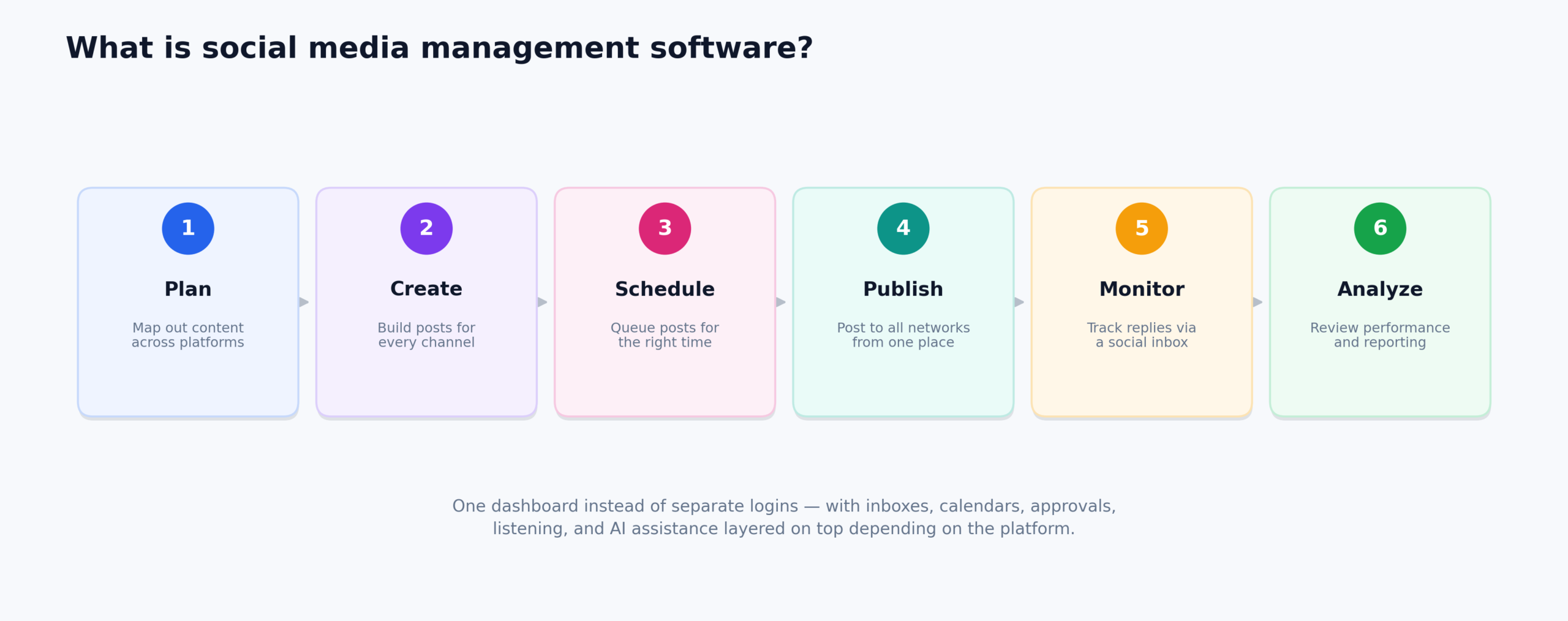
Why Do Businesses Need Social Media Management Software in 2027?
Centralized Social Media Management
Social media management software brings multiple social accounts into one workspace. This reduces the need to repeatedly switch between different social platforms when publishing or monitoring content.
Faster Content Scheduling
Scheduling tools allow businesses to prepare content in advance. Teams can organize upcoming posts, maintain consistent publishing schedules, and plan campaigns from a single content calendar.
Better Social Media Analytics
Analytics help users understand how their social content performs. Common measurements include engagement, reach, impressions, clicks, follower growth, and individual post performance.
Easier Team Collaboration
Marketing teams often have different people responsible for writing, designing, reviewing, approving, and publishing content. Collaboration features help organize these responsibilities within one workflow.
Improved Audience Engagement
Social inboxes can bring comments, messages, mentions, and other interactions into a centralized workspace. This helps teams manage audience conversations without constantly opening individual social networks.
More Efficient Content Creation
Many platforms now provide AI tools, templates, content suggestions, media libraries, and other features that can reduce repetitive work during social media content creation.
Types of Social Media Management Software
Social media management platforms can be grouped according to the type of work they emphasize. Some focus mainly on scheduling, while others concentrate on analytics, engagement, agency workflows, visual planning, or enterprise operations. Understanding these types can help businesses choose a platform that matches their social media goals and daily workflow.
1. Social Media Scheduling Software
These platforms focus on planning and scheduling posts across multiple social networks. They are commonly used by creators, businesses, and marketing teams that want a consistent publishing schedule. Users can prepare content in advance and organize upcoming posts through calendars or automated publishing queues.
2. Social Media Analytics Software
Analytics-focused platforms provide performance data, reports, audience insights, and other measurements. They are useful for marketers who need to evaluate social media results. These tools can help identify high-performing content, monitor audience growth, and understand how different social channels are performing.
3. Social Media Engagement Software
These tools emphasize comments, messages, mentions, and customer interactions. Their social inbox features help teams manage conversations from a centralized interface. This can make it easier for businesses to respond to customers, monitor brand conversations, and keep track of important social interactions.
4. Visual Social Media Planning Software
Visual planning platforms help users organize image and video content before publishing. They are particularly useful for visual-focused social networks and brands. Features such as visual calendars, media libraries, feed previews, and content organization can help maintain a consistent visual style.
5. Agency Social Media Management Software
Agency-focused platforms provide features for managing multiple clients and social profiles. Common capabilities include bulk scheduling, approval workflows, reporting, permissions, and client management. These tools can help agencies organize different client campaigns while keeping publishing and reporting activities in one workspace.
6. Enterprise Social Media Management Software
Enterprise platforms are designed for organizations with larger teams, multiple brands, complex workflows, extensive reporting requirements, and broader customer engagement operations. They often provide advanced governance, social listening, analytics, collaboration, and customer experience features for managing social activity at a larger scale.
What Matters When Reviewing Social Media Management Software
When reviewing social media management software, businesses should look beyond the number of supported networks. The platform should match the organization’s publishing volume, team structure, reporting requirements, workflow, and budget.
- Supported Social Networks: Check whether the platform supports the social networks and account types you use.
- Scheduling and Publishing: Look for content calendars, queues, bulk scheduling, and publishing options.
- Analytics and Reporting: Compare available metrics, reports, exports, and performance tracking.
- Social Inbox: Check whether comments, messages, and mentions can be managed centrally.
- Team Collaboration: Review approval workflows, permissions, assignments, and shared calendars.
- Content Creation: Consider templates, AI tools, media editing, and content suggestions.
- Agency Features: Agencies should check client management, reporting, permissions, and approval tools.
- Integrations: Consider integrations with CRM, design, analytics, advertising, and marketing platforms.
- Pricing: Compare plans based on users, social profiles, features, and billing frequency.
15 Best Social Media Management Software in 2027
The following 15 platforms cover a range of social media management needs, including publishing, scheduling, analytics, engagement, visual planning, agency workflows, automation, and enterprise social operations.
1. Hootsuite — Best Overall
Company Overview
| Detail | Information |
|---|---|
| Founded | 2008 |
| Headquarter | Vancouver, British Columbia, Canada |
| Software Type | Social Media Management |
| Core Features | Scheduling, publishing, analytics, social listening, engagement |
| Deployment | Cloud-based |
| Pricing Model | Subscription |
| Free Trial | Available |
| Starting Price | Varies by current plan |
| Payment Frequency | Monthly or annual |
| Supported Platforms | Web, iOS, Android |
Hootsuite is widely recognized as one of the most popular social media management platforms for businesses and marketing teams managing multiple social networks. It combines content scheduling, publishing, engagement, analytics, and social listening in one centralized environment.
The platform is particularly useful for teams that need a broader social media workflow rather than a basic scheduling tool. Its centralized management, monitoring, analytics, and collaboration capabilities allow businesses to organize social activity across multiple accounts and team members.
Key Features
- Social Media Scheduling: Schedule and publish posts across multiple social media accounts from one dashboard.
- Content Calendar: Organize upcoming posts and campaigns through a centralized content calendar.
- Social Inbox: Manage messages and conversations from supported social networks in one place.
- Analytics & Reporting: Track social performance and create reports for your accounts.
- Social Monitoring: Monitor your brand, competitors, conversations, and relevant topics.
- AI Content Tools: Generate social post ideas, captions, and images using Hootsuite’s AI features.
Pricing
- Standard: $99/user/month
- Professional: $199/user/month
- Advanced: $399/user/month
- Enterprise: Custom pricing
- Free Trial: 14 days
- Billing: Monthly or annual
2. Sprout Social — Best for Analytics
Company Overview
| Detail | Information |
|---|---|
| Founded | 2010 |
| Headquarter | Chicago, Illinois, United States |
| Software Type | Social Media Management |
| Core Features | Analytics, publishing, engagement, listening, reporting |
| Deployment | Cloud-based |
| Pricing Model | Subscription |
| Free Trial | Available |
| Starting Price | Varies by current plan |
| Payment Frequency | Monthly or annual |
| Supported Platforms | Web, iOS, Android |
Sprout Social is widely recognized as one of the most popular social media management platforms for teams that need detailed analytics and social intelligence. It combines publishing, engagement, reporting, and social listening tools within a centralized platform.
The software is particularly relevant for data-driven marketing teams that want to understand social performance alongside everyday publishing and audience engagement. Its analytics and reporting capabilities help organizations evaluate content and social activity across supported networks.
Key Features
- Social Publishing: Create, schedule, organize, and publish content across supported social networks.
- Smart Inbox: Manage social messages and interactions from a consolidated inbox.
- Social Analytics: Measure profile, post, audience, and engagement performance.
- Social Listening: Monitor keywords, locations, conversations, and audience sentiment.
- Competitive Insights: Compare social performance with competitors on supported plans.
- AI-Powered Tools: Use AI features for content creation, replies, insights, and social workflows.
Pricing
- Essentials: $79/seat/month, billed annually
- Standard: $199/seat/month
- Professional: $299/seat/month
- Advanced: $399/seat/month
- Enterprise: Custom pricing
- Free Trial: 30 days
3. Buffer — Best for Small Businesses
Company Overview
| Detail | Information |
|---|---|
| Founded | 2010 |
| Headquarter | San Francisco, California, United States |
| Software Type | Social Media Management |
| Core Features | Scheduling, publishing, analytics, engagement, AI tools |
| Deployment | Cloud-based |
| Pricing Model | Subscription |
| Free Trial | Available for paid plans |
| Starting Price | Free plan available |
| Payment Frequency | Monthly or annual |
| Supported Platforms | Web, iOS, Android |
Buffer is widely recognized as one of the most popular social media management platforms for creators, small businesses, and users who want straightforward social scheduling. Its simple workflow makes it possible to plan, organize, and publish content without the complexity of a large enterprise system.
The platform combines scheduling, content calendars, analytics, engagement, and AI-assisted content creation. This makes Buffer useful for smaller teams that need practical social media management features while keeping their publishing workflow relatively simple.
Key Features
- Social Scheduling: Schedule posts across supported social networks from one dashboard.
- Content Calendar: Plan and organize upcoming social content using a visual calendar.
- Analytics: Monitor post and channel performance with social analytics.
- Community Inbox: Manage audience comments and interactions from supported channels.
- AI Assistant: Generate content ideas, captions, replies, and other social content.
- Team Collaboration: Manage approvals, permissions, and collaborative publishing on the Team plan.
Pricing
- Free: $0 for up to 3 channels
- Essentials: From $6/channel/month
- Team: From $12/channel/month
- Annual Essentials: From $60/channel/year
- Annual Team: From $120/channel/year
- Free Trial: 14 days for paid plans
4. Metricool — Best for Reporting
Company Overview
| Detail | Information |
|---|---|
| Founded | 2016 |
| Headquarter | Madrid, Spain |
| Software Type | Social Media Management & Analytics |
| Core Features | Scheduling, analytics, competitor tracking, reporting |
| Deployment | Cloud-based |
| Pricing Model | Subscription |
| Free Trial | Available depending on plan |
| Starting Price | Varies by plan |
| Payment Frequency | Monthly or annual |
| Supported Platforms | Web, mobile |
Metricool is widely recognized as one of the most popular social media management platforms for marketers who need scheduling combined with detailed performance reporting. Its dashboard brings publishing and analytics together, allowing users to manage content while monitoring its results.
The platform is particularly useful for businesses, creators, and agencies that regularly need social media reports. Its analytics, competitor tracking, planning, and reporting capabilities provide a broader view of social performance than a basic scheduling tool.
Key Features
- Social Media Scheduling: Plan and publish content across supported social networks.
- Social Analytics: Track account, post, audience, and performance data.
- Competitor Analysis: Monitor and compare selected competitor profiles.
- Reports: Create downloadable PDF and PPT social media reports.
- Advertising Analytics: Analyze supported social advertising campaigns.
- Team & Client Management: Manage collaborators, roles, approvals, and client workflows on Advanced plans.
Pricing
- Free: $0/month
- Starter: From $20/month
- Advanced: From $53/month
- Custom: Custom pricing
- Annual Billing: Available with savings of up to 24%
- Free Plan: Available indefinitely
5. Agorapulse — Best for Social Inbox
Company Overview
| Detail | Information |
|---|---|
| Founded | 2010 |
| Headquarter | Paris, France |
| Software Type | Social Media Management |
| Core Features | Social inbox, scheduling, monitoring, analytics, collaboration |
| Deployment | Cloud-based |
| Pricing Model | Subscription |
| Free Trial | Available |
| Starting Price | Varies by plan |
| Payment Frequency | Monthly or annual |
| Supported Platforms | Web, mobile |
Agorapulse is widely recognized as one of the most popular social media management platforms for businesses and agencies that need centralized social engagement. Its social inbox helps teams organize messages, comments, and other interactions while keeping publishing and reporting within the same platform.
The software also provides scheduling, monitoring, analytics, and collaboration tools. This combination makes it useful for teams that need to manage both social publishing and ongoing audience conversations from a centralized workflow.
Key Features
- Unified Social Inbox: Manage social messages and organic comments from supported networks in one inbox.
- Publishing & Scheduling: Schedule and publish unlimited social posts.
- Content Calendar: Organize upcoming and previously published content.
- Social Reporting: Track audience, content, and social performance.
- Inbox Automation: Automate selected inbox and moderation workflows.
- Team Collaboration: Assign posts and inbox tasks and manage team workflows.
Pricing
- Standard: $79/user/month billed annually
- Professional: $119/user/month billed annually
- Advanced: $149/user/month billed annually
- Standard Monthly: $99/user/month
- Professional Monthly: $149/user/month
- Advanced Monthly: $199/user/month
- Custom: Contact Agorapulse
- Free Trial: 30 days
6. Later — Best for Visual Planning
Company Overview
| Detail | Information |
|---|---|
| Founded | 2014 |
| Headquarter | Boston, Massachusetts |
| Software Type | Visual Social Media Management |
| Core Features | Visual planning, scheduling, publishing, analytics |
| Deployment | Cloud-based |
| Pricing Model | Subscription |
| Free Trial | Available depending on plan |
| Starting Price | Varies by plan |
| Payment Frequency | Monthly or annual |
| Supported Platforms | Web, iOS, Android |
Later is widely recognized as one of the most popular social media management platforms for visual content planning and social publishing. Its visual-first approach is particularly useful for creators and brands that need to organize images, videos, and other media before publishing.
The platform combines visual planning, scheduling, analytics, and publishing features. This makes it useful for businesses and creators that want their social media content to remain visually organized while managing multiple publishing activities.
Key Features
- Visual Content Calendar: Plan and preview social posts before publishing.
- Social Scheduling: Schedule content across supported social platforms.
- Best Time to Post: Identify recommended publishing times for supported platforms.
- Link in Bio: Create a social landing page connected to your published content.
- AI Content Tools: Generate content ideas and captions with AI tools.
- Social Analytics: Measure platform and content performance.
Pricing
- Starter: $18.75/month billed annually
- Growth: $37.50/month billed annually
- Scale: $82.50/month billed annually
- Free Trial: 14 days
- Starter: 1 social set and 1 user
- Growth: 2 social sets and collaboration features
- Scale: 6 social sets and advanced capabilities
7. SocialPilot — Best for Agencies
Company Overview
| Detail | Information |
|---|---|
| Founded | 2014 |
| Headquarter | Lewes, Delaware, United States |
| Software Type | Social Media Management |
| Core Features | Scheduling, bulk publishing, analytics, collaboration |
| Deployment | Cloud-based |
| Pricing Model | Subscription |
| Free Trial | Available |
| Starting Price | Varies by plan |
| Payment Frequency | Monthly or annual |
| Supported Platforms | Web, mobile |
SocialPilot is widely recognized as one of the most popular social media management platforms for agencies and businesses managing multiple social profiles. Its combination of bulk scheduling, client management, collaboration, and reporting supports social media workflows that involve many accounts.
The platform is particularly useful for agencies that need to organize content for different clients without maintaining separate publishing systems. Its scheduling and reporting tools can help teams manage recurring social media work more efficiently.
Key Features
- Social Media Scheduling: Schedule and publish content across supported social platforms.
- Bulk Scheduling: Upload and schedule large batches of social posts.
- Content Calendar: Plan and organize content from a centralized calendar.
- Analytics & Reporting: Track performance and generate social media reports.
- Client Collaboration: Manage clients, approvals, and agency workflows.
- White-Label Reporting: Create branded reports for agency clients.
Pricing
- Essentials: $17/month billed annually
- Standard: $34/month billed annually
- Premium: $85/month billed annually
- Ultimate: $170/month billed annually
- Free Trial: 14 days
- Monthly Billing: Available at higher rates
8. Zoho Social — Best for Zoho Users
Company Overview
| Detail | Information |
|---|---|
| Founded | 2015 |
| Headquarter | Chennai, Tamil Nadu, India |
| Software Type | Social Media Management |
| Core Features | Publishing, scheduling, monitoring, analytics, CRM integration |
| Deployment | Cloud-based |
| Pricing Model | Subscription |
| Free Trial | Available |
| Starting Price | Varies by plan |
| Payment Frequency | Monthly or annual |
| Supported Platforms | Web, mobile |
Zoho Social is widely recognized as one of the popular social media management platforms for businesses that already use Zoho applications. Its integration with the broader Zoho ecosystem allows social media activity to connect with other business and customer-management workflows.
The platform provides publishing, scheduling, monitoring, analytics, and collaboration tools. Its connection with Zoho CRM can also help businesses incorporate social interactions into broader customer-management processes.
Key Features
- Social Scheduling: Schedule and publish content across supported social channels.
- Publishing Calendar: Organize scheduled, published, and draft content.
- Bulk Scheduling: Upload and schedule multiple posts at once.
- Social Monitoring: Monitor conversations and social activity from supported networks.
- Analytics & Reports: Track social performance and create reports.
- Zoho Integration: Connect social activity with Zoho CRM and Zoho Desk on supported plans.
Pricing
- Free: Available
- Standard: Paid plan
- Professional: Paid plan
- Premium: Paid plan
- Agency: Paid plan
- Agency Plus: Paid plan
- Free Trial: 15 days
- Annual Billing: Up to 33% savings
Zoho dynamically displays regional pricing on its pricing page, so the exact dollar amount can differ by country and billing option.
9. Loomly — Best for Collaboration
Company Overview
| Detail | Information |
|---|---|
| Founded | 2015 |
| Headquarter | Los Angeles, California, United States |
| Software Type | Social Media Management |
| Core Features | Content calendar, publishing, collaboration, approvals |
| Deployment | Cloud-based |
| Pricing Model | Subscription |
| Free Trial | Available |
| Starting Price | Varies by plan |
| Payment Frequency | Monthly or annual |
| Supported Platforms | Web, mobile |
Loomly is widely recognized as one of the popular social media management platforms for teams that need structured content planning and collaboration. Its workflow helps teams organize social content, review posts, and coordinate publishing responsibilities.
The platform combines content calendars, publishing tools, post ideas, collaboration, and approval workflows. These capabilities make it useful for businesses where several people participate in the social media creation and publishing process.
9. Loomly — Best for Collaboration
Key Features
- Content Calendar: Plan and organize social media campaigns through a centralized calendar.
- Post Creation: Create social posts and prepare platform-specific content.
- Scheduling & Publishing: Schedule content across supported social networks.
- Approval Workflows: Review and approve posts before publication.
- Team Collaboration: Assign tasks and collaborate with team members.
- Analytics: Monitor social performance and content results.
Pricing
- Monthly & Annual Plans: Available
- Annual Billing: 25% discount compared with monthly billing
- Free Trial: Available
- Enterprise: Custom requirements can be handled through Loomly
- Pricing: Varies according to selected plan and number of users/social accounts
10. Sendible — Best for Client Management
Company Overview
| Detail | Information |
|---|---|
| Founded | 2009 |
| Headquarter | London, United Kingdom |
| Software Type | Agency Social Media Management |
| Core Features | Scheduling, monitoring, reporting, analytics, collaboration |
| Deployment | Cloud-based |
| Pricing Model | Subscription |
| Free Trial | Available |
| Starting Price | Varies by plan |
| Payment Frequency | Monthly or annual |
| Supported Platforms | Web, mobile |
Sendible is widely recognized as one of the popular social media management platforms for digital agencies managing multiple clients and brands. Its agency-oriented workflow brings scheduling, monitoring, reporting, and collaboration into one environment.
The platform helps agencies organize social profiles for different clients while maintaining centralized publishing and reporting processes. This makes it useful for teams that need to manage recurring social media services across several businesses.
Key Features
- Client Workspaces: Organize separate clients, brands, profiles, and workflows.
- Social Scheduling: Schedule and publish content across connected social profiles.
- Bulk Scheduling: Upload and schedule multiple pieces of content efficiently.
- Approval Workflows: Allow clients and team members to review content before publication.
- Reporting: Create social performance reports for clients and campaigns.
- AI Tools: Use AI-powered tools to assist with social content and publishing workflows.
Pricing
- Core: $35/month
- Plus: $99/month
- Premium: $199/month
- Elite: $299/month
- Enterprise: $750/month
- Free Trial: 14 days
11. SocialBee — Best for Content Recycling
Company Overview
| Detail | Information |
|---|---|
| Founded | 2016 |
| Headquarter | Cluj-Napoca, Romania |
| Software Type | Social Media Management & Automation |
| Core Features | Content recycling, scheduling, automation, analytics |
| Deployment | Cloud-based |
| Pricing Model | Subscription |
| Free Trial | Available |
| Starting Price | Varies by plan |
| Payment Frequency | Monthly or annual |
| Supported Platforms | Web, mobile |
SocialBee is widely recognized as one of the popular social media management platforms for users who want to automate recurring and evergreen content. Its content-category approach allows users to organize posts and create publishing schedules that can reduce repetitive manual work.
The platform combines scheduling, content recycling, automation, analytics, and AI-assisted content tools. This makes it useful for creators, marketers, and small businesses that want to maintain consistent social publishing with less manual scheduling.
Key Features
- Content Categories: Organize posts into categories for structured publishing.
- Content Recycling: Automatically reuse evergreen content according to your publishing schedule.
- AI Content Creation: Generate captions, content ideas, and other social content with AI.
- Bulk Scheduling: Upload and manage large batches of social posts.
- Analytics: Track social performance and access historical data.
- Approval Workflows: Review and approve social content before publishing on supported plans.
Pricing
- Bootstrap: $29/month
- Accelerate: $49/month
- Pro: $99/month
- Bootstrap Annual: $290/year
- Accelerate Annual: $490/year
- Pro Annual: $990/year
- Free Trial: 14 days
12. Sprinklr — Best for Enterprises
Company Overview
| Detail | Information |
|---|---|
| Founded | 2009 |
| Headquarter | New York City, United States |
| Software Type | Enterprise Social Management & Customer Experience |
| Core Features | Social management, listening, engagement, analytics, customer experience |
| Deployment | Cloud-based |
| Pricing Model | Custom |
| Free Trial | Demo-based |
| Starting Price | Custom pricing |
| Payment Frequency | Custom |
| Supported Platforms | Web and enterprise environments |
Sprinklr is widely recognized as one of the major enterprise social management platforms for organizations with complex social media and customer experience requirements. Its capabilities extend beyond basic scheduling into social engagement, listening, analytics, and broader customer-facing workflows.
The platform is designed for larger organizations that may operate multiple brands, markets, teams, and channels. Its enterprise-oriented structure makes it relevant to businesses that need centralized governance and extensive social management capabilities.
Key Features
- Enterprise Social Management: Manage social publishing, engagement, and workflows at enterprise scale.
- Social Listening: Monitor conversations, trends, and customer sentiment.
- Social Advertising: Manage paid social campaigns across multiple channels.
- AI Optimization: Use AI-powered insights for campaign optimization and budget decisions.
- Cross-Channel Reporting: Combine paid, owned, and earned social data in unified reporting.
- Customer Care: Connect social engagement with broader customer-service workflows.
Pricing
- Sprinklr Enterprise: Custom pricing
- Social Management: Quote-based
- Social Advertising: Quote-based
- Free Trial: No current self-serve trial
- Demo: Available
- Self-Serve Products: Discontinued in 2026
13. Canva — Best for Social Design
Company Overview
| Detail | Information |
|---|---|
| Founded | 2013 |
| Headquarter | Sydney, Australia |
| Software Type | Visual Design & Social Publishing |
| Core Features | Design, templates, brand tools, content creation, publishing |
| Deployment | Cloud-based |
| Pricing Model | Freemium subscription |
| Free Trial | Available for eligible plans |
| Starting Price | Free plan available |
| Payment Frequency | Monthly or annual |
| Supported Platforms | Web, Windows, macOS, iOS, Android |
Canva is widely recognized as one of the most popular visual content platforms for creating social media graphics, videos, and other marketing materials. Its social publishing features make it useful for users who want to design and prepare social content within the same platform.
Canva is particularly useful for creators and small businesses that need visually consistent social content. Templates, design tools, brand features, and publishing capabilities allow users to move from content creation to social distribution within one workflow.
Key Features
- Social Media Templates: Create posts, Stories, Reels, thumbnails, and other social assets.
- Graphic Design: Design social graphics using templates, photos, videos, fonts, and visual elements.
- Social Content Planner: Plan and schedule social content from Canva.
- Brand Kits: Store brand colors, fonts, logos, and other brand assets.
- AI Design Tools: Generate, edit, resize, translate, and enhance content using Canva’s AI tools.
- Video Creation: Create and edit videos for social media publishing.
Pricing
- Free: $0
- Pro: $180/year per person
- Business: $250/year per person
- Enterprise: Custom pricing
- Free Trial: Available for eligible paid plans
- Education & Nonprofit: Special eligibility-based plans available
14. MeetEdgar — Best for Automation
Company Overview
| Detail | Information |
|---|---|
| Founded | 2014 |
| Headquarter | Austin, Taxas |
| Software Type | Social Media Automation |
| Core Features | Content library, recycling, scheduling, automation |
| Deployment | Cloud-based |
| Pricing Model | Subscription |
| Free Trial | Available depending on offering |
| Starting Price | Varies by plan |
| Payment Frequency | Monthly or annual |
| Supported Platforms | Web |
MeetEdgar is widely recognized as a social media management platform focused on automated content organization and recycling. Its content-library approach allows users to store reusable posts and create publishing schedules that reduce the need for repeated manual scheduling.
The platform is particularly useful for creators, entrepreneurs, and small businesses with evergreen content libraries. Automated queues and content categories can help maintain a regular social presence while reducing repetitive publishing tasks.
Key Features
- Automated Scheduling: Automatically publish content according to predefined schedules.
- Content Categories: Organize social posts into categories for automated publishing.
- Content Recycling: Reuse evergreen content automatically.
- Unlimited Scheduled Posts: Store and schedule unlimited posts under the current plans.
- Weekly Automations: Automate recurring publishing slots based on content categories.
- AI Content Tools: Use Inky AI credits to assist with social content creation.
Pricing
- Eddie: $29.99/month
- Edgar: $49.99/month
- Eddie Annual: $299/year ($24.91/month equivalent)
- Edgar Annual: Annual billing available
- Free Trial: 30 days
- Team Members: Up to 20 included
15. Emplifi — Best for Customer Experience
Company Overview
| Detail | Information |
|---|---|
| Founded | 2021 |
| Headquarter | Columbus, Ohio |
| Software Type | Enterprise Social Marketing & Customer Experience |
| Core Features | Social marketing, analytics, influencer marketing, commerce, CX |
| Deployment | Cloud-based |
| Pricing Model | Custom subscription |
| Free Trial | Demo-based |
| Starting Price | Custom pricing |
| Payment Frequency | Custom |
| Supported Platforms | Web and enterprise environments |
Emplifi is widely recognized as an enterprise social marketing and customer experience platform for organizations that need to connect social media activity with broader marketing and customer-facing operations. Its capabilities extend beyond basic scheduling into analytics, influencer marketing, commerce, and customer experience.
The platform is particularly relevant to larger brands that manage complex social programs and want social marketing data to support broader customer journeys. Its combination of social, marketing, commerce, and experience capabilities gives enterprises a wider framework for managing digital customer interactions.
Key Features
- Social Publishing: Plan, schedule, and publish content across major social networks.
- AI Content Tools: Use AI-powered tools for content creation, optimization, and social workflows.
- Unified Inbox: Manage DMs, comments, and customer interactions from one environment.
- Social Analytics: Analyze social performance, campaigns, audiences, and business outcomes.
- Social Listening: Monitor conversations, trends, sentiment, and emerging topics.
- Customer Experience Tools: Connect social marketing with customer care, commerce, and broader CX workflows.
Pricing
- Social Marketing Essential: Starting at $1,249/month
- Social Marketing Advanced: Starting at $2,499/month
- Social Marketing Intelligent: Custom quote
- Social Care: Custom pricing
- Social Commerce: Custom pricing
- Users: Unlimited users; pricing is not based on seats
- Pricing Model: Based on business volume and usage rather than per-seat pricing
Comparison of the Top 15 Best Social Media Management Software
| Software | Best For | Key Strength | Pricing Type |
|---|---|---|---|
| Hootsuite | Overall management | Multi-network management | Subscription |
| Sprout Social | Analytics | Social intelligence | Subscription |
| Buffer | Small businesses | Simple scheduling | Freemium |
| Metricool | Reporting | Analytics and reports | Freemium/Subscription |
| Agorapulse | Social inbox | Engagement management | Subscription |
| Later | Visual planning | Visual content workflows | Subscription |
| SocialPilot | Agencies | Multi-account management | Subscription |
| Zoho Social | Zoho users | CRM ecosystem | Subscription |
| Loomly | Collaboration | Content workflows | Subscription |
| Sendible | Client management | Agency workflows | Subscription |
| SocialBee | Content recycling | Evergreen automation | Subscription |
| Sprinklr | Enterprises | Enterprise CX | Custom |
| Canva | Social design | Visual content creation | Freemium |
| MeetEdgar | Automation | Content recycling | Subscription |
| Emplifi | Customer experience | Enterprise social marketing | Custom |
Frequently Asked Questions (FAQs)
What is the best social media management software in 2027?
There is no single platform that fits every business. Hootsuite, Sprout Social, Buffer, Metricool, Agorapulse, Later, SocialPilot, and other platforms serve different social media management needs.
What does social media management software do?
Social media management software can help users schedule, publish, monitor, analyze, and organize content across multiple social networks. Depending on the platform, it may also include social inboxes, reporting, collaboration, social listening, and automation.
Is there free social media management software?
Yes. Some platforms offer free plans or limited free functionality. Buffer and Canva, for example, provide free options, while other platforms may offer trials rather than permanently free plans.
What social media management software is best for agencies?
Agency-focused platforms such as SocialPilot and Sendible provide features for managing multiple clients, social profiles, scheduling, collaboration, and reporting. The appropriate choice depends on the agency’s workflow and account volume.
Can social media management software manage multiple social networks?
Yes. Most social media management platforms are designed to manage multiple supported social networks from one dashboard. However, the exact networks and publishing features vary between providers.
Conclusion
Social media management software can simplify the process of planning, publishing, monitoring, and analyzing content across multiple social networks. Platforms such as Hootsuite, Sprout Social, Buffer, Metricool, Agorapulse, Later, SocialPilot, and the other options in this list provide different combinations of scheduling, analytics, engagement, collaboration, automation, and enterprise features.
The right choice depends on your specific social media workflow. Small businesses may prioritize simplicity and cost, agencies may need client management and reporting, while larger organizations may require advanced analytics, social listening, governance, and customer experience capabilities. Comparing supported networks, features, team requirements, and pricing can help you select software that fits your social media strategy.
