
Document management software (DMS) centralizes the creation, capture, organization, retrieval, and archiving of digital files across an organization. Replacing scattered network drives, desktop folders, and physical paper archives, a modern DMS establishes a secure, searchable repository equipped with automated version control, granular role-based access permissions, and optical character recognition (OCR). These platforms streamline daily operations while preventing data loss, version conflicts, and regulatory non-compliance.
The right platform depends on your document volume, regulatory environment, storage requirements, and existing software stack. Before selecting a provider, businesses should evaluate storage caps versus pooled quotas, metadata-based indexing, automated retention schedules, and native integrations with core enterprise software like Microsoft 365, Google Workspace, and leading ERP or CRM systems.
What are the Best Document Management Software in 2027?
Our Top Picks are:
- Microsoft SharePoint — Best for Microsoft 365 Document Libraries
- Box — Best for Secure Cloud Content Sharing
- M-Files — Best for Folderless Metadata Document Indexing
- DocuWare — Best for Automated Document Workflow Routing
- Laserfiche — Best for Enterprise Records Retention & Compliance
- Revver — Best for Unlimited Storage on Dedicated DMS
- Egnyte — Best for Hybrid Cloud Ransomware Protection
- Google Workspace (Google Drive) — Best for Real-Time Collaborative Document Editing
- Dropbox Business — Best for Fast Desktop File Synchronization
- Zoho WorkDrive — Best Budget-Friendly Team Cloud Workspace
- OpenText Content Cloud — Best for Enterprise-Scale Multi-System ECM
- PandaDoc — Best for Contract Workflows & e-Signatures
- Adobe Document Cloud — Best for Enterprise PDF Management
- Confluence (Atlassian) — Best for Internal Knowledge Team Workspaces
- Hyland (OnBase / Alfresco) — Best for Regulated Industry Content Workflows
What is Document Management Software?
A document management software (DMS) system is an enterprise application engineered to store, manage, track, and protect electronic documents and scanned paper assets throughout their lifecycle. Unlike basic consumer cloud storage drives that simply mirror local folders to the web, a dedicated DMS acts as an intelligent, compliant repository that captures file metadata, logs comprehensive audit trails, and coordinates business workflows around corporate records.
Through a centralized administrative portal, organizations can configure role-based access controls, enforce automated document retention schedules, and track every edit, download, and permission change through immutable version histories. Modern document management systems also leverage optical character recognition (OCR) and artificial intelligence to extract data from scanned PDFs, invoices, and contracts, making the entire repository instantly searchable by keywords, client tags, or project codes.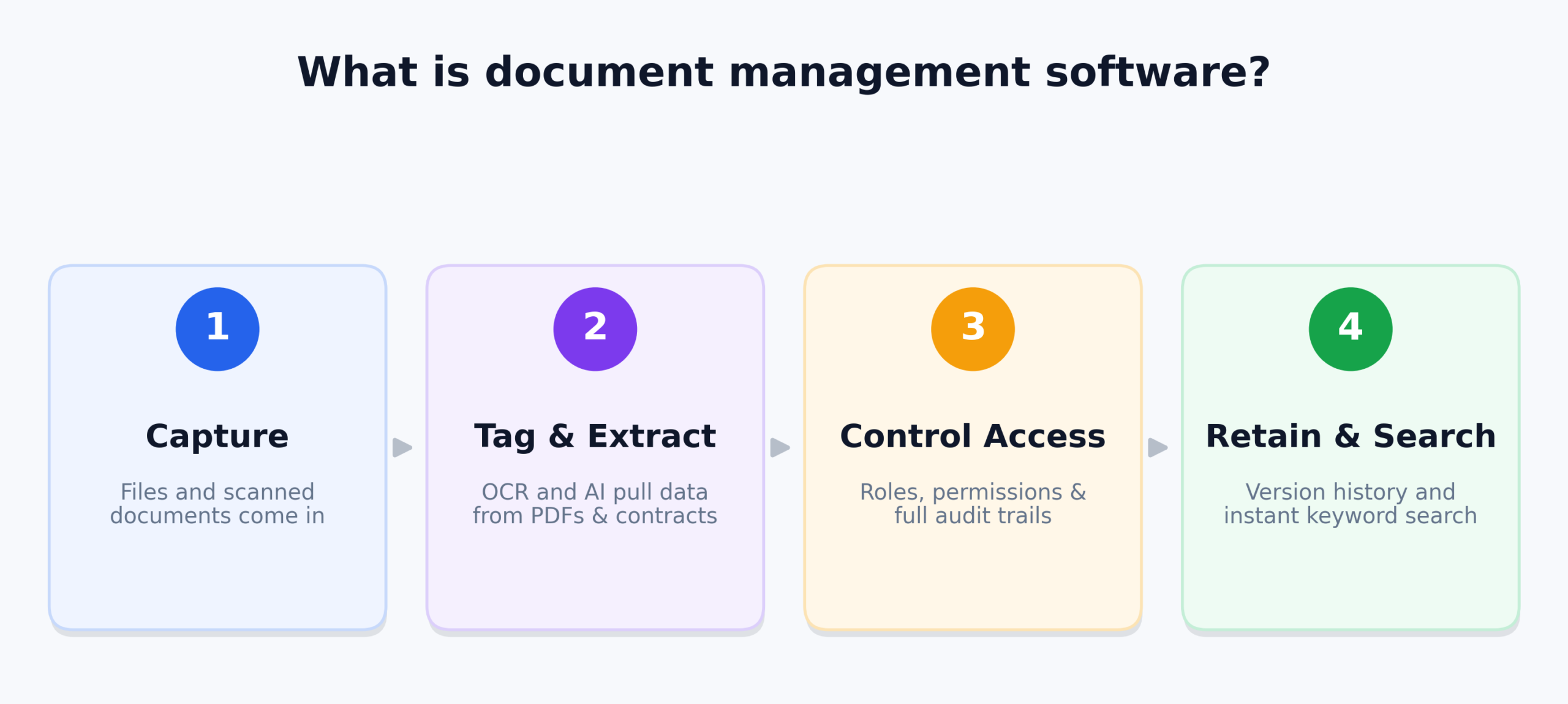
What are the Types of Document Management Systems?
Organizations select from three primary architectural models depending on document volume, compliance requirements, and operational infrastructure:
1. Cloud-Native Document Management & Collaboration Platforms (SaaS)
Hosted in multi-tenant or private cloud environments, platforms like Box, SharePoint, and Zoho WorkDrive offer instant scalability, browser and mobile access, and real-time co-authoring without local server upkeep. They emphasize team collaboration, client portal sharing, and integrations with standard productivity tools.
2. Enterprise Content Management (ECM) & Records Governance Systems
Engineered for heavily regulated industries, platforms like Laserfiche, OpenText, and Hyland focus on formal records management, defensible disposition, regulatory holds, and deep compliance audits (HIPAA, GDPR, FDA 21 CFR Part 11). These systems support both cloud and on-premises server deployments.
3. Metadata-Driven & Workflow-Automated Systems
Platforms such as M-Files, DocuWare, and Revver organize content based on what a document is (its context, customer, and type) rather than where it is saved in a static folder tree. They feature visual workflow builders that automate document routing, review cycles, and approval handoffs.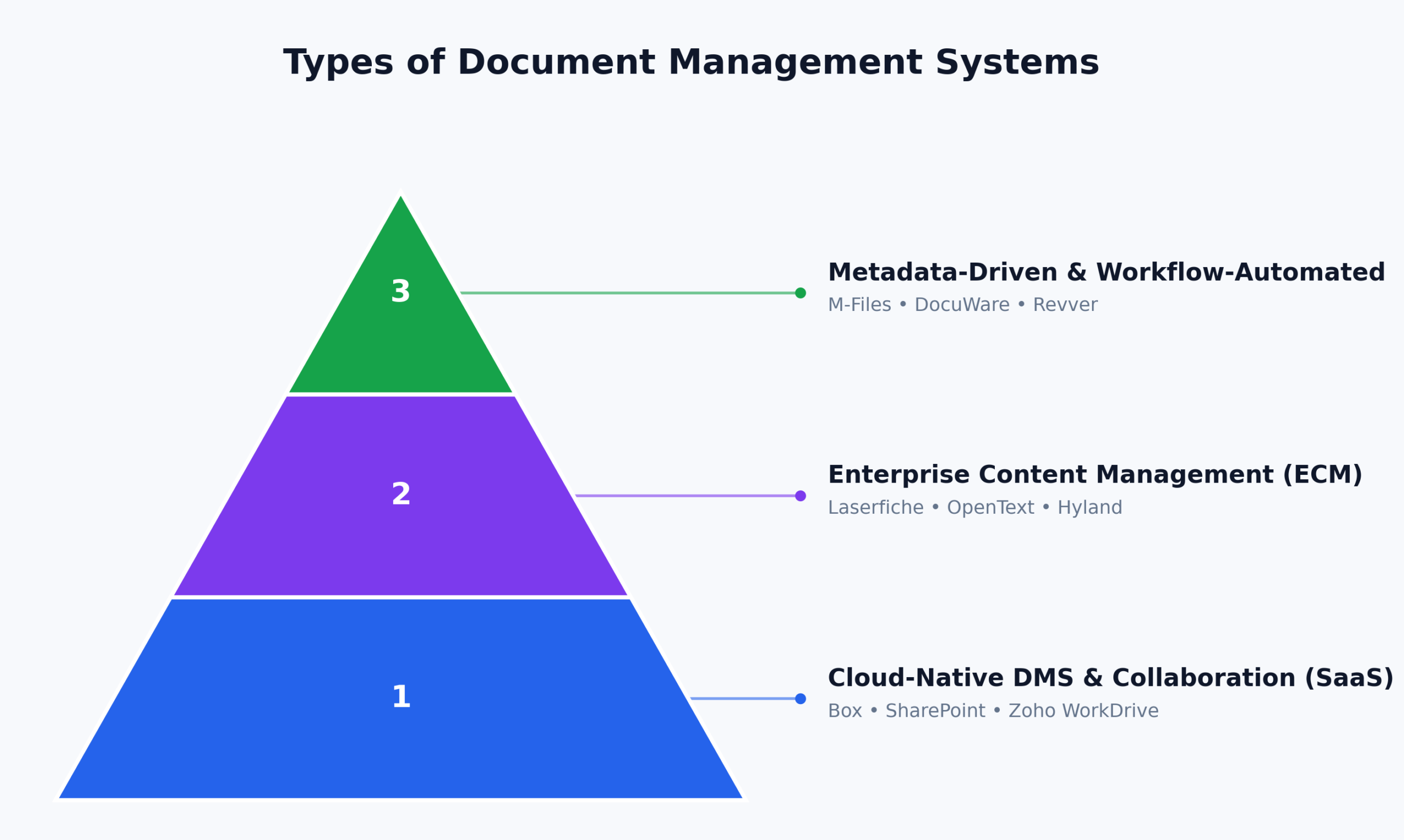
Why Do Businesses Need Modern Document Management Software?
Modern organizations require structured document management software to eliminate operational silos, safeguard intellectual property, and satisfy legal audit mandates:
- Eliminate File Chaos: Centralize storage to prevent messy duplicate files and conflicting drafts.
- Stop Version Confusion: Automatic version control ensures everyone references the latest master document.
- Instant Information Retrieval: Locate contracts and records in seconds using full-text OCR search.
- Metadata-Driven Organization: Categorize files by project, client, or type instead of buried subfolders.
- Audit-Ready Compliance: Meet strict legal standards with automated retention policies and tamper-proof logs.
- Automated Legal Holds: Protect critical litigation files from accidental modification or early deletion.
- Secure External Sharing: Share files safely using watermarks, expiring links, and password protection.
- Granular Access Control: Restrict viewing and editing permissions based on specific employee roles.
- Faster Workflow Approvals: Route invoices, proposals, and contracts automatically for rapid sign-off.
- Paperless Efficiency: Digitize paper records to cut physical storage overhead and administrative delays.
What Matters When Reviewing Document Management Software
When evaluating document management software, focus on the features that impact everyday productivity, data security, and long-term operating costs.
Storage Architecture and Pricing Transparency
Examine whether storage is calculated as an open-ended pool, an unlimited tier, or a restrictive per-user cap. Look closely at overage fees and user minimums to understand the true total cost of ownership before committing.
Metadata Tagging and Full-Text OCR Search
Ensure the platform includes optical character recognition (OCR) capable of searching the text inside scanned PDFs, image files, and contracts, paired with customizable metadata attributes to surface documents regardless of where they are filed.
Version Control and Audit Trails
A dependable DMS maintains automated version histories with side-by-side file comparisons, roll-back capabilities, and time-stamped logs of every view, export, edit, and deletion for accountability.
Security, Encryption, and Compliance Certifications
Look for enterprise-grade security controls, including 256-bit AES encryption at rest, TLS encryption in transit, role-based access control (RBAC), multi-factor authentication (MFA), and compliance with GDPR, HIPAA, SOC 2, and ISO 27001 standards.
Software Stack and Workflow Integrations
Confirm that the platform integrates natively with your existing office suites (Microsoft 365, Google Workspace), e-signature tools, CRM platforms (Salesforce, HubSpot), and accounting or ERP software to keep files connected to daily operations.
15 Best Document Management Software in 2027
Below is an in-depth breakdown of the top 15 document management software platforms in 2027, evaluating their features, usability, operational performance, and real-world deployment value.
1. Microsoft SharePoint — Best for Microsoft 365 Document Libraries
Company Overview
| Detail | Information |
| Founded | 2001 |
| Headquarters | Redmond, Washington, United States |
| Software Type | Enterprise Content Management (ECM) & Document Collaboration Platform |
| Core Features | Document Libraries, Automated Version History, Real-Time Co-Authoring, Role-Based Access Controls, Full-Text Search, Metadata Tagging |
| Deployment | Cloud-hosted (Microsoft 365) / Hybrid & On-Premises (SharePoint Server) |
| Pricing Model | Subscription / Per-user (bundled within Microsoft 365 business suites) |
| Free Trial | 30-day free trial via Microsoft 365 Business plans |
| Starting Price | From $6.00 / user/month (Microsoft 365 Business Basic, annual commitment) |
| Payment Frequency | Monthly / Annual billing |
| Supported Platforms | Web, Windows, macOS, iOS, Android, and Microsoft Graph REST API |
Microsoft SharePoint is a top document management platform in 2027 for organizations needing enterprise file control inside Microsoft 365. Teams can build structured libraries, track complete version histories, and configure custom metadata schemas. Controlled via Microsoft Entra ID, administrators easily enforce granular security groups and compliance rules.
The platform eliminates document silos by enabling real-time co-authoring across Word, Excel, and PowerPoint with linked Teams discussions. Integrated with Power Automate and Purview, it easily automates multi-stage approvals and data retention schedules. This ensures thousands of corporate files remain organized, secure, and fully audit-ready.
Key Features
- Structured Document Libraries: Organize digital assets with custom metadata columns, hierarchical folder structures, and automated check-in/check-out protections to prevent file overwrites.
- Real-Time Co-Authoring: Collaborate simultaneously on Word, Excel, and PowerPoint documents with live cursor tracking, in-line comments, and version restoration.
- Automated Workflow Automation: Connect directly with Microsoft Power Automate to route contracts, invoices, and project specifications through multi-level approval paths.
- Enterprise Security & Compliance: Protect sensitive business records using Microsoft Purview data loss prevention (DLP), sensitivity labels, and retention schedules.
- Universal Search & Discovery: Locate files rapidly across vast content repositories using intelligent full-text indexing, metadata filters, and Microsoft Copilot context queries.
Pricing
- Microsoft 365 Business Basic: $6.00 / user/month (billed annually) — includes web and mobile versions of Office apps, SharePoint document libraries, Teams, and 1 TB of cloud storage per organization plus 10 GB per licensed user.
- Microsoft 365 Business Standard: $12.50 / user/month (billed annually) — adds desktop Office applications and standard collaboration tools.
- Microsoft 365 Business Premium: $22.00 / user/month (billed annually) — includes advanced enterprise security, conditional access policies, and Microsoft Purview compliance tools.
- Free Trial: 30-day free trial available for up to 25 users via Microsoft 365.
2. Box — Best for Secure Cloud Content Sharing
Company Overview
| Detail | Information |
| Founded | 2005 |
| Headquarters | Redwood City, California, United States |
| Software Type | Cloud Content Management (CCM) & Document Collaboration Platform |
| Core Features | Unlimited Cloud Storage, Granular Access Permissions, Box Sign e-Signatures, Automated Workflow Routing, Box AI Document Q&A, File Watermarking |
| Deployment | Cloud-hosted |
| Pricing Model | Subscription / Per-user |
| Free Trial | 14-day free trial on Business plans |
| Starting Price | From $15 / user/month (Business Plan, billed annually) |
| Payment Frequency | Monthly / Annual billing |
| Supported Platforms | Web, Windows, macOS, iOS, Android, and Box REST API |
Box is a premier document management platform in 2027 for businesses needing secure external collaboration. It lets teams share large files and confidential contracts safely with clients and partners. Built-in tools include seven-tier access permissions, dynamic watermarking, and Box AI for document queries.
The platform provides verified unlimited cloud storage across all its standard business subscription tiers. Teams can automate multi-stage approvals with Box Relay and gather legally binding signatures via Box Sign. Comprehensive compliance coverage including HIPAA, FINRA, and GDPR ensures enterprise-grade governance across all files.
Key Features
- Unlimited Cloud Storage: Store and archive corporate documents without per-gigabyte caps across all core business and enterprise subscription tiers.
- Granular Permission Controls: Assign seven distinct user access roles—from previewer-only to co-owner—to prevent unauthorized file modifications or downloads.
- Box Relay Workflow Automation: Build no-code automated approval pipelines that route incoming files, trigger alerts, and track sign-offs automatically.
- Integrated Box Sign e-Signatures: Create, send, and execute legally binding digital signatures directly within the document viewer at no extra cost.
- Enterprise Security & Compliance: Protect sensitive content using AES 256-bit encryption, dynamic file watermarking, and compliance support for HIPAA and SOC 2.
Pricing
- Business Starter: $5 / user/month (billed annually, 3-user minimum, 100 GB pooled storage).
- Business: $15 / user/month (billed annually, 3-user minimum, unlimited storage, Box Sign, and standard integrations).
- Business Plus: $25 / user/month (billed annually, unlimited storage, advanced external collaboration, and custom metadata templates).
- Enterprise: Custom quote (includes full Box Governance, HIPAA compliance, and developer API sandboxes).
3. M-Files — Best for Folderless Metadata Document Indexing
Company Overview
| Detail | Information |
| Founded | 2002 |
| Headquarters | Austin, Texas, United States & Tampere, Finland |
| Software Type | Metadata-Driven Enterprise Information Management (EIM) System |
| Core Features | Metadata-Based Retrieval, M-Files Aino Generative AI, Multi-Repository Search, Automated Version Control, Document Approval Workflows |
| Deployment | Cloud-hosted, On-Premises, and Hybrid Cloud |
| Pricing Model | Subscription / Per-seat (tiered by deployment scope) |
| Free Trial | 30-day guided interactive trial |
| Starting Price | From €65 / seat/month (Essentials Plan) |
| Payment Frequency | Annual billing |
| Supported Platforms | Web, Windows desktop client, iOS, Android, and REST API |
M-Files is a standout document management platform in 2027, replacing confusing folder trees with metadata-driven indexing. Files are organized by what they are rather than where they sit, using client, project, and status tags. This ensures employees always pull the single master version without duplicate file clutter.
The platform connects to network folders, SharePoint, Salesforce, and ERPs without manual migration. Its integrated AI assistant, M-Files Aino, quickly summarizes agreements, extracts clauses, and automates metadata tagging. Built-in audit trails and automated compliance workflows deliver reliable records governance for demanding industries.
Key Features
- Folderless Metadata Architecture: Locate and organize business documents by their contextual tags and properties rather than rigid folder hierarchies.
- M-Files Aino Generative AI: Summarize lengthy contracts, ask contextual questions about documents, and automate tag assignment using integrated AI.
- Universal Repository Search: Search and manage content across disconnected data sources—including network shares, SharePoint, and Google Drive—from one interface.
- Automated Version Governance: Maintain an automatic, immutable version history that tracks changes, author edits, and check-in/check-out timestamps.
- Compliance Workflow Engine: Enforce standard operating procedures (SOPs), electronic signatures, and audit trails to meet ISO and FDA regulatory standards.
Pricing
- Essentials Plan: €65 / seat/month (billed annually, includes core metadata engine, M-Files Aino AI, and web/desktop apps).
- Enterprise Plan: Custom quote (tailored for large organizations requiring custom connectors, high-availability clusters, and advanced audit modules).
- Free Trial: 30-day interactive software trial available upon request.
4. DocuWare — Best for Automated Document Workflow Routing
Company Overview
| Detail | Information |
| Founded | 1988 |
| Headquarters | Germering, Germany & New Windsor, New York, United States (Ricoh Company) |
| Software Type | Cloud Document Management & Business Process Automation Platform |
| Core Features | Intelligent Indexing (AI-OCR), Automated Approval Workflows, Digital Web Forms, Invoice Processing, Full-Text Search, Audit Logging |
| Deployment | Cloud-hosted (DocuWare Cloud) / On-Premises |
| Pricing Model | Subscription based on user tiers, workflow licenses, and storage packages |
| Free Trial | 30-day full-access free trial |
| Starting Price | Custom quote (typically £10–£60 / user/month based on regional deployment and volume) |
| Payment Frequency | Annual billing |
| Supported Platforms | Web, Windows desktop, iOS, Android, and DocuWare Platform REST API |
DocuWare is a premier document management platform in 2027 for finance and HR teams automating routine paperwork. It captures incoming files from email, scanners, and multi-function printers. Its machine-learning Intelligent Indexing engine automatically extracts invoice numbers, vendor names, and line-item totals.
The platform coordinates multi-department approval processes and matches invoices against purchase orders in accounting systems. Files route to designated department heads based on set budget thresholds and archive into tamper-proof digital filing cabinets. Strict compliance support for GDPR, HIPAA, and SOX keeps business records fully audit-ready.
Key Features
- Intelligent Indexing (AI-OCR): Automatically capture, read, and index critical metadata fields from scanned receipts, invoices, and contracts using AI algorithms.
- Visual Workflow Designer: Design drag-and-drop workflow routes for invoice authorizations, contract reviews, and employee onboarding packets.
- Digital Web Forms: Create responsive web forms to capture customer requests and vendor data, automatically generating structured digital records.
- Accounting & ERP Synchronization: Integrate directly with Sage, QuickBooks, SAP, Microsoft Dynamics, and Xero for automated accounts payable reconciliation.
- Tamper-Proof Digital Archiving: Store records in encrypted digital filing cabinets with immutable audit trails to comply with tax and legal retention requirements.
Pricing
- DocuWare Cloud Packages: Tiered by storage capacity and active users (Cloud 4, Cloud 15, Cloud 40, Cloud 100).
- Pricing Structure: Custom quote model, typically averaging between £10 and £60 / user/month depending on user mix (Named Client vs. Workflow User packs).
- Free Trial: 30-day fully functional cloud trial available.
5. Laserfiche — Best for Enterprise Records Retention & Compliance
Company Overview
| Detail | Information |
| Founded | 1986 |
| Headquarters | Long Beach, California, United States |
| Software Type | Enterprise Content Management (ECM) & Business Process Automation (BPA) |
| Core Features | Defensible Records Retention, Electronic Forms, Business Process Library, Intelligent Document Capture, Digital Signatures, Audit Trails |
| Deployment | Cloud-hosted (Laserfiche Cloud) / On-Premises (Laserfiche Rio & Avante) |
| Pricing Model | Subscription / Per-user (tiered by minimum seat counts) |
| Free Trial | Guided live demonstration and proof-of-concept trial |
| Starting Price | From $73 / user/month (Professional Plan, 5-user minimum, billed annually) |
| Payment Frequency | Annual billing |
| Supported Platforms | Web, Windows client, iOS, Android, and Laserfiche REST API |
Laserfiche is widely recognized as one of the best document management software platforms in 2027 for public-sector agencies, educational institutions, healthcare networks, and financial institutions that require rigorous records governance. With nearly four decades of expertise in electronic document management, Laserfiche provides a complete enterprise ecosystem for capturing paper records, automating complex administrative forms, and enforcing formal records management guidelines.
As a compliance-centric document management software suite, Laserfiche delivers defensible disposition and lifecycle management that withstands strict regulatory audits. Organizations can establish automated retention schedules that archive or purge records according to Department of Defense (DoD) 5015.2 standards, HIPAA rules, and state open-records mandates. Supported by an extensive library of pre-built business process templates, Laserfiche helps organizations modernize constituent services, permit approvals, and vendor contracts.
Key Features
- Defensible Records Management: Automate record lifecycles from creation to archival or destruction in accordance with DoD 5015.2 and statutory compliance rules.
- No-Code Business Process Automation: Automate multi-step approval workflows, document routing, and notifications using an intuitive flowchart builder.
- Smart Document Capture: Scan, clean, and OCR physical documents with automated barcode recognition and data extraction tools.
- Custom Electronic Forms: Build public-facing and internal digital forms that capture signatures, attachments, and payment records.
- Comprehensive Audit Trails: Track every file interaction—including views, exports, print jobs, and deletions—with time-stamped compliance logs.
Pricing
- Professional Plan: $73 / user/month (billed annually, 5-user minimum) — includes full document management, capture, forms, and business process automation.
- Business Plan: $93 / user/month (billed annually, 25-user minimum) — adds records lifecycle management, SSO with SCIM provisioning, and public portals.
- Business+ Plan: $42 / user/month (billed annually, 500-user minimum) — enterprise volume licensing tier.
- Free Trial: Custom product walkthrough and evaluation environment available upon request.
6. Revver — Best for Unlimited Storage on Dedicated DMS
Company Overview
| Detail | Information |
| Founded | 2001 (Formerly eFileCabinet) |
| Headquarters | Lehi, Utah, United States |
| Software Type | Cloud Document Management & Workflow Automation Software |
| Core Features | Unlimited Storage, Revver AI Smart Suite, Secure Client Portals, Automated Document Governance, Form Creation, E-Signatures |
| Deployment | Cloud-hosted |
| Pricing Model | Subscription / Per-user (with tiered volume discounts) |
| Free Trial | Interactive live product demonstration |
| Starting Price | From $25 / user/month (Basic Plan, list rate; volume discounts available) |
| Payment Frequency | Annual billing |
| Supported Platforms | Web, Windows desktop application, iOS, Android, and REST API |
Revver, formerly known as eFileCabinet, is recognized as one of the best document management software solutions in 2027 for small-to-midsize businesses, accounting practices, and legal firms that want transparent pricing without storage limits. By pairing an accessible user experience with automated document routing, Revver eliminates the administrative burdens of manual file naming, paper filing, and document retrieval.
As a specialized document management software system, Revver stands out by including unlimited storage and its full Revver AI Smart Suite across every subscription tier. The platform automatically organizes incoming documents into standardized cabinet-drawer-folder structures, extracts key data points to auto-populate metadata tags, and shares sensitive tax forms or legal agreements through encrypted client portals. With built-in compliance protections for SEC, FINRA, and HIPAA regulations, Revver provides an affordable, dependable solution for document-heavy operations.
Key Features
- Unlimited Cloud Storage: Archive unlimited business files, scanned records, and media assets without paying tiered storage overage charges.
- Revver AI Smart Suite: Automatically identify document types, extract metadata fields, and route files to correct folder locations using built-in AI.
- Encrypted Client Portals: Share sensitive financial, medical, and legal records securely with outside clients via branded, password-protected portals.
- Automated Filing & Naming Rules: Enforce consistent file naming conventions and automated folder creation rules to prevent organizational disarray.
- Regulatory Compliance Controls: Ensure compliance with HIPAA, FINRA, and GDPR mandates through automated file retention and deletion schedules.
Pricing
- Basic Plan: Starts at $25 / user/month list price (volume discounts reduce price to ~$4 / user/month at scale).
- Essentials Plan: Starts at $67 / user/month list price (volume discounts reduce price to ~$39 / user/month).
- Full Plan: Starts at $87 / user/month list price (volume discounts reduce price to ~$56 / user/month; includes advanced AI and automation).
- Free Demo: Live guided product demonstration and tailored quote available upon request.
7. Egnyte — Best for Hybrid Cloud Ransomware Protection
Company Overview
| Detail | Information |
| Founded | 2007 |
| Headquarters | Mountain View, California, United States |
| Software Type | Hybrid Cloud Content Governance & Document Security Platform |
| Core Features | Hybrid Cloud Synchronization, Automated Ransomware Detection, Content Lifecycle Governance, AI-Powered Document Search, Smart Cache |
| Deployment | Hybrid Cloud (Cloud-hosted with on-premises local storage sync) |
| Pricing Model | Subscription / Per-user |
| Free Trial | 15-day free trial on Business plans |
| Starting Price | From $22 / user/month (Business Plan, billed annually) |
| Payment Frequency | Monthly / Annual billing |
| Supported Platforms | Web, Windows, macOS, iOS, Android, and developer APIs |
Egnyte is widely recognized as one of the best document management software platforms in 2027 for businesses operating in hybrid IT environments such as architecture, engineering, construction (AEC), and financial services where fast local network file access must be balanced with centralized cloud administration. Egnyte connects on-premises network attached storage (NAS) and local file servers to a secure cloud layer, allowing teams to edit large CAD drawings and project files locally while maintaining unified cloud governance.
As an advanced document management software platform, Egnyte distinguishes itself through built-in cybersecurity and content compliance. The platform monitors document repositories continuously using machine-learning algorithms to detect suspicious user logins, abnormal file downloads, and active ransomware infections, automatically isolating affected devices before damage spreads. Combined with sensitive data discovery (scanning for PII, PCI, and HIPAA data) and automated document retention policies, Egnyte delivers an enterprise-grade document control environment.
Key Features
- Hybrid Cloud File Sharing: Combine local on-premises file server speeds with cloud collaboration through Egnyte’s Smart Cache technology.
- Built-in Ransomware Protection: Detect and block anomalous file encryption behavior automatically, restoring clean versions with a single click.
- Sensitive Data Classification: Automatically scan document repositories to identify and protect sensitive data types, including PII, PHI, and financial records.
- Granular Sub-Folder Permissions: Assign specific read, write, and preview permissions down to individual sub-folder levels to protect confidential projects.
- Egnyte Copilot AI Search: Search and summarize complex documents across enterprise data vaults using natural language queries.
Pricing
- Business Plan: $22 / user/month (billed annually, up to 100 users, 1 TB base storage plus 10 GB per user).
- Enterprise Lite: $39 / user/month (billed annually, includes advanced security and compliance auditing).
- Elite Plan: $48 / user/month (billed annually, includes comprehensive threat management and data governance).
- Ultimate Plan: Custom quote for large enterprises needing advanced data loss prevention (DLP) and multi-region data residency.
8. Google Workspace (Google Drive) — Best for Real-Time Collaborative Document Editing
Company Overview
| Detail | Information |
| Founded | 2006 (Google Drive launched 2012) |
| Headquarters | Mountain View, California, United States (Alphabet Inc.) |
| Software Type | Cloud Productivity Suite & Collaborative Document Storage |
| Core Features | Shared Drives, Real-Time Docs/Sheets/Slides Co-Authoring, Smart Search, Google Gemini AI, Granular Link Sharing, Revision History |
| Deployment | Cloud-hosted |
| Pricing Model | Subscription / Per-user |
| Free Trial | 14-day free trial across all business tiers |
| Starting Price | From $7.00 / user/month (Business Starter, annual commitment) |
| Payment Frequency | Monthly / Annual billing |
| Supported Platforms | Web, Windows/macOS desktop client (Drive for Desktop), iOS, Android, and Google Workspace REST APIs |
Google Workspace, centered around Google Drive, is recognized as one of the best document management software solutions in 2027 for agile teams, tech startups, and educational institutions that prioritize seamless, real-time collaboration. Operating as a pure cloud environment, Google Drive enables teams to draft, revise, and publish documents without saving local copies, sending email attachments, or resolving confusing version conflicts.
As an everyday document management software platform, Google Workspace excels through its real-time co-authoring tools in Google Docs, Sheets, and Slides. Multiple team members can edit documents simultaneously, suggest changes, assign action items with @mentions, and chat directly within the document interface. Integrated with Google Gemini AI, users can generate summaries, rewrite proposals, and extract insights from stored files instantly. Supported by centralized administrative controls and Shared Drives that belong to teams rather than individuals, Google Drive provides an intuitive file management system.
Key Features
- Shared Team Drives: Organize department files in centralized spaces where file ownership is maintained by the organization rather than individual accounts.
- Real-Time Collaborative Editing: Co-author files simultaneously with live cursor tracking, inline commenting, and detailed revision histories.
- Google Gemini AI Assistant: Summarize lengthy documents, draft new business proposals, and analyze spreadsheets directly inside the Workspace suite.
- Intelligent Cloud Search: Surface documents quickly using Google’s search engine, which indexes file text, image contents, and scanned PDFs.
- Native Desktop Sync (Drive for Desktop): Access cloud files directly from Windows File Explorer or macOS Finder without consuming local hard drive storage.
Pricing
- Business Starter: $7.00 / user/month (billed annually) — includes 30 GB pooled storage per user, custom business email, and video meetings.
- Business Standard: $14.00 / user/month (billed annually) — increases storage to 2 TB pooled per user and adds Shared Drives.
- Business Plus: $22.00 / user/month (billed annually) — increases storage to 5 TB pooled per user and adds advanced security and Google Vault eDiscovery.
- Enterprise: Custom quote (tailored storage pools, advanced data loss prevention, and enterprise support).
9. Dropbox Business — Best for Fast Desktop File Synchronization
Company Overview
| Detail | Information |
| Founded | 2007 |
| Headquarters | San Francisco, California, United States |
| Software Type | Cloud Storage, File Synchronization & Content Collaboration Platform |
| Core Features | Block-Level File Sync, Dropbox Paper Collaboration, Smart Sync (Online-Only Files), Document Watermarking, Shared Link Controls, Dropbox Sign |
| Deployment | Cloud-hosted |
| Pricing Model | Subscription / Per-user |
| Free Trial | 30-day free trial on Business plans |
| Starting Price | From $15 / user/month (Standard Plan, billed annually) |
| Payment Frequency | Monthly / Annual billing |
| Supported Platforms | Web, Windows, macOS, Linux, iOS, Android, and Dropbox API |
Dropbox Business is recognized as one of the best document management software platforms in 2027 for creative agencies, media production teams, and remote businesses that demand rapid, reliable desktop file synchronization. Known for its block-level sync algorithm, Dropbox updates only the specific modified portions of large files rather than re-uploading entire documents, making it one of the fastest and most stable file-sharing platforms available.
As an accessible document management software platform, Dropbox Business provides a clean user experience that requires almost no employee training. With Smart Sync technology, employees can browse terabytes of company files directly from Windows File Explorer or macOS Finder without exhausting local disk space. Supported by centralized administrative consoles, time-stamped version restoration up to 180 days, and seamless integrations with Zoom, Slack, and Microsoft 365, Dropbox Business maintains productivity across distributed workforces.
Key Features
- Block-Level Desktop Sync: Experience fast file updates through proprietary sync technology that uploads only modified binary blocks.
- Smart Sync (Online-Only Storage): View and manage cloud files on local desktop drives without consuming physical storage until opened.
- Extended File Recovery & Version History: Roll back accidental file edits or restore deleted documents up to 180 days on standard business tiers.
- Custom Shared Link Controls: Protect sensitive business documents using custom link passwords, expiration dates, and download restrictions.
- Integrated Dropbox Sign: Collect electronic signatures on agreements, NDAs, and onboarding forms directly from the Dropbox interface.
Pricing
- Standard Plan: $15 / user/month (billed annually, 3-user minimum, 5 TB pooled team storage, and 180-day version recovery).
- Advanced Plan: $24 / user/month (billed annually, 3-user minimum, 15 TB pooled team storage, and advanced admin security).
- Enterprise Plan: Custom quote (tailored storage volume, custom integration support, and dedicated 24/7 account management).
- Free Trial: 30-day full-access trial available.
10. Zoho WorkDrive — Best Budget-Friendly Team Cloud Workspace
Company Overview
| Detail | Information |
| Founded | 1996 (Zoho WorkDrive launched 2019) |
| Headquarters | Chennai, Tamil Nadu, India & Del Valle, Texas, United States |
| Software Type | Team Content Collaboration & Cloud Document Management Software |
| Core Features | Team Folders, Native Office Suite (Writer/Sheet/Show), Zia Smart Search, Document Check-In/Check-Out, External Sharing Portals |
| Deployment | Cloud-hosted |
| Pricing Model | Subscription / Per-user (with pooled team storage) |
| Free Trial | 15-day free trial (no credit card required) |
| Starting Price | From $2.50 / user/month (Starter Plan, billed annually) |
| Payment Frequency | Monthly / Annual billing |
| Supported Platforms | Web, Windows, macOS, Linux, iOS, Android, and Zoho REST API |
Zoho WorkDrive is recognized as one of the best document management software solutions in 2027 for budget-conscious organizations, startups, and enterprises that already operate within the broader Zoho business software ecosystem. Built as a team-centric cloud workspace, WorkDrive organizes corporate assets into shared Team Folders, eliminating the permission confusion and security risks of individual personal drives.
As an affordable document management software alternative, Zoho WorkDrive delivers exceptional value by including an online office suite Zoho Writer for text documents, Zoho Sheet for spreadsheets, and Zoho Show for presentations at a fraction of the cost of legacy platforms. The built-in AI assistant, Zia, performs optical character recognition (OCR) and deep content searches across text, images, and PDFs. With granular admin auditing, data encryption at rest and in transit, and native synchronization with Zoho CRM and Zoho Books, WorkDrive is an efficient document management hub.
Key Features
- Dedicated Team Folders: Create structured team workspaces with member roles (Admin, Organizer, Editor, Viewer) to govern department files securely.
- Integrated Zoho Office Suite: Create and collaborate on documents, spreadsheets, and presentations online with real-time multi-user editing.
- Zia AI Intelligent Search: Search for documents using natural language queries, image text recognition (OCR), and metadata filtering.
- Document Check-In & Check-Out: Lock documents during active editing to prevent conflicting modifications and version branches by colleagues.
- Deep Zoho App Integration: Connect files directly to customer records in Zoho CRM, project tasks in Zoho Projects, and invoices in Zoho Books.
Pricing
- Starter Plan: $2.50 / user/month (billed annually, 3-user minimum, 1 TB shared storage for the team plus 100 GB per additional user).
- Team Plan: $4.50 / user/month (billed annually, 3-user minimum, 3 TB shared storage plus 300 GB per additional user).
- Business Plan: $9.00 / user/month (billed annually, 3-user minimum, 5 TB shared storage plus 500 GB per additional user, with advanced analytics).
- Enterprise Plan: Custom quote for 200+ users requiring dedicated compliance engineering.
11. OpenText Content Cloud — Best for Enterprise-Scale Multi-System ECM
Company Overview
| Detail | Information |
| Founded | 1991 |
| Headquarters | Waterloo, Ontario, Canada |
| Software Type | Enterprise Content Management (ECM) & Information Management Platform |
| Core Features | Enterprise Archiving, Core Content Governance, SAP/Salesforce Deep Integration, Multi-System Information Management, Legal Holds |
| Deployment | Cloud-hosted (OpenText Cloud), Hybrid, and On-Premises |
| Pricing Model | Enterprise licensing / Custom quote based on deployment scope |
| Free Trial | Enterprise demonstration and proof-of-concept available |
| Starting Price | Custom quote (typically $150,000–$600,000+ total cost for mid-to-large enterprise rollouts) |
| Payment Frequency | Annual / Multi-year contracts |
| Supported Platforms | Web, Windows client, iOS, Android, and OpenText Developer APIs |
OpenText Content Cloud is widely recognized as one of the best document management software suites in 2027 for multinational corporations, government agencies, and heavily regulated global enterprises that need to govern millions of records across disconnected business platforms. As a global leader in Enterprise Content Management (ECM), OpenText connects enterprise business processes directly with corporate content, ensuring documents are governed consistently regardless of where they originate.
The platform excels by integrating deeply with enterprise line-of-business systems like SAP, Salesforce, Microsoft 365, and Oracle. When a sales order is completed in SAP or a customer ticket is resolved in Salesforce, OpenText Content Cloud automatically files, categorizes, and archives the supporting contracts and delivery receipts in compliance with corporate governance rules. With automated legal hold management, defensible records disposal, and multi-tenant cloud security, OpenText provides an auditable document infrastructure for global organizations.
Key Features
- Enterprise Line-of-Business Integration: Link unstructured content directly to structured business records in SAP, Salesforce, and Microsoft Dynamics.
- Centralized Content Governance: Enforce uniform metadata taxonomies, access controls, and retention schedules across multiple corporate subsidiaries.
- Defensible Records Management: Manage regulatory holds, legal discovery, and automated file destruction to satisfy SEC, FDA, and GDPR mandates.
- High-Volume Document Ingestion: Capture, classify, and extract data from millions of monthly invoices, claims, and correspondence files using automated capture tools.
- Enterprise Information Security: Protect sensitive assets using customer-managed encryption keys, role-based controls, and comprehensive audit logs.
Pricing
- Express (X1) & Premium (X2) Tiers: Scoped based on document storage volumes, connected enterprise systems, and user counts.
- Deployment Costs: Custom enterprise contracts negotiated with systems integrators and OpenText account representatives.
- Free Trial: Proof-of-concept sandbox environments arranged through sales engineering.
12. PandaDoc — Best for Contract Workflows & e-Signatures
Company Overview
| Detail | Information |
| Founded | 2011 |
| Headquarters | San Francisco, California, United States |
| Software Type | Document Automation & Electronic Signature Software |
| Core Features | Drag-and-Drop Document Editor, Legally Binding e-Signatures, Content Library & Templates, Real-Time Document Analytics, CRM Sync |
| Deployment | Cloud-hosted |
| Pricing Model | Subscription / Per-user |
| Free Trial | 14-day free trial on standard plans |
| Starting Price | From $19 / user/month (Essentials Plan, billed annually) |
| Payment Frequency | Monthly / Annual billing |
| Supported Platforms | Web, iOS, Android, and PandaDoc REST API |
PandaDoc is recognized as one of the best document management software platforms in 2027 for sales, legal, and operational teams focused on automating the creation, negotiation, and signing of client-facing business documents. Moving beyond passive PDF storage, PandaDoc functions as an interactive document workspace where teams can assemble proposals, quotes, contracts, and vendor agreements from modular content blocks in minutes.
As an actionable document management software platform, PandaDoc streamlines the entire sales-to-close cycle. Sales representatives can merge customer data automatically from CRMs like Salesforce, HubSpot, and Pipedrive into standardized contract templates, minimizing human data entry errors. Recipient tracking provides real-time document analytics notifying senders the moment a client opens a proposal, how many minutes they spend on each page, and when they sign. With built-in payment processing, PandaDoc allows businesses to collect credit card deposits the moment a contract is executed.
Key Features
- Modular Document Editor: Build customized proposals, master services agreements (MSAs), and invoices using pre-approved text, pricing tables, and media blocks.
- Legally Binding e-Signatures: Capture ESIGN and UETA-compliant electronic signatures with complete cryptographic signing certificates.
- Real-Time Recipient Analytics: Monitor when clients open documents, how long they view each page, and identify decision-making bottlenecks.
- Two-Way CRM Synchronization: Auto-populate customer fields and product pricing tables directly from HubSpot, Salesforce, and Zoho CRM.
- Content Library Management: Maintain approved corporate boilerplate clauses, case studies, and pricing models to ensure team-wide brand consistency.
Pricing
- Free eSign Plan: $0 / month (allows sending basic documents for digital signature).
- Essentials Plan: $19 / user/month (billed annually) — includes drag-and-drop editor, templates, and real-time analytics.
- Business Plan: $49 / user/month (billed annually) — adds CRM integrations, content library, approval workflows, and custom branding.
- Enterprise Plan: Custom quote (adds single sign-on, advanced CPQ tools, and developer API access).
13. Adobe Document Cloud — Best for Enterprise PDF Management
Company Overview
| Detail | Information |
| Founded | 1982 (Acrobat launched 1993, Document Cloud launched 2015) |
| Headquarters | San Jose, California, United States |
| Software Type | Digital Document Management & PDF Productivity Suite |
| Core Features | Advanced PDF Editing & Conversion, Adobe Acrobat Sign, Optical Character Recognition (OCR), Form Creation, Cloud Document Reviews |
| Deployment | Cloud-hosted with desktop client sync |
| Pricing Model | Subscription / Per-user |
| Free Trial | 7-day free trial on Acrobat Pro |
| Starting Price | From $19.99 / user/month (Acrobat Pro for Teams, annual commitment) |
| Payment Frequency | Monthly / Annual billing |
| Supported Platforms | Web, Windows, macOS, iOS, Android, and Adobe Document Services APIs |
Adobe Document Cloud anchored by Adobe Acrobat and Adobe Acrobat Sign is widely recognized as one of the best document management software suites in 2027 for businesses that handle high volumes of PDF documents, digital forms, and contracts. As the inventor of the Portable Document Format (PDF), Adobe provides standard-setting software for converting, editing, protecting, and archiving business documents across desktop, web, and mobile environments.
The platform functions as a document management solution by pairing comprehensive PDF manipulation tools with cloud collaboration. Users can convert scanned paper documents into searchable, editable text using Adobe’s optical character recognition (OCR) engine, redact confidential information permanently, and send files for collective online review without email attachments. With Adobe Acrobat Sign integrated into Microsoft 365, Salesforce, and Workday, organizations can execute enterprise-grade electronic signatures while maintaining legally defensible audit trails.
Key Features
- Industry-Standard PDF Editing: Create, edit, split, and merge complex PDF files while preserving original typography and layouts.
- Optical Character Recognition (OCR): Transform paper scans and flattened image PDFs into searchable, selectable text across multiple languages.
- Adobe Acrobat Sign Integration: Send documents for legally binding digital signatures and track execution status from within Acrobat.
- Document Redaction & Security: Permanently redact sensitive text, metadata, and hidden data fields while applying password encryption.
- Collaborative Cloud Reviews: Collect feedback and comments from multiple stakeholders on a single shared PDF link in real time.
Pricing
- Acrobat Standard for Teams: $14.99 / user/month (billed annually, Windows only, core PDF tools).
- Acrobat Pro for Teams: $19.99 / user/month (billed annually, Windows/macOS, includes advanced editing, redaction, and e-signatures).
- Adobe Acrobat Sign Enterprise: Custom quote for high-volume corporate e-signature workflows and API integrations.
- Free Trial: 7-day free trial available for Acrobat Pro.
14. Confluence (Atlassian) — Best for Internal Knowledge Team Workspaces
Company Overview
| Detail | Information |
| Founded | 2002 (Confluence launched 2004) |
| Headquarters | Sydney, New South Wales, Australia & San Francisco, California, United States |
| Software Type | Team Workspace, Knowledge Base & Collaborative Documentation Platform |
| Core Features | Structured Spaces and Pages, Real-Time Collaborative Editing, Atlassian Intelligence (AI), Pre-Built Templates, Jira Deep Integration |
| Deployment | Cloud-hosted (Atlassian Cloud) / Self-Managed (Data Center) |
| Pricing Model | Subscription / Per-user (with volume discounts at scale) |
| Free Trial | Free tier for up to 10 users; 7-day trial on paid plans |
| Starting Price | From $5.16 / user/month (Standard Plan, estimated annual equivalent) |
| Payment Frequency | Monthly / Annual billing |
| Supported Platforms | Web, Windows, macOS, iOS, Android, and Atlassian REST APIs |
Confluence is recognized as one of the best document management software solutions in 2027 for product development, engineering, and cross-functional teams that need to organize technical documentation, company wikis, and project knowledge. Developed by Atlassian, Confluence replaces static, forgotten file folders with an open, dynamic workspace where teams can create, share, and collaborate on rich digital documents in real time.
As a documentation management platform, Confluence stands out for its direct integration with Atlassian Jira and Trello. Product managers and engineers can link technical specifications and meeting notes directly to active software development tickets, ensuring that project context is always clear. Powered by Atlassian Intelligence, users can summarize pages, create action-item checklists, and convert rough notes into polished documentation. Organized into distinct team Spaces, Confluence prevents knowledge loss across growing companies.
Key Features
- Structured Spaces & Hierarchical Pages: Organize company knowledge into dedicated team or project Spaces with intuitive parent-child page trees.
- Real-Time Co-Authoring: Collaborate simultaneously on pages with live cursors, inline comments, and automated version restoration.
- Jira Ecosystem Integration: Embed live Jira issues, roadmap timelines, and development statuses directly inside documentation pages.
- Extensive Template Library: Deploy pre-formatted templates for project plans, product requirements documents (PRDs), and employee handbooks.
- Atlassian Intelligence AI: Summarize long team discussions, search knowledge bases using natural language, and automate repetitive writing tasks.
Pricing
- Free Plan: $0 / month for up to 10 users (includes standard page editing, templates, and 2 GB storage).
- Standard Plan: Approximately $5.16 to $6.05 / user/month (up to 50,000 users, page permissions, and 250 GB storage).
- Premium Plan: Approximately $9.73 to $11.55 / user/month (unlimited storage, Atlassian Intelligence, and analytics).
- Enterprise Plan: Custom quote (billed annually, includes multi-site instances, 99.95% uptime SLA, and Atlassian Access security).
15. Hyland (OnBase / Alfresco) — Best for Regulated Industry Content Workflows
Company Overview
| Detail | Information |
| Founded | 1991 |
| Headquarters | Westlake, Ohio, United States |
| Software Type | Enterprise Content Services & Information Management Platform |
| Core Features | Case Management, Document Capture & Indexing, Regulatory Compliance Holds, Advanced Workflow Automation, Open-Source API Architecture |
| Deployment | Cloud-hosted (Hyland Cloud), Hybrid, and On-Premises |
| Pricing Model | Enterprise licensing / Custom quote based on deployment scale and modules |
| Free Trial | Enterprise consultation & personalized product demonstration |
| Starting Price | Custom quote (typically $50,000–$100,000+ annually for mid-sized deployments) |
| Payment Frequency | Annual contracts |
| Supported Platforms | Web, Windows client, iOS, Android, and open REST APIs |
Hyland through its flagship OnBase platform and Alfresco open-source content services is recognized as one of the best document management software solutions in 2027 for large healthcare systems, insurance carriers, and government agencies managing complex content workflows. Hyland specializes in unifying unstructured patient files, claim records, and citizen applications with core enterprise transactional systems like Epic, Cerner, and Guidewire.
Hyland stands out because it combines content management with comprehensive case management. Rather than treating files as isolated assets, Hyland organizes documents, data records, and communication histories around specific business events such as an insurance claim investigation, a medical record review, or a loan underwriting file. Supported by automated regulatory retention schedules, secure digital capture, and developer-friendly REST APIs, Hyland provides an adaptable foundation for enterprise information governance.
Key Features
- Case-Centric Document Management: Centralize customer documents, communication records, and task workflows around individual business cases.
- Deep Healthcare & Financial Integrations: Connect unstructured documents with core operational engines including Epic, Cerner, and Guidewire.
- Automated Document Capture: Ingest, parse, and classify scanned physical files, faxes, and electronic records using machine-learning OCR.
- Strict Regulatory Governance: Enforce compliance retention rules, automated legal hold freezes, and defensible audit records.
- Flexible Open Architecture (Alfresco): Build customized document management workflows using open-source developer frameworks and open APIs.
Pricing
- Enterprise Licensing Model: Pricing is customized based on deployment architecture (cloud or on-premises), concurrent users, and required functional modules.
- Implementation Services: Professional software deployment, data migration, and systems integration quoted separately through certified Hyland partners.
- Free Demo: Live tailored enterprise demonstration available upon request.
Best Document Management Software Compared
| Document Management Software | Best For | Starts At | Free Trial / Demo | Standout Feature | Primary Trade-off |
| Microsoft SharePoint | Microsoft 365 document libraries | $6.00 / user/mo | 30-day free trial | Native Word, Excel, and Teams co-authoring | Calculated storage pool rather than unlimited storage |
| Box | Secure cloud content sharing | $15 / user/mo | 14-day free trial | Unlimited cloud storage confirmed on business tiers | Advanced governance requires higher enterprise plans |
| M-Files | Folderless metadata document indexing | €65 / seat/mo | 30-day interactive trial | Metadata-driven search with M-Files Aino AI | Steeper learning curve for teams accustomed to folders |
| DocuWare | Automated document workflow routing | Quote-only (~£10–£60/mo) | 30-day free trial | AI-powered invoice indexing and approval routing | No fixed public price list; quotes require consultation |
| Laserfiche | Enterprise records retention & compliance | $73 / user/mo | Guided live demo | Defensible records lifecycle and DoD 5015.2 compliance | Strict minimum seat requirements on standard plans |
| Revver | Unlimited storage on dedicated DMS | $25 / user/mo | Interactive live demo | Unlimited storage and Revver AI Suite on all tiers | Lighter multi-system ECM integration than OpenText |
| Egnyte | Hybrid cloud ransomware protection | $22 / user/mo | 15-day free trial | Built-in ransomware detection and Smart Cache sync | Base business plan storage is capped at 100 GB |
| Google Workspace (Drive) | Real-time collaborative editing | $7.00 / user/mo | 14-day free trial | Native Google Docs/Sheets co-authoring and Gemini AI | Entry-level plan offers thin pooled storage (30 GB) |
| Dropbox Business | Fast desktop file synchronization | $15 / user/mo | 30-day free trial | Fast block-level desktop file synchronization | Pooled storage quotas rather than unlimited storage |
| Zoho WorkDrive | Budget-friendly team cloud workspace | $2.50 / user/mo | 15-day free trial | Low entry price with integrated Zoho Office Suite | Less advanced compliance tooling than enterprise ECM |
| OpenText Content Cloud | Enterprise-scale multi-system ECM | Custom enterprise quote | Proof-of-concept demo | Centralized content governance spanning SAP and Salesforce | High implementation costs and complex setup |
| PandaDoc | Contract workflows & e-signatures | $19 / user/mo | 14-day free trial | Modular proposal builder with real-time recipient tracking | Focused on sales contracts rather than general file storage |
| Adobe Document Cloud | Enterprise PDF management | $19.99 / user/mo | 7-day free trial | Comprehensive PDF editing, OCR, and Acrobat Sign | Primarily tailored for PDF files rather than broad ECM |
| Confluence (Atlassian) | Internal knowledge team workspaces | $5.16 / user/mo | Free tier (up to 10 users) | Native Jira integration and structured knowledge spaces | Lacks formal records retention and archival tools |
| Hyland (OnBase / Alfresco) | Regulated industry content workflows | Custom enterprise quote | Enterprise consultation | Case-centric management for healthcare and banking | Long deployment cycles requiring specialist integrators |
How to Choose the Right Document Management Software
Selecting the right document management software determines how quickly employees locate critical records, how securely confidential data is shared, and whether your organization satisfies strict regulatory compliance audits. When evaluating platforms, use these six core evaluation steps:
Assess Your Primary Problem: Everyday Storage vs. Formal Governance
Identify whether your core challenge is simple cloud storage and real-time collaboration (where Google Workspace, Dropbox Business, or Box excel) or defensible records retention, audit trails, and legal hold requirements (which require enterprise ECM systems like Laserfiche, OpenText, or M-Files).
Evaluate Metadata-Driven Indexing vs. Folder Trees
If your team spends excessive time searching through deeply nested, disorganized folder structures, consider a metadata-driven platform like M-Files. Tagging documents by client, project code, and document type allows files to surface instantly based on what they are rather than where they were saved.
Verify Storage Quotas, Caps, and Overage Fees
Carefully evaluate how each vendor calculates storage. Some platforms (like Box and Revver) provide true unlimited storage on business plans, while others (like SharePoint, Dropbox, and Google Drive) provide pooled organizational allotments that incur monthly overage fees once exhausted.
Review Workflow Automation and Approval Routing
For departments handling repetitive paper trails such as accounts payable, human resources, and procurement prioritize systems with visual workflow designers like DocuWare or Revver. Automated approval chains, OCR data capture, and electronic signatures eliminate manual data entry and email follow-ups.
Confirm Security, Encryption, and Regulatory Compliance
Ensure the software complies with relevant industry standards such as HIPAA, GDPR, SOC 2 Type II, FINRA, or DoD 5015.2. Look for essential security controls including AES 256-bit encryption at rest, TLS encryption in transit, role-based access controls (RBAC), and automated ransomware detection.
Check Tech Stack and Business App Integrations
Choose a document management platform that integrates directly with your existing productivity and line-of-business applications. Seamless connectivity with Microsoft 365, Google Workspace, leading platforms from our review of the 15 Best CRM Software 2027: According To CRM Experts, and core accounting or ERP engines ensures documents remain synchronized with active daily operations.
Conclusion
Document management software in 2027 has evolved from basic cloud file folders into an intelligent operational foundation that safeguards corporate knowledge, automates routine administrative workflows, and ensures audit-ready compliance. Choosing the right platform depends on whether your organization prioritizes everyday co-authoring, secure external file sharing, or deep records governance.
For teams deeply embedded in the Microsoft or Google ecosystems, Microsoft SharePoint and Google Workspace provide familiar, collaborative document environments. If secure external client collaboration and unlimited storage are paramount, Box and Revver deliver exceptional value. Organizations struggling with folder clutter will benefit from the metadata intelligence of M-Files, while finance teams seeking automated invoice approvals will find DocuWare purpose-built for their needs. For public-sector agencies and heavily regulated enterprises requiring formal records retention, Laserfiche and OpenText Content Cloud remain the benchmark.
By aligning your organization’s document volume, security requirements, and daily workflows with the right DMS platform, you eliminate administrative friction, secure sensitive intellectual property, and ensure your team retrieves the right information the moment it is needed.
Frequently Asked Questions (FAQs)
What is document management software (DMS)?
Document management software is an electronic system used to capture, store, organize, track, and secure digital files and scanned paper documents throughout their lifecycle. It centralizes corporate information, provides automated version control, and establishes role-based access permissions.
How does a document management system differ from basic cloud storage?
Basic cloud storage (like personal Google Drive or Dropbox) simply syncs and stores local files on remote servers. In contrast, a dedicated DMS provides advanced capabilities including metadata tagging, automated approval workflows, optical character recognition (OCR), tamper-proof audit trails, and defensible records retention schedules.
What is metadata-driven document management?
Metadata-driven document management organizes files based on their content, properties, and context (such as customer name, project ID, or expiration date) rather than a fixed folder location. Platforms like M-Files use metadata so users can find documents instantly regardless of where they were originally stored.
Can document management software help with regulatory compliance?
Yes. Quality document management systems support compliance with regulations such as HIPAA, GDPR, FINRA, SEC Rule 17a-4, and ISO standards by enforcing encrypted data storage, user access logging, legal hold freezes, and automated record disposal schedules.
What is OCR and why is it important in a DMS?
Optical Character Recognition (OCR) is technology that extracts readable text from scanned paper documents, PDFs, and images. It makes the entire contents of scanned files searchable, enabling users to find documents using specific keywords, invoice numbers, or contract clauses.
