
Spotting whether someone in your circle has subscribed to Snapchat+ (the app’s premium version) can feel a bit like solving a mystery. Unlike the standard Snapchat, Snapchat Plus unlocks exclusive perks from Snapchat Planets to unique customization features that make the experience more interactive and fun. Naturally, this makes people curious:
What exactly is Snapchat Plus?
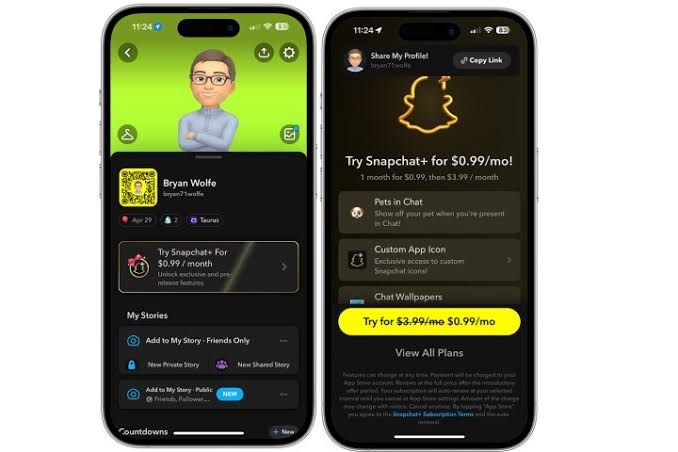
Snapchat Plus is the platform’s premium subscription that works like a VIP pass, giving users access to features regular accounts cannot use. It includes longer-lasting Stories, exclusive Bitmoji backgrounds, custom chat designs, advanced analytics, and early access to experimental tools.
For many users, the big question is how to know if someone has Snapchat Plus. The good news is that many of these premium features leave visible clues. From special badges to unique icons and custom visuals, there are clear indicators that can reveal who is subscribed. This guide will walk you through the key signs to look for.
Why would someone want to know if a friend has Snapchat Plus?
If you’ve ever wondered what Snapchat Plus looks like in action, keeping an eye on who’s using it can give you a clearer picture. It helps you see which premium features show up in everyday use, and it can also make it easier to notice the customizations and extras that regular users don’t have access to.
How does the Snapchat+ badge work and who gets it?
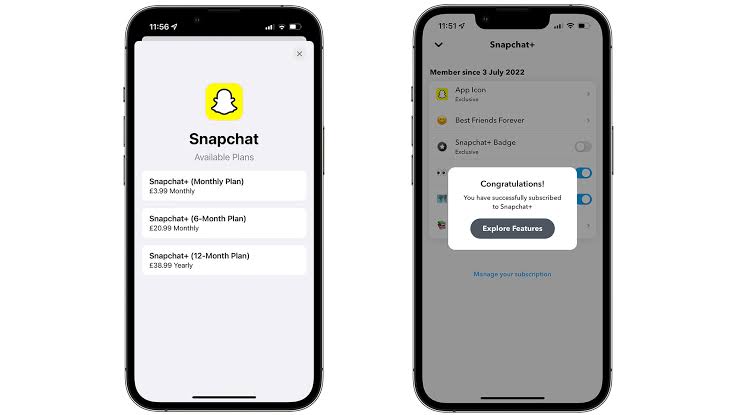
One of the clearest signs of Snapchat Plus is the star-shaped badge a white star inside a black circle that can appear next to a user’s display name.
To spot it, open Snapchat, head over to the Friends tab, and tap on your friend’s Bitmoji or profile picture to view their profile. If they’ve chosen to display their premium status, you’ll see the little star icon sitting right next to their name.
Keep in mind, though, that this badge is optional. Some users prefer not to show it, so the absence of the star doesn’t always mean they aren’t subscribed.
Do longer Stories suggest that someone has Snapchat Plus?
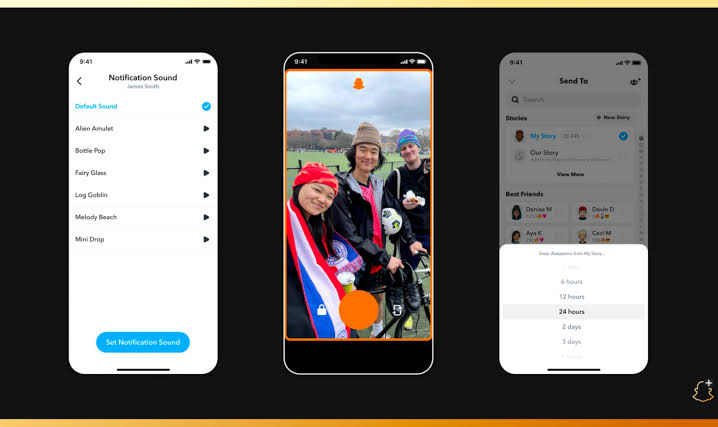
On regular Snapchat, Stories vanish after 24 hours. With Snapchat Plus, subscribers can extend their Stories for up to an entire week.
To spot this, keep an eye on your friend’s Story. If the exact same Story is still visible after a full day has passed, it’s a strong clue they might be using Snapchat Plus.
However, be cautious some users may simply repost the same Story to keep it active. Make sure it’s truly the same content and not just a fresh upload before assuming they’re a subscriber. What do exclusive Bitmoji or AI backgrounds tell you?
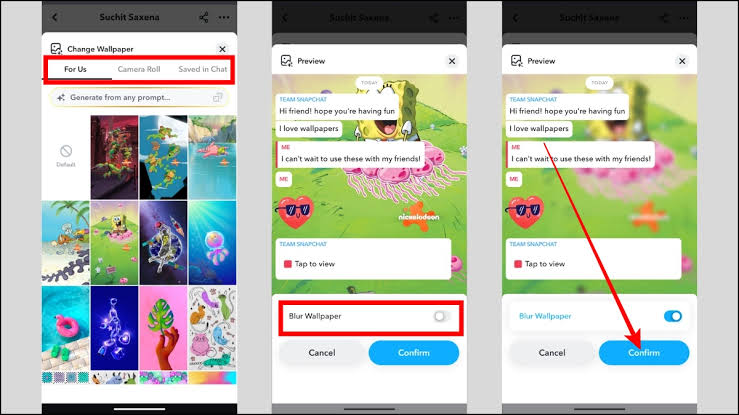
Are custom chat wallpapers only for Snapchat Plus users?
One of the perks of Snapchat Plus is the ability to set exclusive chat wallpapers, including custom images pulled directly from a user’s camera roll.
To spot this, open a chat with your friend and pay attention to the background. If it looks unusually stylish, personalized, or shows a custom photo, there’s a good chance they’re using Snapchat Plus. Some wallpapers may even display a small star or lock icon, marking them as premium.
Keep in mind, though, not every wallpaper will be obvious. But if you come across a design or personal image that isn’t available in your own settings, that’s a clear sign of a Plus subscription
How do extra Snap replays hint at Snapchat Plus?
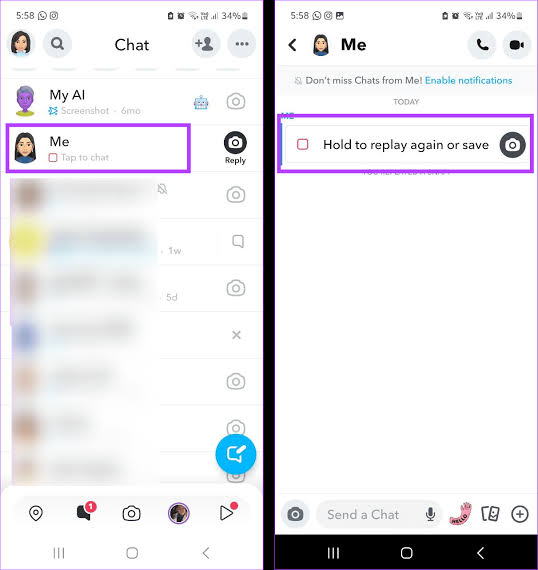
Normally, Snapchat only allows a Snap to be replayed once. With Snapchat Plus, however, subscribers unlock the option to replay a Snap more than one time giving them an extra look at the content.
To identify this, send a Snap to your friend and watch for the notifications. If you receive two replay alerts for the exact same Snap, it’s a strong indicator that they’re subscribed to Snapchat Plus.
A quick note: only the sender can see replay activity, which means you’ll need to be the one sending Snaps in order to catch this subtle clue.
What is the Friend Solar System feature in Snapchat Plus?
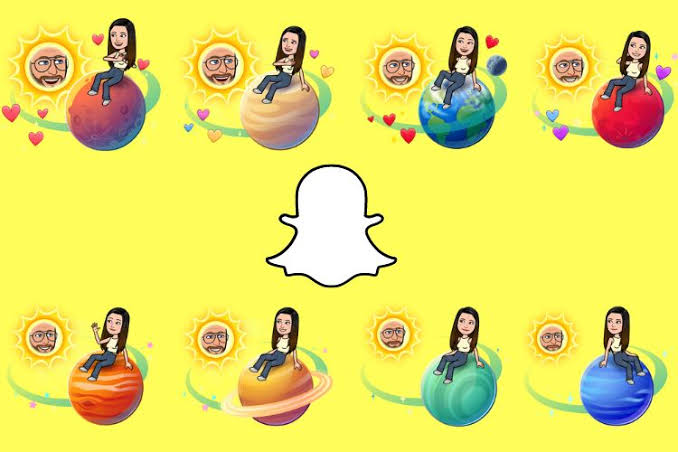
One of the most unique features of Snapchat Plus is the Friend Solar System. This feature places tiny planet icons such as Mercury, Mars, or others next to a friend’s Bitmoji, with each planet representing your position in their circle of best friends.
To spot it, open a chat with your friend or check your Best Friends list. If you notice a small planet symbol displayed alongside their Bitmoji or username, it’s a sign the Friend Solar System is active.
Keep in mind that these icons only appear if either you or your friend is subscribed to Snapchat Plus. Without a Plus subscription, the solar system feature won’t be visible at all.
How do post-view emojis give away a Snapchat Plus account?
Another subtle but creative perk of Snapchat Plus is the ability to set a custom emoji that appears after someone views their Snap. It’s a small detail, but it adds a personalized touch that makes chats feel more unique.
To notice this feature, pay attention right after you view a Snap from a friend. If an unexpected emoji appears next to their name in your chat thread—something beyond the default Snapchat visuals—it’s likely their chosen Post View Emoji.
It’s worth noting that not every Plus subscriber uses this option, and the emoji can sometimes be easy to overlook. Still, when you see a fun or unusual symbol pop up, it’s a strong hint they’re enjoying this premium feature.
What makes Snap Map icons unique for Plus users?
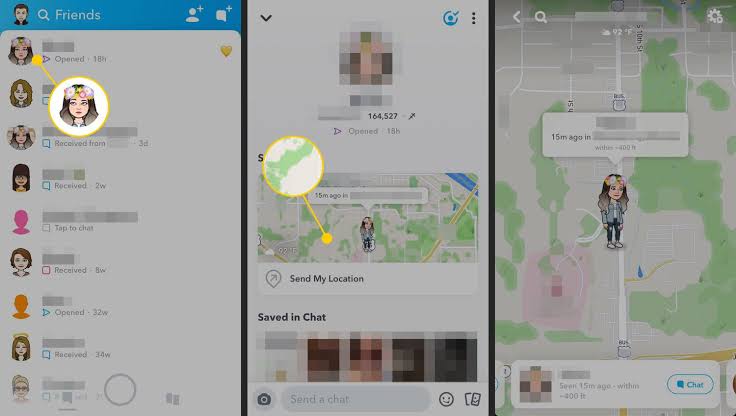
Snapchat Plus gives users the option to personalize their Bitmoji on the Snap Map with fun add-ons like pets, cars, and other custom icons. These little details make profiles stand out and are one of the more noticeable Plus features.
To spot them, open the Snap Map and look closely at your friends’ Bitmojis. If you see extra elements—such as a dog, cat, or even a stylish car—that don’t normally appear, it’s a strong indicator they’re using Snapchat Plus.
Keep in mind that Snapchat occasionally adds temporary icons during special events. However, if a friend consistently has a pet or vehicle next to their Bitmoji, that’s a clear sign of a Plus subscription.
Can instant Snap Streaks confirm a Plus subscription?
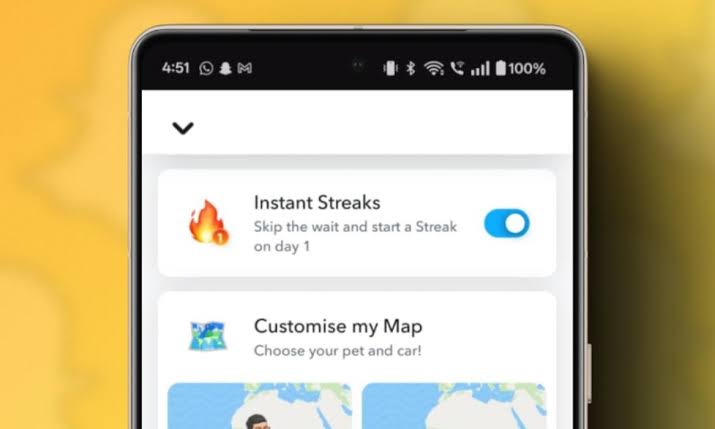
On standard Snapchat, it takes three consecutive days of sending Snaps back and forth before a Snap Streak begins. Snapchat Plus changes that rule by allowing subscribers to start a Streak instantly, without the usual waiting period.
To spot this, pay attention when you begin chatting with a new friend. If the fire, emoji the symbol of a Streak, appears immediately after your very first exchange, it’s a strong clue they’re using Snapchat Plus.
That said, this is one of the more subtle indicators. Unless you’re actively starting new Streaks and watching closely, it can be easy to miss.
What limitations should you keep in mind when spotting Snapchat Plus?
Trying to figure out who’s using Snapchat Plus isn’t always straightforward—and here’s why:
- Some features stay behind the scenes: Insights like advanced analytics, experimental tools, or custom app icons are only visible to the subscriber, not to their friends.
- Visibility is a choice: Snapchat Plus members can turn off their badge or skip using exclusive perks, making it tricky to identify them at first glance.
- Not all signs are foolproof: A Story that lasts for days might simply be reposted, and special Bitmoji icons could appear for everyone during seasonal events.
- Privacy matters: Treat these hints as fun observations, not absolute proof. At the end of the day, Plus users are still just your friends on Snapchat.
Is it possible to hide Snapchat Plus status from others?
Not everyone wants to show off their Snapchat Plus membership and the good news is, you don’t have to. Here’s how you can stay low-key:
- Head to your profile and open the. Snapchat+ settings menu.
- Toggle off the Snapchat+ Badge so the star icon won’t appear next to your name.
- If you’d rather not stand out, avoid using exclusive wallpapers, custom backgrounds, or other flashy features that make your subscription obvious.
What Features Are Exclusive to Snapchat Plus?
Snapchat Plus includes several premium tools that regular users cannot access. Some of these features are visible to friends, while others stay private and only improve the subscriber’s personal experience. Understanding these exclusive perks makes it easier to recognize why certain accounts look or behave differently.
Story Rewatch Indicators
Snapchat Plus allows users to see how many friends rewatched their Stories. While others cannot directly see these analytics, subscribers often use this feature to track engagement and understand which content performs best.
Custom App Icons
Subscribers can change the Snapchat app icon on their phone using exclusive themes and colors. This feature is only visible on their own device, but it remains one of the most popular customization perks included with Snapchat Plus.
Priority Story Replies
When replying to creators or influencers, Snapchat Plus users may receive priority placement in responses. This improves visibility when interacting with public profiles and content creators on the platform.
Ghost Trails on Snap Map
Snapchat Plus users can sometimes access Ghost Trails, which show the recent movement history of friends on Snap Map if location sharing is enabled. This feature adds more detailed tracking and interaction capabilities.
Should You Subscribe to Snapchat Plus?
Whether Snapchat Plus is worth it depends on how often you use Snapchat and what kind of experience you want from the app. Casual users who mainly send occasional Snaps may not notice a major difference. However, people who spend a lot of time on Snapchat often enjoy the added personalization and exclusive tools.
Snapchat Plus Is Best For:
Users who enjoy customizing their profile and chats.
People who actively maintain Snap Streaks every day.
Creators and influencers tracking audience engagement.
Friends who enjoy experimenting with early features.
Snapchat Plus May Not Be Necessary For:
Users who only use Snapchat occasionally.
People focused mainly on private messaging.
Anyone uninterested in customization or premium extras.
Ultimately, Snapchat Plus is more about enhancing the experience rather than unlocking essential features. The standard version of Snapchat still includes all the core communication tools most users already enjoy.
Common Myths About Snapchat Plus
Many users misunderstand what Snapchat Plus actually provides. Because of the premium badge and exclusive features, some people assume it offers abilities far beyond what it really does. Clearing up these myths helps users understand the subscription more accurately.
Snapchat Plus Does Not Verify Your Account
Some people confuse Snapchat Plus with verification status. The subscription does not provide a verified checkmark or official creator badge. Verification remains a separate process controlled directly by Snapchat.
Snapchat Plus Does Not Reveal Private Information
Premium users cannot secretly view private messages, screenshots, or hidden activities from other accounts. Snapchat Plus focuses mainly on customization and enhanced user experience rather than privacy invasion.
Snapchat Plus Does Not Remove Ads Completely
Although subscribers gain extra features, ads still appear in parts of the app. Snapchat Plus is not an ad-free version of Snapchat, and users should not expect advertisements to disappear entirely.
Why Snapchat Plus Became Popular So Quickly
Snapchat Plus gained popularity rapidly because it introduced something many social apps were already exploring: premium memberships with exclusive features. Instead of limiting communication tools, Snapchat focused on offering personalization, early access, and visual upgrades that appeal strongly to younger audiences.
Another reason for its success is curiosity. Features like Friend Solar System and custom Bitmoji add-ons became highly discussed online, encouraging more users to subscribe just to explore them firsthand. Social media trends and influencer content also played a major role in promoting Snapchat Plus, especially among Gen Z users who enjoy experimenting with new digital experiences and customization features.
Things to Consider Before Buying Snapchat Plus
Before subscribing, it’s important to think about how often you actually use Snapchat. If you open the app multiple times a day, maintain long Snap Streaks, and enjoy customizing your profile, Snapchat Plus may feel worthwhile. The extra features can make interactions more entertaining and provide access to tools regular users cannot use.
However, casual users may not notice enough difference to justify the subscription. Most core Snapchat features including messaging, Stories, video calls, and Snap Map are still available for free. Snapchat Plus mainly enhances the experience rather than transforming it completely. Understanding this distinction helps users decide whether the premium subscription matches their personal usage habits and expectations.
Conclusion:
Identifying a Snapchat Plus user comes down to recognizing a few clear signs: extended Stories, custom chat wallpapers, extra Snap replays, Friend Solar System icons, unique Bitmoji add-ons, and post-view emojis. While these features often give away a Plus subscription, they aren’t always guaranteed indicators. Some users may hide their badge or avoid using visible perks, and certain icons or effects can appear during special events.
The key takeaway is simple: Snapchat Plus offers exclusive customization and premium tools that regular users don’t have. If you notice these differences, there’s a good chance your friend is a subscriber.
Frequently Asked Questions (FAQs)
Can I try Snapchat Plus for free?
Yes, Snapchat often gives a 7-day free trial.
Does Snapchat Plus give more privacy?
No, it mainly adds features—not extra privacy.
Do I need Snapchat Plus to use Snap Map?
No, but Plus gives extra customization like pets or cars.
Can I share Snapchat Plus features with friends?
No, the perks only work on your own account.
Does Snapchat Plus make your account verified?
No, it doesn’t give you a verified checkmark.
Do all new updates come first to Plus users?
Yes, Plus subscribers usually get early access to new tools.
