
Instagram is where millions of people connect daily, but sometimes you may notice that a user has suddenly disappeared from your feed or your search results. This situation often raises the question: How to Check If Someone Blocked You on Instagram. Since Instagram does not send any notifications when someone blocks you, it is up to you to identify the signs and confirm it. This article explains everything step by step with helpful visuals, tables, and guidance to make the process clear.
Understanding How to Check If Someone Blocked You on Instagram
Instagram is not just a photo-sharing app anymore—it is a platform where friendships, communities, and businesses grow daily. But sometimes, you might notice that a person you once interacted with suddenly disappears from your profile. Their likes vanish, their stories stop showing up, and their username becomes difficult to find. At this point, one question comes to mind: How to Check If Someone Blocked You on Instagram. Since Instagram does not notify users when someone blocks them, the process can be confusing. This article explains the emotional, technical, and practical sides of finding out if you’ve been blocked. With detailed steps, comparisons, and clear signs, you’ll know exactly what’s happening and how to respond.
Why It’s Important to Know If Someone Blocked You
When learning How to Check If Someone Blocked You on Instagram, it’s essential to understand why this knowledge matters. Blocking is not just a digital action—it can affect your relationships, emotions, and even business goals. For personal users, it provides closure when someone cuts off interactions. For businesses or influencers, it helps track engagement patterns and understand why followers might choose to disengage.
- Personal clarity: Knowing you’re blocked avoids unnecessary overthinking.
- Business growth: Brands can analyze why some users disconnect.
- Peace of mind: Helps you move on without confusion.
- Digital boundaries: Reminds us that everyone has the right to control who sees their content.
What Happens When Someone Blocks You
To truly understand How to Check If Someone Blocked You on Instagram, you need to know what changes take place when someone takes this action. Blocking is designed to cut off interaction between two accounts entirely.
When someone blocks you, you may experience the following:
- Profile invisibility: You cannot view their profile anymore.
- No posts or stories: Their content disappears from your feed and highlights.
- Message restrictions: Old messages stay, but new ones won’t be delivered.
- Engagement freeze: Likes, comments, and tags involving them may vanish.
These changes indicate that the user has decided to completely stop digital contact with you.
Misunderstandings People Have About Blocking
It’s easy to assume you’ve been blocked when a profile disappears, but that’s not always the case. Before moving to the step-by-step guide on How to Check If Someone Blocked You on Instagram, it’s important to clear up some common misconceptions.
- Account deactivation: The user may have temporarily deactivated their profile, making it invisible to everyone, not just you.
- Username changes: If they changed their username, searches may not bring up their profile until you know the new name.
- Privacy updates: They may have switched to private, which hides their posts if you are not following them.
- Technical glitches: Sometimes, Instagram temporarily hides or restricts accounts.
These factors can look like blocking, so confirming with steps is crucial.
Emotional Impact of Being Blocked
Being blocked is more than a technical issue—it carries an emotional side too. Many users take it personally, but the truth is that blocking usually reflects the blocker’s needs rather than your actions. It could be about privacy, space, or simply a change in social dynamics.
- Not personal: People block for their own comfort, not always because of you.
- Emotional balance: Accepting it helps reduce stress and anxiety.
- Moving forward: Instead of focusing on one user, grow other connections.
- Respect for boundaries: Understanding that digital boundaries matter in relationships.
Step-by-Step Guide: How to Check If Someone Blocked You on Instagram
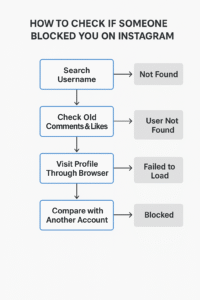
When you’re unsure about whether someone has blocked you, it’s best to follow a structured process rather than guessing. Instagram does not provide a direct alert when someone blocks you, which is why these checks are important. Below is the complete step-by-step guide on How to Check If Someone Blocked You on Instagram with practical methods you can follow.
Step 1: Search Their Username
The first step is to use the search bar on Instagram to look for the person’s username. If you type it in and nothing shows up, this could be a strong indication of being blocked. However, disappearing usernames are not always due to blocking, so take this as the first clue rather than final proof.
- Open Instagram and type their exact username in the search bar.
- If they don’t appear but you know the username is correct, consider it a sign.
- Sometimes, they may have changed their username, so check old comments or tags to confirm.
- Try searching on both the Instagram app and on a browser for accuracy.
Pro Tip: If the account appears but shows “No Posts Yet” even though you know they post regularly, that’s another sign you may have been blocked.
Step 2: Check Old Comments and Likes
Another reliable method in How to Check If Someone Blocked You on Instagram is to review your older posts where that person may have interacted. If they ever liked or commented on your photos, their name will remain visible. By clicking on it, you can test whether the profile is still accessible.
- Open your own older posts and scroll through the likes or comments list.
- Tap on their name or profile picture if it appears.
- If Instagram displays “User Not Found” or shows a blank profile, blocking is highly likely.
- If their comment has turned into plain text without a clickable link, this may also mean they deactivated their account instead.
Pro Tip: Cross-check with mutual friends. If they can still tap and open the profile but you can’t, then blocking is almost certain.
Step 3: Visit Their Profile Through Browser
If you’re still unsure, move to a browser-based check. This is another important part of How to Check If Someone Blocked You on Instagram, because Instagram profiles can be opened directly via their URL.
- Open a browser like Chrome or Safari and type:
instagram.com/username. - If you see an error message like “Sorry, this page isn’t available”, it could mean you were blocked.
- To be sure, ask another friend to type the same URL.
- If the profile opens for them but not for you, then you know blocking has occurred.
Pro Tip: Always log out of Instagram when testing the profile link. Sometimes being logged in affects visibility if you are blocked.
Step 4: Compare with Another Account
The most foolproof method in How to Check If Someone Blocked You on Instagram is checking with another account. This method eliminates doubts because it allows you to confirm whether the profile exists and is still active.
- Login using another Instagram account (a second personal account, business profile, or a friend’s account).
- Search for the same username and check if the profile appears.
- If the profile opens normally for the other account but not for yours, then blocking is confirmed.
- This method rules out account deletion, username changes, or glitches.
Pro Tip: Use a neutral account that the person has no connection to. This ensures they haven’t also restricted access to that account.
Difference Between Blocked and Deactivated
| Feature | Blocked | Deactivated |
|---|---|---|
| Profile Search | Hidden only from you | Hidden from everyone |
| Comments & Likes | Still clickable but “User Not Found” | Disappears completely |
| Messages | Old chats remain, no new delivery | Old chats may vanish |
| Others’ View | Visible to others | Not visible at all |
This table makes it easier to separate blocking from deactivation.
Other Signs to Watch For
Besides the direct steps, there are smaller hints that someone may have blocked you:
- Their Instagram Stories never appear.
- You can’t tag them in new posts.
- Mutual friends can see their content, but you can’t.
- Past highlights disappear completely.
Adding these signs strengthens your confirmation process.
Tools and Limitations
Many people wonder if there are shortcuts or apps that can instantly confirm whether someone has blocked them. While the internet is full of third-party tools claiming to reveal this, the truth is that Instagram does not provide an official feature or API for identifying who blocked you. This means most of these apps are unreliable, often inaccurate, and can sometimes compromise your privacy.
- Third-party apps: They may collect your login information or misuse your account data, which poses a serious security risk.
- Manual checks: Searching usernames, checking past interactions, and using different accounts are still the most reliable and safe ways.
- Instagram policy: The platform intentionally avoids giving users a direct “blocked” notification to maintain privacy and reduce conflict.
Takeaway: Avoid using unofficial tools. Manual methods, though slightly longer, keep your account safe and give you more accurate results.
What to Do After Being Blocked
Realizing that you’ve been blocked on Instagram can feel uncomfortable, but how you respond is important for your online and emotional well-being. Once you confirm using the Step-by-Step Guide: How to Check If Someone Blocked You on Instagram, it’s best to move forward with maturity.
- Respect boundaries: If someone blocked you, it usually means they need space. Respecting their decision is the healthiest step forward.
- Stay positive: Don’t dwell on the negative. Focus your energy on improving your own content and interactions.
- Learn from experience: Reflect on whether your past actions may have caused discomfort. If so, use this as a lesson for future online behavior.
- Keep building connections: Strengthen relationships with supportive followers who engage positively with you.
Tips to Prevent Being Blocked
Being blocked can sometimes be avoided by practicing mindful and respectful interaction on Instagram. Many users block others when they feel overwhelmed, spammed, or uncomfortable. To reduce this risk, consider the following tips:
- Avoid spamming DMs: Sending too many direct messages quickly can feel intrusive.
- Don’t over-comment: Commenting excessively, especially with repetitive or irrelevant text, may annoy others.
- Respect no-reply signals: If someone doesn’t respond, don’t push further. Give them space.
- Post balanced content: Share a variety of meaningful posts instead of overwhelming followers with too much promotional or irrelevant material.
- Keep interactions respectful: A polite tone and thoughtful comments go a long way toward maintaining healthy connections.
Result: Practicing these behaviors helps you build a trustworthy reputation and avoid unnecessary blocks.
Alternatives to Blocking
Sometimes users may not want to completely block someone but still need a break from their content. Instagram offers alternatives that can help manage your feed without cutting ties entirely:
- Mute: Hides posts and stories from a user without unfollowing them, ideal if you just want a break.
- Restrict: Limits how the person interacts with your content. Their comments are only visible to them until you approve.
- Unfollow: Removes their content from your feed, but they remain a follower unless they unfollow you too.
Why use alternatives? These tools provide flexibility. Instead of immediately blocking, you can customize how much you want to interact or view someone’s content. This prevents unnecessary conflicts while giving you control over your Instagram experience.
Conclusion
Learning How to Check If Someone Blocked You on Instagram is about observing the right signs and confirming with multiple checks. While being blocked can feel uncomfortable, it’s more about the other person’s decision than yours. Use the steps, tables, and comparisons shared here to clarify doubts. Most importantly, respect others’ boundaries and continue building positive interactions on your Instagram journey.
Frequently Asked Questions (FAQs)
Can I know for sure if someone blocked me?
Instagram doesn’t notify you directly, but by following the steps in this guide on How to Check If Someone Blocked You on Instagram, you can confirm it. Searching their profile, checking old interactions, and comparing with another account usually gives a clear answer.
Does blocking remove old messages?
No. When learning How to Check If Someone Blocked You on Instagram, it’s important to know that past messages remain in your inbox. However, their profile picture and bio will disappear, and you won’t be able to send new messages to them.
Could it be deactivation instead of blocking?
Yes. Sometimes an account is deactivated or deleted, which looks similar to being blocked. The difference is, if you try the steps in How to Check If Someone Blocked You on Instagram with another account, you’ll see the truth—deactivated accounts vanish for everyone, not just you.
Do third-party apps really work for checking blocks?
No. Many apps claim to show who blocked you, but they aren’t reliable or safe. The most secure way is to use manual checks outlined in this guide on How to Check If Someone Blocked You on Instagram. This avoids risks to your privacy and account security.
What should I do if someone blocks me?
Once you confirm using How to Check If Someone Blocked You on Instagram, the best action is to respect their choice. Don’t try to bypass the block. Instead, focus on your own growth, maintain healthy online habits, and engage with people who support you.
