
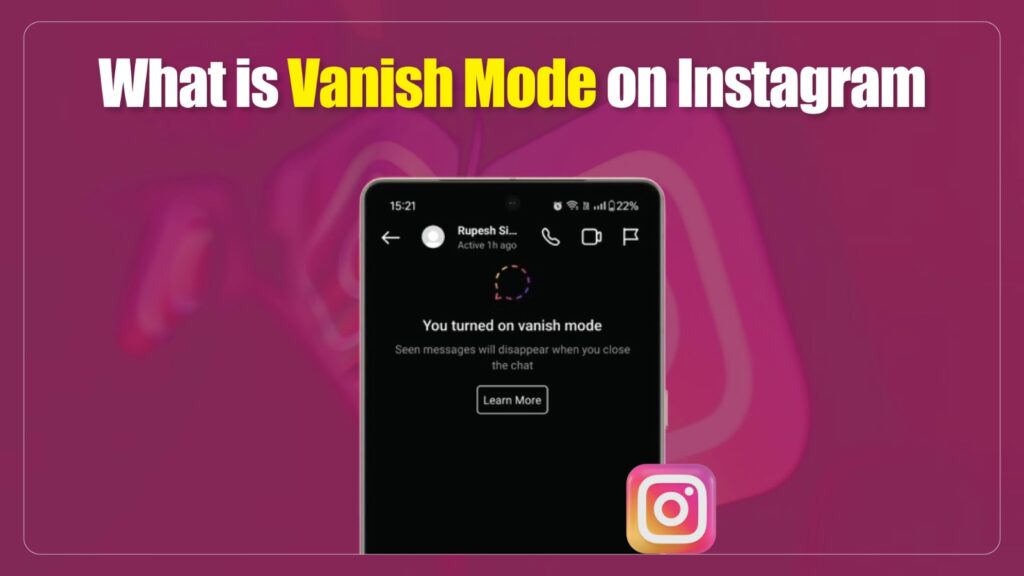
Ever sent a message on Instagram that you wished could disappear after the chat ended? That’s exactly what Vanish Mode on Instagram was designed for. Introduced as part of Instagram’s privacy updates, Vanish Mode allows users to have temporary, self-erasing conversations inside Direct Messages (DMs). Once you leave the chat or turn Vanish Mode off, the messages vanish leaving no history behind.
In 2026, Instagram’s Vanish Mode is still one of the most talked-about features because it offers users more control, flexibility, and privacy in their online conversations. But many still wonder: How does Vanish Mode actually work? What content disappears? And is it truly safe?
This article breaks down everything you need to know about Vanish Mode, including:
- What Vanish Mode is and when Instagram introduced it.
- How it works step by step.
- Its privacy implications, benefits, and limitations.
- Tips for using it responsibly without risking your digital safety.
Whether you’re a casual Instagram user curious about the feature or someone concerned about privacy and security online, this guide will help you understand how Vanish Mode really works and whether it’s right for you.
What Is Vanish Mode on Instagram?
Vanish Mode on Instagram is a privacy feature that allows users to send disappearing messages, photos, videos, and reactions in Direct Messages. Instagram introduced Vanish Mode in 2020 as part of its Messenger integration update to support temporary, self-erasing conversations.
Vanish Mode activates when users swipe up in a one-on-one chat, changing the screen to a dark theme with notifications that the feature is active. Messages sent in this mode disappear automatically once the chat is closed or when Vanish Mode is turned off.
Instagram confirms that Vanish Mode is only available for private conversations, not for group chats or message requests. The feature also provides screenshot notifications, alerting users if the other person captures disappearing content.
Vanish Mode differs from Instagram’s Unsend option and disappearing photos/videos, since the entire chat thread is cleared after exit, rather than individual messages being removed. The feature is designed to enhance ephemeral messaging, user control, and content privacy across Instagram Direct.
How Vanish Mode Works on Instagram
- Open an Instagram Direct Message (DM) with another user.
- Swipe up on the chat screen until the background turns dark.
- Receive a notification confirming Vanish Mode activation.
- Send ephemeral content such as text, images, videos, emojis, or voice notes.
- Disappear messages automatically when the chat is closed or Vanish Mode is turned off.
- Notify both participants of mutual consent when Vanish Mode is enabled.
- Exit Vanish Mode by swiping up again or leaving the conversation thread.
- Trigger screenshot alerts if a participant captures disappearing content.
- Restrict Vanish Mode to one-on-one chats, excluding group messages and requests.
- Apply Instagram’s data retention policy, retaining metadata or flagged reports for safety.
Limitations and Conditions of Vanish Mode
Vanish Mode on Instagram is limited to one-on-one chats and does not function in group conversations. The feature is also unavailable in new message requests, meaning users cannot activate it with people they have never messaged before.
In addition, Vanish Mode is not accessible in all regions or account types, as Instagram gradually rolls out the feature based on market and compliance requirements. To use it, both participants must have the Messenger integration update, and Instagram may disable the feature in chats flagged for suspicious activity or policy violations.
Privacy and Security Implications of Vanish Mode
Vanish Mode on Instagram enhances user privacy by making messages, photos, videos, and reactions disappear once the chat ends. It introduces screenshot notifications that alert participants if someone captures disappearing content. Despite this, Instagram may still retain metadata or flagged messages for safety reviews under its Community Guidelines.
The feature hides conversations from the inbox but does not guarantee complete secrecy, as external devices can record content. Vanish Mode is designed to give temporary control over chats, but its security depends on responsible use and platform limitations.
Key Privacy and Security Points
- Ensure messages disappear after the chat ends.
- Trigger screenshot alerts if content is captured.
- Retain metadata or flagged reports for compliance checks.
- Hide content from the inbox but not from external recording.
- Provide temporary control without guaranteeing full secrecy.
Pros and Cons of Using Vanish Mode
Vanish Mode offers Instagram users a way to manage ephemeral conversations with more control. It enables disappearing messages that enhance privacy and flexibility, but it also introduces limitations that users must consider. While the feature supports temporary exchanges without leaving a history, it does not eliminate the risks of misuse or external capture. Understanding both the advantages and drawbacks helps users decide when Vanish Mode is appropriate.
Pros of Vanish Mode
- Provide disappearing messages for sensitive or casual chats.
- Ensure screenshot notifications to alert users of captures.
- Support privacy control by removing content after the chat ends.
- Maintain transparency through activation notifications.
Cons of Vanish Mode
- Restrict usage to one-on-one conversations only.
- Exclude new message requests and some regions or accounts.
- Allow potential misuse if someone records content with external devices.
- Remove chat history, which can cause loss of important information.
How to Turn Vanish Mode On and Off
To enable Vanish Mode on Instagram, users must open a one-on-one Direct Message and swipe up on the chat screen until the background changes to a dark theme with a confirmation notice. Any content shared during this session, including text, photos, or reactions, will disappear once the chat is closed.
To exit Vanish Mode, users can either swipe up again or leave the conversation, which restores the chat to normal mode. Both participants receive notifications when Vanish Mode is turned on or off, ensuring transparency.
Steps to Turn On Vanish Mode
- Open a Direct Message with another Instagram user.
- Swipe up on the chat screen until the dark theme appears.
- Receive a notification confirming Vanish Mode activation.
Steps to Turn Off Vanish Mode
- Swipe up again on the chat screen.
- Or leave the conversation to exit Vanish Mode.
- Both users receive a notification when the mode is disabled.
Tips for Using Vanish Mode Responsibly
Vanish Mode is designed to give users temporary control over conversations, but its effectiveness depends on responsible use. While it helps maintain privacy by erasing messages after chats, users should remain cautious, as content can still be saved externally or misused. Following safe practices ensures Vanish Mode is used for its intended purpose without exposing personal information to unnecessary risks.
Responsible Usage Tips
- Share only non-sensitive information when using Vanish Mode.
- Confirm the other participant’s consent before activating the feature.
- Stay aware that external recording devices can bypass vanish protection.
- Avoid relying on Vanish Mode for highly confidential discussions.
- Monitor notifications for screenshots or suspicious activity.
Comparisons to Similar Features
Vanish Mode vs Instagram’s Unsend Option
Instagram’s Unsend option allows users to delete individual messages from a chat, but it requires manual removal for each item. In contrast, Vanish Mode clears the entire conversation once the chat ends or the feature is turned off, offering a broader reset instead of selective deletion.
Vanish Mode vs Disappearing Photos and Videos in DMs
Instagram also supports disappearing photos and videos sent directly in chats. These vanish after being viewed once or twice, depending on the sender’s setting. Vanish Mode differs by applying to the entire chat thread, not just media files, ensuring all text, images, and reactions disappear together.
Vanish Mode vs Snapchat Disappearing Messages
Snapchat is known for default disappearing chats, meaning messages erase automatically unless saved. Unlike Snapchat’s system, Vanish Mode is optional and requires activation, giving users control over when temporary messaging applies. Snapchat also offers stronger integration with disappearing media as part of its core design.
Vanish Mode vs Encrypted Messengers (Signal, Telegram)
Encrypted messengers such as Signal and Telegram provide timed expiration and end-to-end encryption, which adds stronger protection for sensitive conversations. While Vanish Mode deletes messages locally, Instagram may still retain metadata for security review, making it less secure compared to apps built around privacy.
Real User Feedback & Common Issues
User experiences with Vanish Mode highlight both convenience and challenges. Some report confusion when Vanish Mode activates accidentally, often by swiping up unintentionally during chats (Qoli). Others mention that the feature may be unavailable in certain regions or affected by technical glitches, causing inconsistent access.
Privacy concerns also appear in reviews and tech blogs, as users note that while Instagram deletes messages from the chat view, content may still be captured externally. This has raised questions about whether Vanish Mode provides sufficient protection compared to dedicated privacy apps.
Common Issues Reported
- Accidental activation through swipe gestures (Qoli).
- Bugs or glitches leading to feature unavailability.
- Privacy concerns over external recording risks.
- Inconsistent rollout across accounts and regions.
Conclusion
Vanish Mode on Instagram is a privacy-focused feature that enables users to hold temporary conversations where messages, photos, and videos disappear once the chat ends. It differs from other Instagram tools and competing platforms by offering ephemeral messaging with user control and screenshot alerts, but it does not provide complete protection against external recording or misuse.
The feature is best used for casual exchanges, sensitive jokes, or temporary discussions that do not require long-term storage. However, it remains limited to one-on-one chats, is unavailable in some regions or accounts, and is less secure than encrypted messengers like Signal or Telegram.
In practice, Vanish Mode gives Instagram users more control, flexibility, and transparency in private conversations. Still, users should treat it as a convenience feature rather than a comprehensive security tool. For stronger privacy needs, dedicated encrypted apps may be more reliable.
Frequently Asked Questions (FAQs)
What is Vanish Mode on Instagram?
Vanish Mode is a privacy feature in Instagram Direct Messages that lets users send texts, photos, videos, and reactions that disappear after the chat ends. It was introduced in 2020 as part of the Messenger integration update. This mode is designed for short-lived, private conversations without permanent history.
How do you turn on Vanish Mode?
To turn on Vanish Mode, open a Direct Message with another user and swipe up on the chat screen until the background turns dark. A notification confirms activation, and any content sent in this mode becomes temporary. Both users see alerts that the feature is active.
How do you turn off Vanish Mode?
To disable Vanish Mode, swipe up again on the chat screen or simply leave the conversation. Once turned off, the chat returns to normal mode, and all temporary content disappears. Instagram also notifies both participants when Vanish Mode is deactivated.
Does Vanish Mode work in group chats?
No, Vanish Mode is limited to one-on-one conversations and cannot be used in group chats. It is also not available for new message requests with people you haven’t messaged before. Instagram restricts its use to ensure better control and transparency.
Can Instagram still see messages in Vanish Mode?
While messages vanish from the user inbox, Instagram may still retain metadata or flagged reports for compliance, security, or abuse prevention. The platform’s Community Guidelines and safety policies allow review of suspicious activity. Vanish Mode is private but not fully anonymous.
