
Hashtags on LinkedIn are more than just buzzwords—they’re powerful tools to amplify your content, join industry conversations, and reach the right audience. Whether you’re looking to grow your brand, increase post engagement, or become a thought leader in your niche, understanding how to use hashtags on LinkedIn strategically can make all the difference. This guide breaks down everything you need to know—from research tips to analytics—to help you unlock the full potential of LinkedIn hashtags in 2026.
What Are LinkedIn Hashtags?
LinkedIn hashtags are keywords or short phrases preceded by the “#” symbol that help categorize your content. When used strategically, they make your posts more discoverable by LinkedIn users who follow or search for those specific topics. These hashtags can be added to posts, articles, comments, profiles, and even company pages, giving your content multiple touchpoints for visibility.
The primary purpose of hashtags on LinkedIn is to connect your content with a broader audience interested in similar subjects. They enable your posts to appear in hashtag-based feeds, making it easier for users outside your network to engage with your content. Whether you’re discussing leadership trends, marketing strategies, or career tips, using relevant hashtags places your content into an active conversation happening on the platform.
When Did Hashtags Come to LinkedIn? A Quick History
LinkedIn hashtags have had a rollercoaster journey since their introduction. Unlike other social platforms, their adoption on LinkedIn wasn’t always smooth.
Originally, hashtags appeared on LinkedIn several years ago but were rolled back due to low user engagement. Many users didn’t understand their purpose, leading LinkedIn to temporarily remove them from the platform.
2016: Hashtags on the LinkedIn Mobile App
In 2016, LinkedIn reintroduced hashtags—but only on the mobile app. At this point, hashtags became tappable, allowing users to explore related content and join conversations through hashtag search results.
2017: Hashtags Return to Desktop
A year later, hashtags made their comeback on the desktop version as part of LinkedIn’s updated user interface. However, many users were still unsure about how to use them effectively.
2018: Hashtags Become More Prominent
By early 2018, some users noticed they were being prompted or even required to add hashtags to their posts. LinkedIn later confirmed it was testing this feature to assess whether hashtags could help users discover relevant topics and boost visibility.
How do hashtags work on LinkedIn
Hashtags on LinkedIn function similarly to those on platforms like Instagram, TikTok, and X (formerly Twitter). They categorize content, making it easier for users to find posts related to specific topics. When you add relevant hashtags to your LinkedIn content, it can reach people outside your immediate network — especially those who follow those hashtags. This not only increases your visibility but also helps you connect with a more targeted and relevant audience on the platform.
In today’s world of social SEO, LinkedIn hashtags are more important than ever. They help boost content discovery, drive engagement, and improve your chances of appearing in LinkedIn search results. Despite the misconception that hashtags are losing relevance, they remain a crucial tool for marketers, creators, and professionals. However, instead of using random or overly broad hashtags, it’s smarter to select industry-specific and audience-relevant tags to truly maximize your content’s impact.
Smart Hashtag Tips for LinkedIn
- Use 3 to 5 relevant hashtags per post — avoid overloading with too many.
- Mix broad and niche hashtags to balance reach and relevance.
- Track your top-performing hashtag combinations for future use.
- Use tools like Sendible’s Content Library to save and manage hashtag sets efficiently.
Why Hashtags Matter on LinkedIn in 2026
Hashtags play a key role in helping LinkedIn understand the context of your content and make it discoverable. When users follow or search for specific hashtags, your posts have a better chance of showing up—even to people outside your network. This boosts visibility, improves content categorization, and allows the LinkedIn algorithm to recommend your posts to a more relevant audience. Ultimately, hashtags help you reach and engage with the right people in your industry.
How Many Hashtags Should You Use?
LinkedIn recommends using 3 to 5 hashtags per post for the best visibility and engagement. Using too few hashtags can limit your post’s reach, while too many may confuse the algorithm and reduce performance. The key is to strike a balance — focus on quality, not quantity. Choose hashtags that are highly relevant to your audience and content goals. This targeted approach helps your posts appear in the right search feeds.
- Ideal range: 3 to 5 hashtags per post.
- Too few = missed reach opportunities.
- Too many = possible drop in visibility.
Benefits of Using Hashtags to Boost Your Presence on LinkedIn
Hashtags on LinkedIn do much more than categorize content—they play a critical role in expanding your reach, increasing engagement, and strengthening your brand presence. When used strategically, hashtags can elevate your content performance and position you as a thought leader in your niche.
Increased Engagement and Visibility
Using the right hashtags can significantly improve the visibility and engagement of your posts. By tagging relevant industry terms, you become part of ongoing conversations, allowing your content to appear in hashtag feeds followed by your target audience. Studies show that posts with even one hashtag can generate up to 12.6% more engagement than those without. This boost in exposure can lead to higher reach, more reactions, and increased profile visits.
Targeting the Right Audience
Hashtags are a powerful way to attract the exact audience you’re trying to reach. Specific hashtags like #DigitalMarketing, #RemoteWork, or #StartupGrowth ensure your posts are seen by professionals actively interested in those topics. This targeted visibility helps you connect with like-minded individuals, generate qualified leads, and build stronger professional relationships. It’s a simple yet effective way to make your content relevant to those who matter most.
Strengthening Your Personal or Brand Identity
Consistently using a curated set of hashtags helps build a recognizable and cohesive presence on LinkedIn. Whether you’re an individual expert or managing a company page, sticking to core hashtags like #LeadershipTips, #TechInnovation, or your own branded tag can reinforce your positioning. Over time, your audience will start to associate those hashtags with your content, boosting brand recall and establishing authority in your niche.
Types of Hashtags to Include
Use a mix of:
- Niche-specific hashtags Example: #DigitalMarketingTips, #CyberSecurityExperts, #AIinHealthcare
- Broad hashtags Example: #Leadership, #Technology, #Marketing, #Business
- Branded hashtags Your own brand or company tag like #AxximumInsights, #ImDigitalVinod, etc.
- Event or trend-based hashtags Example: #Budget2026, #WomensDay, #EarthDay
LinkedIn Hashtag Strategy Template (2026)
To get the most out of hashtags on LinkedIn in 2026, it’s important to follow a structured approach. A well-balanced mix ensures your content reaches both wide and targeted audiences. Start with one or two industry-specific hashtags to connect with niche professionals. Then, add one or two broad trending hashtags to boost overall visibility. Finally, include a branded hashtag to build recognition and track your content.
- Use 1–2 niche/industry hashtags.
- Add 1–2 popular or trending hashtags.
- Include 1 branded hashtag for consistency.
Tips to Use Hashtags Effectively
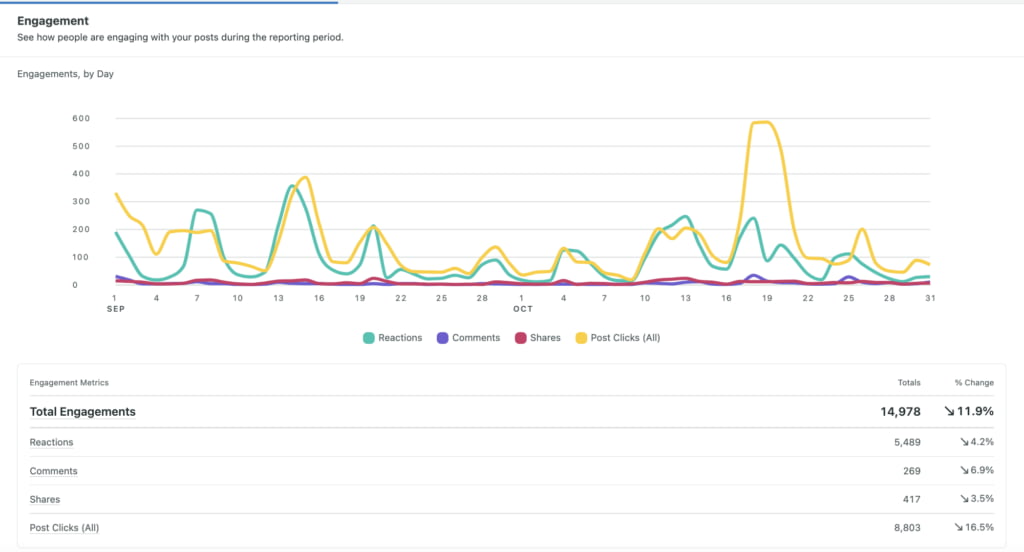
Use LinkedIn Analytics to Refine Your Hashtag Strategy
Using these analytics, you can see which hashtags consistently deliver high impressions, clicks, or engagement from your target audience. For example, you might discover that #DigitalMarketingTips outperforms #MarketingTips, or that one hashtag boosts reach while another drives more meaningful interactions. Over time, refining your hashtag selection based on performance data helps maximize both visibility and impact.
Research Before Posting
Before using any hashtag, always research it on LinkedIn by typing it into the search bar. This helps you see how many people follow that hashtag and whether it’s actively used. A hashtag with thousands of followers may offer more visibility than one with just a few. It also ensures that the tag aligns with your content’s topic. Using relevant, well-followed hashtags increases the chances of your post being discovered.
Don’t Overdo It
Adding too many hashtags can actually hurt your post’s performance. LinkedIn recommends using only 3 to 5 focused hashtags instead of flooding your post with 10 or 15 random ones. Overuse can make your content appear spammy and confuse the algorithm. Always aim for relevance and clarity over quantity. Quality hashtags lead to better engagement and targeted reach.
Be Consistent
Creating and using a branded hashtag in every post helps build content recognition and brand identity. Whether you’re a company, consultant, or content creator, consistency boosts visibility over time. Followers begin to associate your content with that specific hashtag. It also makes it easier for users to search and track your past posts. Keep your branded tag short, unique, and aligned with your messaging.
Use Hashtags in the First Comment (Optional)
If you prefer a clean, professional-looking caption, consider placing your hashtags in the first comment instead. This keeps your post visually tidy while still allowing hashtags to function for discovery. Some creators say it helps avoid looking too promotional in the main copy. However, the effectiveness of this approach varies. Test both methods to see what works best for your audience.
How to Find New Hashtags on LinkedIn
With thousands of hashtags circulating on LinkedIn, finding the right ones for your content requires a smart and strategic approach. Here are several effective methods to help you discover relevant, high-performing LinkedIn hashtags in 2026.
Use the LinkedIn Search Bar
You can still search hashtags directly through LinkedIn’s search bar, even though the platform no longer offers hashtag suggestions in the dropdown. Simply type a hashtag like #SocialMedia and hit enter — this will show you recent posts using that tag. While manual hashtag searches aren’t as powerful as they once were, they’re still useful for quick discovery and post analysis.
Use Social Listening Tools to Spot Trends
One of the most powerful ways to uncover new hashtags is through social listening. Tools like Sprout Social allow you to monitor industry conversations, influencer posts, and trending discussions. If thought leaders in your field frequently use hashtags like #EmployeeAdvocacy or #B2BContent, those tags are likely worth testing in your own content. Social listening helps you stay ahead of trends and align your posts with what your audience actually cares about.
Leverage Sprout’s ‘Conversation’ Feature
Sprout Social’s Conversation tool aggregates data from your LinkedIn mentions and comments across connected accounts. This feature helps you identify the exact words and hashtags your audience is using in real-time. From there, you can compile a refined list of relevant keywords and hashtags tailored to your brand and content themes.
Conduct Manual Research and Competitor Analysis
Take a closer look at what hashtags your competitors or industry leaders are using in their top-performing LinkedIn posts. This can reveal what’s working well in your niche and help you adopt similar strategies. Also, explore active LinkedIn Groups and professional forums—the terminology used in discussions often translates into highly relevant, niche-specific hashtags.
Use Hashtag Generator Tools
If you want to speed up the process, try third-party hashtag research tools. Platforms like Boost App Social, Tagsfinder, and LazyApply can suggest trending hashtags based on your keywords. These tools often include valuable metrics like follower count, engagement rate, and related tags, helping you make data-driven hashtag decisions for your LinkedIn posts.
Final Verdict
Using hashtags on LinkedIn isn’t just a trendy move—it’s a smart strategy to expand your professional presence. By choosing the right hashtags, you improve post visibility, reach a targeted audience, and build a recognizable personal or brand identity. Whether you’re a job seeker, thought leader, or business, effective hashtag use can elevate your LinkedIn engagement and position you as a trusted voice in your field. Start with 3–5 relevant hashtags, stay consistent, and monitor performance to refine your approach.
Frequently Asked Questions (FAQs)
How many hashtags should I use on LinkedIn?
Stick to 3–5 relevant hashtags per post. Overloading with too many can dilute your message and confuse the algorithm.
Should I create my own branded hashtag?
Yes, especially if you’re building a personal or company brand. A unique hashtag boosts recognition and makes your content easier to find.
Can hashtags really improve my LinkedIn post engagement?
Absolutely. Posts with at least one hashtag receive over 12% more engagement than those without, making them a valuable tool for growth.
Where should I place hashtags—in the caption or the comments?
Both are acceptable. Many users prefer putting them in the first comment for a cleaner caption, but LinkedIn indexes them either way.
How do I find the best hashtags for my industry?
Use LinkedIn’s search bar to explore hashtags and see their follower count. Prioritize ones with a strong following that match your content.
