
Video remains one of the most powerful tools for standing out on social media—and LinkedIn is no exception. With video uploads on LinkedIn increasing by 45% year-over-year and short-form content dominating user engagement, now is the perfect time to add video to your LinkedIn marketing strategy. According to the 2024 Social Media Content Strategy Report, 66% of users prefer short-form videos in their feeds, making them the most engaging content type.
LinkedIn is rapidly evolving into a short-form video hub, outpacing other content formats. Whether you’re showcasing products, sharing thought leadership, or educating your audience, LinkedIn video offers a high-impact way to build brand awareness.
The best part? You don’t need to create more video content from scratch. With tools like Sprout Social’s LinkedIn integration, you can easily schedule, crosspost, and track the performance of your videos across multiple channels. Test different formats, monitor audience engagement, and see how LinkedIn video fits into your broader social strategy—all from one dashboard.
Using Video Branding to Build a Strong B2B Presence on LinkedIn in 2026
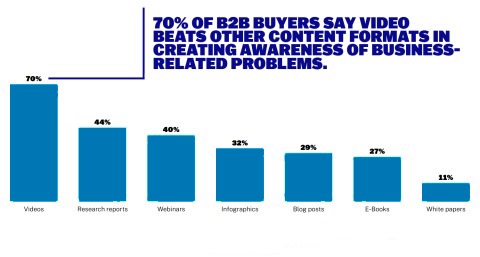
Video has become the preferred content format among B2B buyers, with 95% stating that it plays a crucial role in their purchase decisions. In fact, 70% say video is more effective than any other format for creating awareness around business challenges.
This is where video branding guidelines come into play. They ensure consistency in your brand’s tone, voice, and visual identity—creating a unified look and feel across all your video content. When your videos follow clear branding rules, viewers begin to recognize your content instantly, even without seeing your logo.
Trust is a key driver in B2B sales, and video helps you build it. According to Brightcove, 93% of B2B buyers say video increases their trust in a brand. By establishing solid video branding guidelines, you not only maintain consistency but also strengthen brand recognition and credibility across every video you publish.
How video on LinkedIn fits into the social media landscape
LinkedIn has been testing video on the platform over the past few years. Some users may see a dedicated video tab in the navigation bar on its mobile app. The tab takes users to its new immersive vertical video feed that mirrors the short-form, swipeable style popularized by TikTok, YouTube Shorts and Instagram Reels.
This addition is just the beginning. Recent updates include a full screen verticle image feed on desktop and the “Videos for You” module, which recommends curated content based on user behavior. And they are keeping their community updated on video best practices on the platform.
Fortunately for social practitioners everywhere, similar features across different networks makes social media content creation easier.
With the rise of LinkedIn video, several LinkedIn influencers and content creators have claimed that their vertical video content receives more engagement and impressions on LinkedIn. While these observations are unconfirmed, this suggests the platform is investing in video discovery and performance.
Outside of LinkedIn’s video push, the platform has evolved a lot in the last few years. Our 2026 Social Content Strategy Report found that it’s evolved from being strictly business to a place where users get more personal and build a community. For brands, this shift opens the door to more meaningful connections and allows you to meet your audience where they are, professionally and personally.
The impact of video for your brand on LinkedIn
For B2B brands, video on LinkedIn offers a powerful channel to elevate brand visibility and connect with key decision-makers. With four out of five LinkedIn users involved in business decisions—and double the purchasing power of the average online user—LinkedIn video gives your message more credibility and reach in a highly targeted environment.
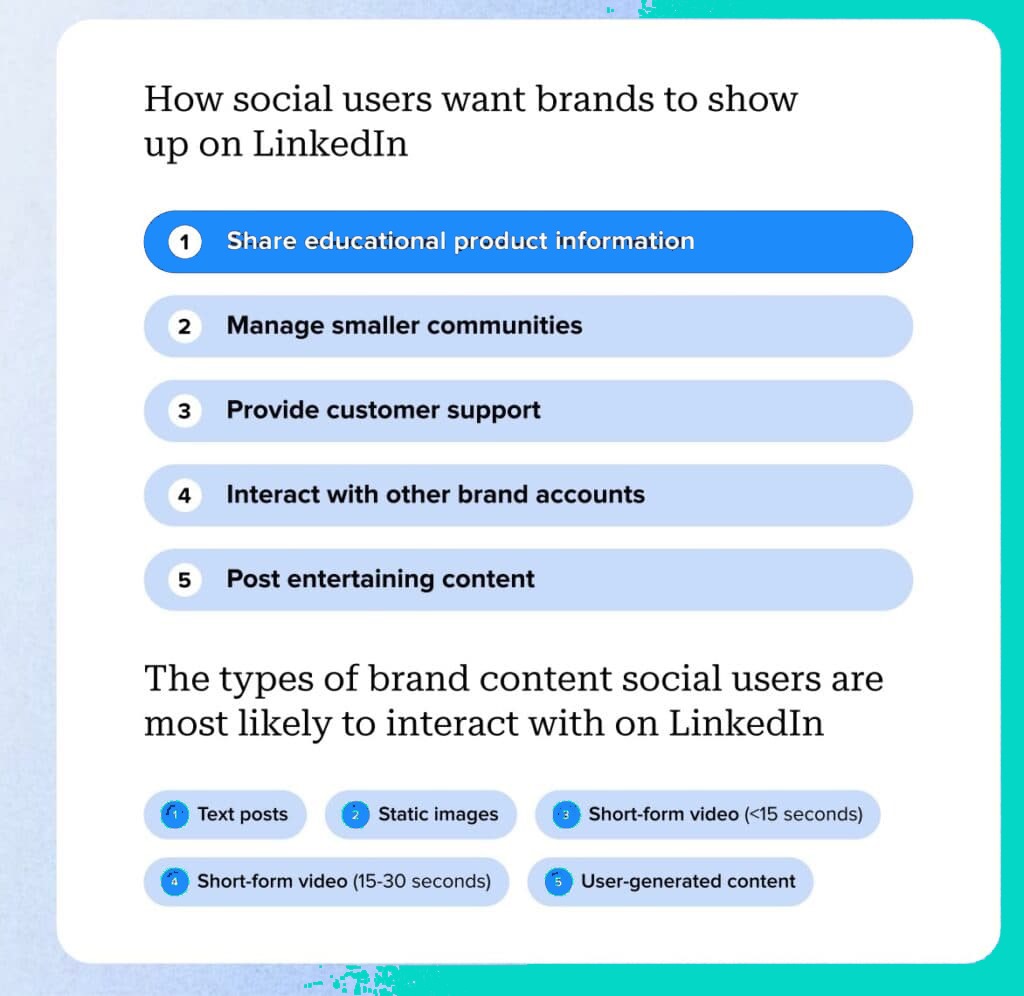
According to Sprout’s 2026 Content Strategy Report, LinkedIn users want brands to show up with value. They’re most engaged by content that:
- Shares educational product information
- Builds niche communities
- Offers customer support
- Interacts with other brand pages
- Delivers entertaining experiences
When it comes to format, the top-performing types of content are:
- Text posts
- Static images
- Short-form videos under 15 seconds
- Short-form videos between 15–30 seconds
- User-generated content
While educational content tops the list, standing out in a crowded feed requires more than just information. The solution? Edutainment—content that blends education with entertainment.
Edutainment is highly effective on LinkedIn, especially for communicating product benefits in a way that’s quick, visual, and memorable. Whether through humor, storytelling, or gamified elements, B2B brands can transform traditional explainer videos into dynamic, bite-sized content that drives engagement and brand recall. In fact, 66% of users in Sprout’s 2026 report said edutainment is the most engaging form of brand content—surpassing even memes, skits, and serial videos.
Using video for engagement and community building on LinkedIn
Want to boost engagement on your LinkedIn videos? Start with two simple strategies: keep them short and include a single, clear call to action (CTA). According to the 2026 Social Media Content Strategy Report, videos under 15 to 30 seconds generate the highest levels of engagement—perfect for busy LinkedIn users scrolling through their feeds.
Another powerful tactic is partnering with LinkedIn influencers and thought leaders. There’s been a 23% year-over-year increase in posts from CEOs, and content shared by C-suite executives or thought leaders receives up to four times more engagement than standard brand posts. This shows that LinkedIn audiences crave authentic voices over polished promotional content.
One effective way to tap into this trend is through LinkedIn Thought Leader Ads. These ads highlight video content from influential individuals—such as employees, partners, or executives—rather than from the brand directly. This approach adds credibility, feels less sales-focused, and helps humanize your brand.
Understanding the Different Types of LinkedIn Video Content
LinkedIn offers several video formats, each designed for specific goals—from brand awareness to community building. Knowing how and when to use each type can help you maximize your reach and engagement.
LinkedIn Live Video
LinkedIn Live is perfect for real-time interaction. Use it for:
- Virtual events
- Q&A sessions
- Announcements
- Product launches or webinars
What sets LinkedIn Live apart is its interactive nature—viewers can comment and engage in real time. On average, LinkedIn Live videos generate 23x more comments than regular video posts, making them ideal for community-building.
To use LinkedIn Live, your page must meet specific eligibility criteria and use a third-party streaming tool. Fortunately, Sprout integrates with top streaming platforms, allowing you to manage your live content alongside scheduled posts.
Standard Feed Videos
Standard LinkedIn videos are native uploads that appear directly in your feed. They’re great for establishing brand presence, driving thought leadership, and sharing educational content. Short, high-impact videos work best—especially when they start with a strong hook and end with a clear call to action. These videos help maintain visibility and keep your audience engaged consistently. Brands like Sephora use them effectively to lead users to other platforms or experiences.
LinkedIn Video Ads
LinkedIn Video Ads are paid posts that appear in users’ feeds based on targeting filters like:
- Job title
- Industry
- Company size
This makes video ads a direct line to key decision-makers. According to LinkedIn, users exposed to video ads are 2–3x more likely to associate positive traits with a brand. But effective ad content matters just as much as placement.A study on B2B LinkedIn video ads revealed that only 19% of viewers remembered the brand behind a video ad. To stand out, follow these best practices:
- Mention your brand 3+ times throughout the video
- Use sound intentionally to improve recall
- Keep ads under 30 seconds; recognition drops significantly after 10–18 seconds
LinkedIn Vertical Video
LinkedIn’s vertical video feed is its answer to TikTok, YouTube Shorts, and Instagram Reels. This full-screen, swipeable experience is optimized for mobile and desktop video discovery.
While it’s still in experimental rollout, some users may see a dedicated video tab in their LinkedIn app. The feed is curated—meaning you can’t post directly to it. Instead, LinkedIn surfaces quality, relevant content automatically, often from business-centric creators.
These videos are designed to be:
- Short-form and vertical
- Scrollable for continuous viewing
- Highly discoverable based on user behavior
Integrating LinkedIn video into your social media strategy
Adding LinkedIn video to your broader social strategy enhances reach and authority in the B2B space. Unlike other platforms, LinkedIn offers a professional context, making your message more credible. Align video content with your existing campaigns to maintain consistency in tone and branding. Use video to spotlight product updates, company culture, or industry insights. With video now driving the highest engagement, integrating it boosts both visibility and conversions.
Strategically integrating LinkedIn video into your social media plan can elevate your brand storytelling. When you smartly embed video content into your content calendar, you engage decision-makers who are actively seeking solutions on the platform. Consistent video updates not only build familiarity but also reinforce your authority in the industry. Whether it’s product demos, expert interviews, or behind-the-scenes clips, video helps create real connections. Overall, LinkedIn video makes your content strategy more dynamic, human, and focused on driving results
Final Verdict
Video content on LinkedIn is no longer optional—it’s essential. With decision-makers actively consuming short, informative, and engaging videos, LinkedIn has become a powerful platform for B2B brands to connect authentically. By following branding guidelines, leveraging edutainment, and tapping into thought leadership, you can elevate your video strategy and drive real engagement. Integrating video into your content plan not only boosts visibility but also builds trust, authority, and community.
Frequently Asked Questions (FAQs)
What is the ideal video length for LinkedIn?
Videos under 15 to 30 seconds perform best in terms of engagement, especially when they are clear, concise, and action-driven.
How can I make my LinkedIn videos stand out?
Use edutainment—combine educational insights with entertaining formats like humor, storytelling, or gamification to boost engagement and recall.
Are LinkedIn Thought Leader Ads worth using?
Yes, these ads feel more authentic and human, promoting content from real voices (like employees or influencers) instead of your brand alone.
Should I use CTAs in every LinkedIn video?
Absolutely. A single, strong CTA in every video helps guide viewers to the next step and improves engagement rates.
How often should I post video content on LinkedIn?
Aim for consistency—posting 1–2 times per week helps maintain visibility, engagement, and long-term brand recognition.
