

Are you uploading your YouTube videos at the wrong time without even realizing it? Many creators pour hours into filming, editing, and optimizing their content, only to see it underperform because it went live when their audience wasn’t around. The truth is, timing can make or break your growth. Finding the Best Time to Post on YouTube ensures your video gets the attention it deserves during those critical first few hours. With the right upload schedule strategy, you can boost engagement, increase watch time, and give your content the best chance to go viral.
Why Posting Time Matters on YouTube
Many creators underestimate how much timing impacts visibility. The Best Time to Post on YouTube ensures that your audience is active and ready to watch when your video goes live. If your subscribers are offline, your video may miss out on early engagement, which reduces chances of being recommended. By building a solid upload schedule strategy, you create consistency and align with your audience’s behavior, helping YouTube push your content further.
Key benefits of posting at the right time include:
- Higher click-through rates in the first few hours
- Increased watch time and audience retention
- Better ranking in YouTube’s recommendation system
- Growth of loyal viewers who expect your uploads on a set schedule
Factors That Affect the Best Time to Post on YouTube
There isn’t a universal answer, but certain factors help you identify your ideal publishing window. To create an effective upload schedule strategy, consider:
- Audience Location – If your viewers are in different time zones, you may need to balance global reach.
- Demographics – Students, professionals, or parents all have different active times.
- Content Type – Tutorials perform differently compared to entertainment videos.
- Competition – Posting when fewer creators upload can increase visibility.
- Analytics Data – YouTube Studio provides exact times your subscribers are online.
Best Time to Post on YouTube
Finding the Best Time to Post on YouTube is one of the most effective ways to improve video performance. Your titles, thumbnails, and SEO matter, but your upload schedule strategy determines how quickly your content picks up momentum. Posting at the right hour ensures your video gets noticed when your audience is most active. To help visualize this, here’s a heatmap that highlights the strongest times to upload. The darker colors represent high-performing posting hours, while lighter shades show weaker ones.
Heatmap: Best Time to Post on YouTube
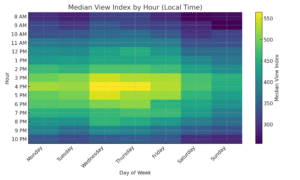
The heatmap shows a clear pattern: weekdays between 3 p.m. and 5 p.m. are the most reliable posting windows, with Wednesday at 4 p.m. standing out as the top-performing slot. Thursday and Monday afternoons are also strong contenders. On the other hand, weekends, especially Sunday mornings, typically bring in fewer views. This reflects how audiences usually watch more YouTube in the afternoons after work or school. Aligning your upload schedule strategy with these peak hours can give your videos a stronger start, improve watch time, and help long-term growth.
Daily Best Posting Times on YouTube
To make it easier, here’s a quick table of the best times for each day:
| Day | Best Posting Times (Local Time) |
| Monday | 4 p.m., 3 p.m., 5 p.m. |
| Tuesday | 3 p.m., 4 p.m., 5 p.m. |
| Wednesday | 4 p.m., 3 p.m., 5 p.m. |
| Thursday | 4 p.m., 3 p.m., 5 p.m. |
| Friday | 3 p.m., 4 p.m., 5 p.m. |
| Saturday | 5 p.m., 3 p.m., 4 p.m. |
| Sunday | 3 p.m., 4 p.m., 5 p.m. |
This table supports the heatmap by giving you a daily upload schedule strategy that’s quick to follow. If you want to maximize your reach, aim for midweek afternoons and avoid early mornings or late nights when audience activity is lowest.
Best Day to Post on YouTube
Finding the Best Time to Post on YouTube is not just about the hour—it also depends on the day. Research from Buffer, which analyzed over 1 million social media posts, reveals clear patterns in audience engagement. Their data shows which days consistently deliver higher video views.
Here’s a breakdown based on their findings:
| Day of the Week | Engagement Level | Why It Works |
| Monday | Low | People are busy starting their week, less time for YouTube. |
| Tuesday | Medium | Engagement improves as the week stabilizes. |
| Wednesday | High | Midweek relaxation leads to more video consumption. |
| Thursday | High | Audience activity continues to rise before the weekend. |
| Friday | High | Many users watch YouTube to kick off their weekend. |
| Saturday | Medium | Consistent activity, especially in the mornings. |
| Sunday | Medium-Low | Engagement drops as people prepare for the new week. |
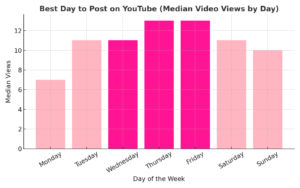
From this analysis, the Best Day to Post on YouTube is Wednesday through Friday, when video views peak. Aligning your upload schedule strategy with these high-engagement days increases the chance of getting more visibility and watch time.
Heatmap: Best Day to Post on YouTube
Below is a heatmap representation of the data, showing which days generate the highest engagement:
Step-by-Step Guide to Finding Your Own Best Time to Post on YouTube
While industry data shows that the Best Time to Post on YouTube is usually between 3 p.m. and 5 p.m. on weekdays, your audience might behave differently. That’s why the smartest creators build a personalized upload schedule strategy using YouTube’s analytics tools. By following the steps below, you’ll learn how to analyze your audience behavior, test posting slots, and lock in the exact times that give your channel the strongest results.
Step One – Check YouTube Analytics
Your first step is to open YouTube Studio → Analytics → Audience tab. Here, you’ll see a purple heatmap graph showing when your viewers are online.
- Darker purple = more viewers online
- Lighter purple = fewer viewers online
- Data updates every 28 days, so check regularly
Table: Why Analytics Matter for Best Time to Post on YouTube
| Tool/Feature | What to Look For | Why It Helps Your Upload Schedule Strategy |
|---|---|---|
| Audience Heatmap | Dark purple bands | Shows peak viewing hours for your channel |
| Viewer Demographics | Location, age, gender | Helps adjust posting times for your audience |
| Watch Time Reports | When viewers stop watching | Improves retention strategies |
Step Two – Identify Peak Days
Look closely at your heatmap to find which days show the darkest purple. These are your high-traffic days when most of your audience is active.
- For many channels: Wednesday, Thursday, and Friday afternoons perform best
- If your channel targets younger audiences, weekends may be stronger
- Posting on peak days gives your video a better chance at early momentum
Pro Tip: If you can only upload once a week, choose the day with the darkest band on your heatmap.
Step Three – Compare Time Zones
If your subscribers are spread across different countries, one time zone may not fit all. Use your analytics to check where most of your audience comes from.
- U.S.-based creators with a global audience may need to adjust for India/Europe
- Posting at 4 p.m. in your country may not be peak time for international viewers
- Test overlapping times that work for multiple regions
Table: Example Time Zone Adjustments
| Audience Location | Local Best Time | Adjusted Posting Time |
|---|---|---|
| USA (EST) | 3–5 p.m. | Keep standard posting |
| UK (GMT) | 6–8 p.m. | Post earlier in EST |
| India (IST) | 8–10 p.m. | Post morning EST |
Step Four – Test and Track
Don’t just rely on analytics—run real tests. For 2–3 weeks, upload videos at different times within your peak hours.
- Track metrics like watch time, impressions, and CTR (click-through rate)
- Compare performance between 3 p.m., 4 p.m., and 5 p.m. posting slots
- Adjust your upload schedule strategy based on which time delivers higher early engagement
Key Metrics to Watch:
- Average watch time (how long people stay)
- Subscriber growth after uploads
- Engagement rate (likes, comments, shares)
Step Five – Optimize and Stick to a Routine
Once you’ve tested and found your Best Time to Post on YouTube, consistency is critical. The algorithm rewards creators who follow a steady upload schedule strategy.
- Post at the same time every week
- Train your viewers to expect new content at that time
- Build habits—just like a TV show with a set airing slot
Checklist for Long-Term Success:
- Post at the same time on peak days
- Monitor analytics monthly for shifts
- Keep experimenting as your audience grows
- Stay consistent to build loyalty
Tools to Help You Find the Best Time to Post
Several tools can refine your upload schedule strategy and provide deeper insights into audience behavior.
- YouTube Studio – Free and built-in analytics.
- TubeBuddy – Offers advanced scheduling and audience insights.
- VidIQ – Helps identify competitive timing and keyword trends.
- Google Analytics – Useful for audience behavior outside YouTube.
Best Practices for Upload Schedule Strategy
To maximize your reach, follow these best practices when building your upload schedule strategy around the Best Time to Post on YouTube:
- Post a few hours before peak audience activity.
- Maintain a consistent weekly schedule.
- Announce your upload time to subscribers (community posts, end screens, or pinned comments).
- Adjust timing during holidays, school breaks, or trending events.
- Use Premiere features for important uploads to generate hype.
Conclusion
The Best Time to Post on YouTube is not one-size-fits-all—it depends on your audience, niche, and data. By analyzing when your subscribers are most active and combining it with research-backed timing, you can create a powerful upload schedule strategy that boosts visibility and engagement. Remember, the real success comes from consistency, testing, and adapting to your audience’s habits.
Frequently Asked Questions (FAQs)
What is the Best Time to Post on YouTube?
The Best Time to Post on YouTube is generally weekday afternoons, especially between 3 p.m. and 5 p.m. This window ensures your video is live when audiences are most active. However, the exact time depends on your viewers, so always refine your upload schedule strategy with YouTube Analytics.
Does posting time really affect YouTube views?
Yes, posting time strongly impacts early engagement. Since YouTube’s algorithm pushes videos that gain quick watch time and clicks, uploading at the Best Time to Post on YouTube can improve visibility. A smart upload schedule strategy ensures your video performs better in the first few hours.
How can I find my own Best Time to Post on YouTube?
You can use YouTube Studio → Analytics → Audience tab to see when your viewers are most active. The purple heatmap highlights peak times. By tracking patterns and testing slots, you’ll discover your personal Best Time to Post on YouTube and refine your upload schedule strategy.
Should I post daily or weekly on YouTube?
Consistency is more important than frequency. Whether daily or weekly, sticking to a regular upload schedule strategy at your channel’s Best Time to Post on YouTube builds audience trust. Start with one or two uploads per week, then scale once you’re comfortable.
Do weekends work for posting on YouTube?
Weekends can perform well for certain audiences, especially younger viewers or entertainment-focused channels. Still, weekdays usually outperform weekends. Test Saturday or Sunday afternoons, but always let your analytics guide your Best Time to Post on YouTube and overall upload schedule strategy.
