
In the fast-paced world of digital storytelling, the difference between a high-performing post and a scroll-past is often found in the technical execution. As visual standards evolve in 2027, creators must master the nuances of mobile-first presentation to capture attention instantly. This guide provides the essential blueprint for perfect visual alignment, ensuring your brand maintains its professional edge across every story you publish.
What Are the Official Instagram Story Dimensions for 2027?
The recommended Instagram story dimensions are 1080 pixels wide by 1920 pixels high. This creates a 9:16 aspect ratio, which is specifically engineered to fill the entire vertical screen of a mobile device. Adhering to these specifications offers several technical advantages for your content:
- Full-Screen Immersion: The 9:16 aspect ratio ensures your media fills the entire vertical display without unattractive borders or “letterboxing.”
- Optimal Clarity: Using the native 1080 x 1920 pixel resolution prevents the platform’s compression engine from introducing blur or pixelation.
- Consistent Rendering: Following these exact dimensions ensures your content appears sharp and professional across all modern smartphone displays.
- Automated Alignment: Designing to this standard avoids forced auto-cropping, which often cuts off critical elements of your visual composition.
Dimensions Comparison Table
| Element | Old Approach | Updated 2027 Approach |
|---|---|---|
| Size | Resize after design | Design in 1080×1920 |
| Ratio | Ignore sometimes | Strict 9:16 |
| Layout | Random | Planned |
Key Points:
- Resolution: 1080 × 1920 px
- Aspect Ratio: 9:16 mandatory
- Format: Vertical-first design
What Do Instagram Story Dimensions Mean for Your Brand?
When discussing Instagram story dimensions, the term refers to the precise pixel-based canvas size required to display media natively on the platform. Think of this as the “digital container” for your content. When your creative assets match these exact dimensions, the platform renders them without the need for destructive background filling or stretching, ensuring the highest possible quality for your audience.
Why Dimensions Matter (Then vs Now)
Earlier Instagram ka algorithm itna strict nahi tha is liye thodi mistakes ignore ho jati thi. Users low-quality ya incorrect ratio ke sath bhi content upload kar dete thay aur phir bhi acceptable results mil jate thay. Lekin ab system kaafi advanced ho gaya hai aur quality directly engagement ko affect karti hai.
Agar tum wrong size use karte ho to content blur, stretched ya cropped ho jata hai. Yeh viewer experience ko kharab karta hai aur log instantly story skip kar dete hain. Isi liye updated strategy me dimensions ek performance factor ban chuke hain.
Impact Comparison
| Issue | Old Result | 2027 Result |
|---|---|---|
| Wrong size | Slight blur | Heavy blur |
| Cropping | Minor issue | Important loss |
| Low quality | Acceptable | Low reach |
Why Do Instagram Story Dimensions Impact Your Engagement?
Your content’s visual quality is the first signal the algorithm uses to determine if a story is worth pushing to more users. When you upload media that doesn’t match the platform’s native 1080 x 1920 standard, Instagram’s compression engine kicks in, often resulting in blurry, stretched, or pixelated visuals.
- Native Scaling: Files uploaded at the correct dimensions require zero re-encoding by the platform.
- Reduced Friction: High-quality, full-screen visuals hold viewer attention longer.
- Professional Branding: Consistent sizing across your brand assets builds trust with your audience.
What Is the “Safe Zone” and Why Should You Use It?
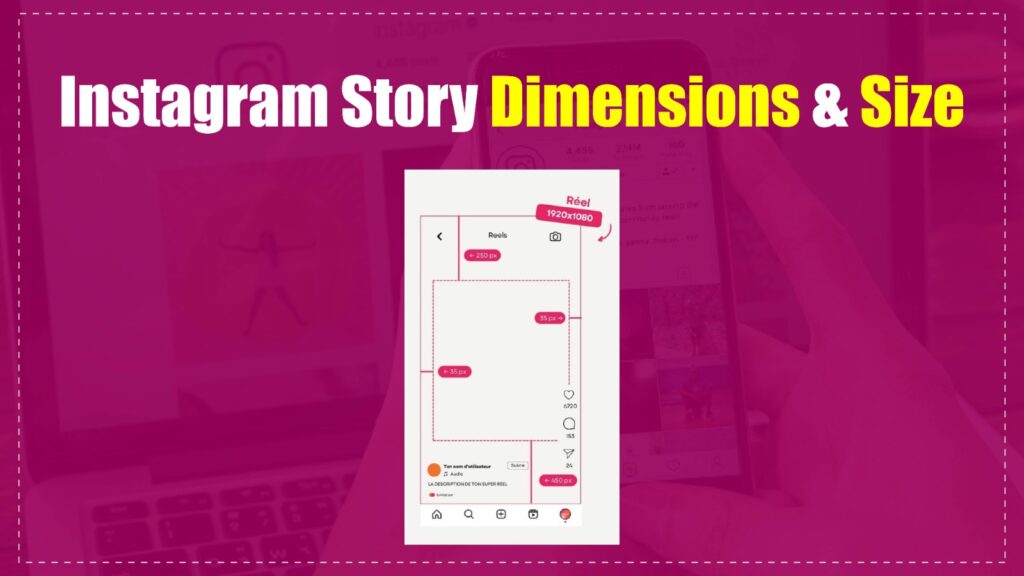
While the total canvas is 1080 x 1920 pixels, the platform overlays interface elements like your username, profile icon, and “Send Message” reply bar over your content. If you place critical text, logos, or faces in these areas, they will be obscured.
To avoid this, treat your instagram story dimensions as having a “Safe Zone”:
Keep all essential information within the central 1080 x 1420 pixel area. This “Safe Zone” ensures your call-to-action (CTA) or brand message remains legible regardless of the device the viewer is using.
How to Properly Format Your Media for Instagram Stories
Understanding the technical backend of your files is just as important as the physical instagram story dimensions. Using incorrect file formats or oversized files can lead to slow load times, which causes viewers to “swipe away” before your content even renders.
Technical Specification Checklist
- File Format: For photos, use .JPG or .PNG. For videos, .MP4 is the industry gold standard.
- Resolution: Always export at 1080 x 1920 px. Avoid “up-scaling” low-resolution images.
- File Size: Keep photos under 30MB and videos under 4GB to prevent compression artifacts.
- Frame Rate: A standard of 30 fps (frames per second) is sufficient and keeps file sizes manageable.
How to Properly Format Your Media for Instagram Stories
Understanding the technical backend of your files is just as important as the physical instagram story dimensions. Using incorrect file formats or oversized files can lead to slow load times, which causes viewers to “swipe away” before your content even renders.
Technical Specification Checklist
- File Format: For photos, use .JPG or .PNG. For videos, .MP4 is the industry gold standard.
- Resolution: Always export at 1080 x 1920 px. Avoid “up-scaling” low-resolution images.
- File Size: Keep photos under 30MB and videos under 4GB to prevent compression artifacts.
- Frame Rate: A standard of 30 fps (frames per second) is sufficient and keeps file sizes manageable.
How Can You Repurpose Content for Stories Without Losing Quality?
Often, you may want to share a landscape photo or a square feed post to your story. If you upload these as-is, Instagram will place them in the center of the screen with a blurred background, which often looks unpolished.
The “Full-Frame” Strategy
To maintain a professional aesthetic when sharing non-vertical content:
- Background Fill: Use a brand-colored background or a blurred version of your image to fill the empty top and bottom space.
- Creative Framing: Use “Collage” or “Layout” stickers within the app to group smaller images into a vertical 9:16 frame.
- Canvas Expansion: In editing tools like Canva or Photoshop, place your square or landscape asset on a 1080 x 1920 px canvas. This creates a custom “frame” for your content.
Which Tools Are Best for Designing Perfect Stories?
You don’t need a professional design team to hit the perfect instagram story dimensions. Several tools offer built-in templates that automatically align your canvas to the 9:16 aspect ratio.
- Canva: Offers thousands of “Instagram Story” presets that are pre-sized to the correct pixel count.
- Adobe Premiere Pro: Use the “Auto-Reframe” sequence setting to convert widescreen video into vertical format automatically.
- InShot: A mobile-first editor that allows you to adjust your canvas ratio to 9:16 before exporting.
- Figma: Excellent for designers who need to create custom overlays and “Safe Zone” guides for recurring brand stories.
Common Mistakes to Avoid in 2027
Even with the right dimensions, common technical errors can ruin your reach. Many creators fail to account for how mobile displays vary, leading to “stretched” content.
- Stretching Content: Never force-fit a landscape image into a vertical frame by stretching it. This creates distortion that is immediately noticeable to the viewer.
- Ignoring Compression: If your file is significantly over the 30MB/4GB limit, Instagram will aggressively compress it. This results in the “fuzzy” or “low-res” look even if your original file was high-quality.
- Overloading Content: Do not cram your entire screen with text. Use the 1080 x 1420 px center space to let your content “behave.”
Future Trends: What Will Evolve in Instagram Stories?
In 2027, the shift toward “shoppable” and “immersive” stories is accelerating. We are seeing a move toward interactive, data-dense story designs.
- High-Fidelity Interaction: We expect future updates to require even more precision in how buttons (polls, links, questions) are placed within the safe zones.
- Dynamic Resolution: Mobile displays are increasing in pixel density; keep an eye on “Ultra-HD” export settings to ensure your content stays crisp on new 4K-capable smartphones.
- Automated Layouts: More AI-driven tools will soon automatically detect your subject matter and suggest the best way to crop your photos into the 1080 x 1920 format.
KPI & Performance Benchmarks
To determine if your story strategy is working, you must track specific metrics that correlate with visual quality and dimension compliance. High-quality visuals that utilize the full 9:16 space typically see higher retention rates. Use these key performance indicators to audit your success:
- Completion Rate: The percentage of viewers who watch your entire story without swiping away.
- Tap-Forward Rate: High rates indicate content may be too long or visually cluttered; low rates suggest engagement.
- Engagement per Pixel: A hypothetical measure of how much action (clicks, polls, replies) you generate relative to the total screen real estate used.
- Conversion Lift: Tracking how properly formatted CTAs within your safe zones lead to direct product link clicks.
| KPI | Description | Target Benchmark |
| Completion Rate | Viewers watching the full story | > 70% |
| Tap-Forward Rate | Users skipping to the next story | < 15% |
| Engagement per Pixel | Interactions per total screen area | High (Positive correlation) |
| Conversion Lift | CTA clicks from safe-zone links | Industry Average + 5% |
Master Framework Summary
- Canvas Setup: Always start with a 1080 x 1920 pixel workspace.
- Aspect Ratio: Ensure your output is fixed at 9:16.
- Buffer Zone: Reserve the top and bottom 250 pixels for UI elements.
- Compression Control: Keep file sizes under the 30MB (photo) / 4GB (video) thresholds.
- Platform Standard: Use .MP4 for video and .JPG/.PNG for static graphics.
Checklist for Implementation
- Is your canvas set to 1080 x 1920?
- Does your design keep text 250px away from the top/bottom edges?
- Have you exported using the correct file format (MP4/JPG)?
- Have you checked your video file size against the 4GB limit?
- Did you preview the story on a mobile device before posting?
Expert Insight
The secret to outperforming competitors on Instagram isn’t just “good content”—it’s platform-native optimization. When you adhere strictly to these dimensions, you aren’t just following rules; you are providing the algorithm with a “clean” file that requires no additional processing. This results in faster loading, higher clarity, and ultimately, a higher retention rate. Users subconsciously trust creators who provide a seamless, full-screen experience that feels like it was “meant” to be on their screen.
Frequently Asked Questions (FAQ)
Can I upload high-resolution 4K video to Instagram Stories?
Yes, you can upload 4K video, but Instagram will automatically compress it down to its standard resolution. To avoid excessive quality loss, export your files at 1080 x 1920 pixels before uploading. This gives you control over the compression process and keeps your visuals crisp.
Does the Instagram story size differ for Android and iOS?
While the aspect ratio remains a consistent 9:16, the device display hardware varies significantly. The “Safe Zone” approach is universal, as it accounts for the overlay UI elements common to both operating systems. Always design for the “Safe Zone” to ensure visibility across all devices.
What happens if I ignore the recommended Instagram story dimensions?
Ignoring these dimensions will cause the app to either crop your image or add colored borders to fill the space. This often results in a poor user experience, as it forces the content into an unnatural layout. Consistently using the correct size maintains your professional brand aesthetic.
How do I ensure my text is readable in a Story?
Keep all critical text within the central 1080 x 1420 pixel “Safe Zone” to avoid UI overlap. Additionally, use high-contrast color combinations and avoid overly thin fonts. Testing your final asset on a mobile device is the best way to verify actual readability.
Should I use different dimensions for video and photo stories?
No, the standard 1080 x 1920 pixel dimensions and 9:16 aspect ratio apply to both photos and videos. Maintaining this uniformity simplifies your production workflow. Stick to this single standard for all story content to ensure maximum visual impact for your audience.
