
The best employee scheduling software platforms are Connecteam, Deputy, and 7shifts for automated shift planning, mobile-first team coordination, and intelligent labor compliance. Distributed, hourly, and deskless organizations rely on tools like When I Work, Homebase, Sling, and Shiftboard to manage dynamic shift swapping, GPS-verified time tracking, demand forecasting, and direct payroll synchronization across multi-location operations.
The best employee scheduling software provides a centralized digital workspace to plan shifts, track attendance, and manage workforce capacity without relying on static spreadsheets, paper rosters, or chaotic messaging threads. Modern platforms empower shift managers to set recurring rosters, forecast staffing requirements based on historical traffic, and enforce overtime rules automatically. With mobile apps enabling staff to claim open shifts and request time off in real time, organizations reduce administrative overhead while keeping operations running smoothly.
Selecting the right staff scheduling platform requires balancing frontline ease of use with compliance and integration depth. Organizations must evaluate whether their workflows require GPS geofencing, POS sales forecasting, tip pooling, or complex 24/7 rotating shift logic for regulated sectors like healthcare, hospitality, and construction. Reviewing transparent per-user or flat-rate per-location pricing structures ensures your operational stack scales sustainably without unexpected overhead.
What are the Best Employee Scheduling Software in 2027?
Our top choices are:
- Connecteam — Best for Deskless & Mobile Frontline Workforces
- Deputy — Best for AI-Driven Shift Scheduling & Complex Labor Compliance
- 7shifts — Best Specialized Scheduling Platform for Restaurants & Hospitality
- When I Work — Best for Fast Implementation & Hourly Team Messaging
- Homebase — Best All-in-One Scheduling, Time Clock & HR Platform for Local SMBs
- Sling — Best Free & Budget-Friendly Solution for Small Service Teams
- ZoomShift — Best for Hourly Shift Rostering & Real-Time Labor Cost Control
- QuickBooks Time — Best for Teams Deeply Integrated into QuickBooks Payroll
- Shiftboard — Best for Mission-Critical 24/7 Operations & Regulated Industries
- Buddy Punch — Best Online Time Clock with Facial Recognition & GPS Geofencing
- ClockShark — Best for Construction, Field Trades & Mobile Job Costing
- Lark — Best Productivity Superapp Combining Team Chat, Approvals & Shift Calendars
- Humanity — Best Enterprise Platform for Demand-Driven Workforce Forecasting
- Planday — Best for European & Multi-Site Hospitality Shift Rostering
- Hub Planner — Best for Project Resource Allocation & Team Capacity Mapping
What is Employee Scheduling Software?
Employee scheduling software is a cloud-based platform designed to automate the creation, distribution, and management of staff rosters and working hours. Rather than manually updating static boards or paper rosters, managers use visual drag-and-drop calendars to assign shifts based on employee availability, labor budgets, certifications, and business demand.
Modern scheduling solutions connect frontline employees with administrative management through native iOS and Android mobile apps. Staff can view upcoming schedules, swap shifts with peers, submit time-off requests, and clock in with GPS verification. For managers, the software flags potential scheduling conflicts, over-time liabilities, and understaffed time blocks before rosters are published.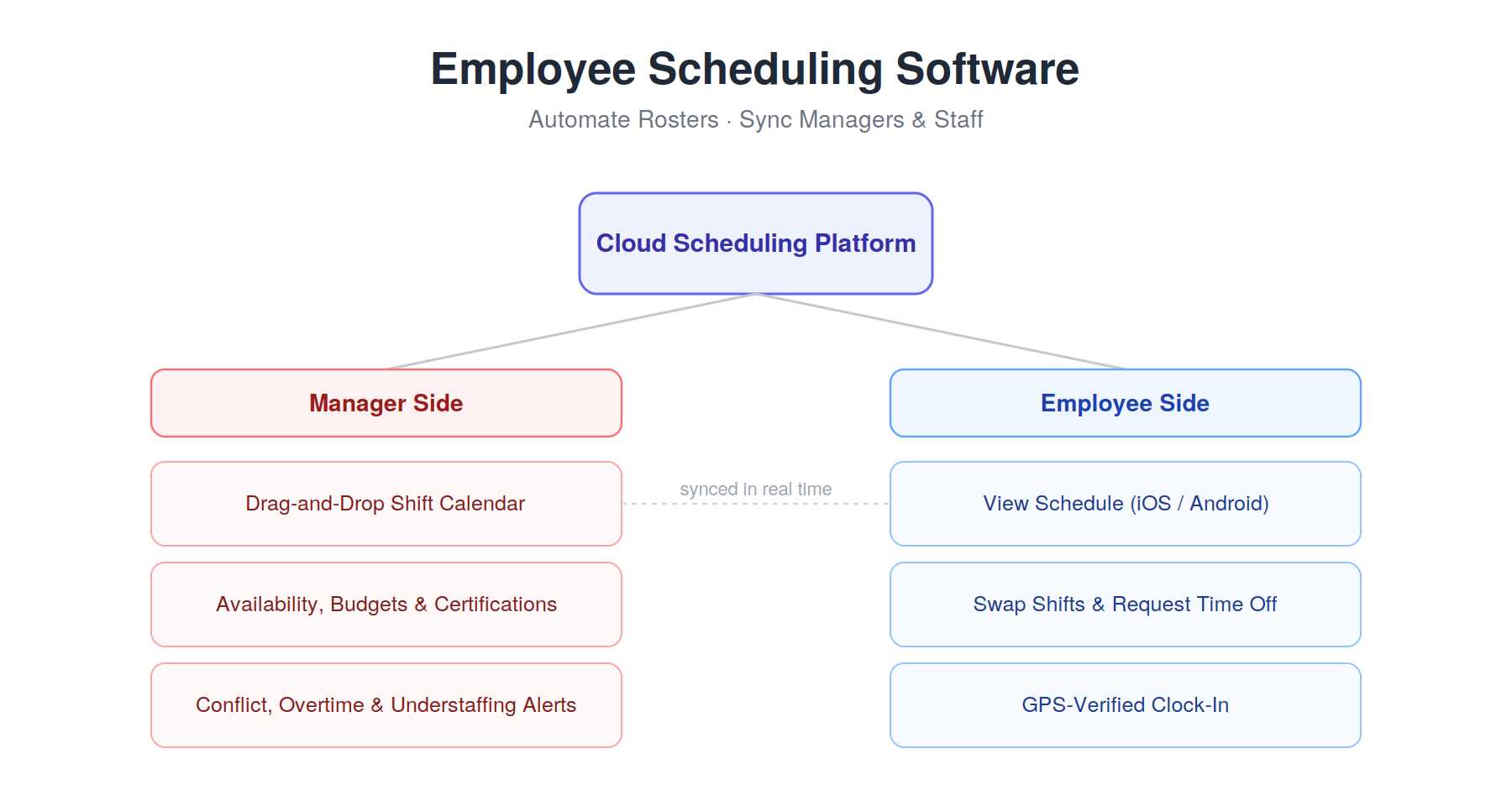
Why Businesses Need Employee Scheduling Software in 2027
Managing dynamic workforces requires automated tools that eliminate scheduling errors, reduce labor costs, and protect employee satisfaction.
Labor Law & Overtime Compliance
Enforcing statutory rest breaks, minimum notice periods, and overtime thresholds is critical to avoiding heavy fines. Scheduling software automates compliance by warning managers of projected overtime or break violations before shifts go live, maintaining immutable digital audit trails for regulatory peace of mind.
Drastic Reduction in Labor Costs
Unplanned overtime and overstaffing erode operating profit margins. Scheduling tools calculate estimated labor expenses in real time as managers build shifts, allowing teams to balance labor spend against projected revenue and peak service hours.
Streamlined Frontline Mobile Coordination
Shift workers need instant, reliable access to their schedules. Mobile-first tools deliver automated push notifications when new rosters drop, allowing employees to confirm shifts, request leave, and trade assignments without endless text messages or phone calls.
Automated Shift Swapping & Availability Tracking
Handling sudden call-outs or schedule changes manually disrupts daily operations. Modern platforms allow employees to swap shifts directly with qualified, available coworkers, routing the final adjustment to management for one-click approval.
Seamless Payroll Integration
Disconnected time tracking leads to manual data entry errors and slow pay cycles. Scheduling platforms link digital time clocks, approved timesheets, and overtime totals directly into payroll systems like QuickBooks, ADP, and Gusto, ensuring accurate disbursements.
How to Choose the Right Employee Scheduling Software
When evaluating employee scheduling platforms for your organization, prioritize the following criteria:
- Workforce Type & Operating Model: Identify whether you manage deskless frontline hourly workers (retail, restaurants, healthcare) or project-based knowledge teams needing resource capacity planning.
- Mobile App Accessibility & Self-Service: Ensure the mobile interface is fast and simple for employees to review rosters, swap shifts, and request PTO with minimal training.
- Labor Forecasting & AI Automation: Look for tools that analyze sales trends, foot traffic, or historical support volume to suggest optimal staffing levels automatically.
- GPS Geofencing & Time Clock Integrity: Choose solutions that verify clock-ins via GPS, biometric photo capture, or worksite kiosks to prevent time theft and buddy punching.
- Pricing Model Fit: Determine whether per-user/month tiers, flat per-location fees, or free starter plans offer the best return on investment for your total headcount.
15 Best Employee Scheduling Software in 2027
Below is our in-depth evaluation of the top 15 employee scheduling platforms in 2027, analyzed across shift-building speed, mobile self-service, labor compliance, and overall value:
1. Connecteam — Best for Deskless & Mobile Frontline Workforces
Company Overview
| Detail | Information |
| Founded | 2016 |
| Headquarters | United States ( New York) |
| Service Type | Mobile-First All-in-One Frontline Workforce Management |
| Target Market | Non-desk industries: retail, security, construction, hospitality, and field cleaning |
| Core Capabilities | Drag-and-Drop Shift Planning, GPS Geofencing, Digital Task Checklists, In-App Chat |
| Deployment | Cloud-based SaaS, iOS, Android, Web |
| Starting Price | Free plan for up to 10 users; Paid plans from $29 / month (fixed for first 30 users) |
| Payment Frequency | Monthly or Annual billing |
Connecteam is widely recognized as one of the best employee scheduling software in 2027 for businesses with deskless, remote, and mobile workforces. Designed from the ground up for smartphone users, the platform allows field managers to dispatch shifts, assign site-specific checklists, and track on-location progress without needing back-office computers.
Its real-time communication tools ensure mobile staff receive instant shift alerts, updates, and safety instructions directly on their phones. Built-in GPS geofencing prevents time theft by ensuring workers clock in only when physically inside designated job locations. Supported by robust payroll export options and automated availability tracking, Connecteam simplifies operational logistics for distributed field teams.
Key Features
- Visual Drag-and-Drop Scheduler: Create recurring shift templates, assign open slots, and publish team rosters instantly.
- GPS Geofenced Time Clock: Verify exact employee clock-in locations and map breadcrumbs to prevent off-site time fraud.
- Attached Digital Checklists: Link mandatory opening/closing checklists, safety forms, and shift instructions to work cards.
- Instant Shift Notifications: Push alerts inform employees of newly published schedules, shift trades, and urgent updates.
- Direct Payroll Integration: Seamlessly export validated timesheet records to QuickBooks, Gusto, and Xero.
Pricing
- Small Business Plan: Free ($0 forever for up to 10 users with core scheduling, time clock, and chat).
- Basic: $29 / month billed annually ($35 monthly) for up to 30 users; $0.50 / additional user/month.
- Advanced: $49 / month billed annually ($59 monthly) for up to 30 users; adds geofencing and shift replacements.
- Expert: $99 / month billed annually ($119 monthly) for up to 30 users; includes auto-scheduling, process automations, and multi-branch management.
2. Deputy — Best for AI-Driven Shift Scheduling & Complex Labor Compliance
Company Overview
| Detail | Information |
| Founded | 2008 |
| Headquarters | Australia (Sydney, New South Wales) |
| Service Type | AI-Augmented Shift Scheduling, Time Tracking & Labor Compliance |
| Target Market | Shift-based retail, healthcare clinics, hospitality groups, and logistics operations |
| Core Capabilities | Auto-Scheduling AI, Shift Bidding Marketplace, Dynamic Break Compliance, Touchless Facial Kiosks |
| Deployment | Cloud-based SaaS, Web, iOS, Android |
| Starting Price | Scheduling Core from $3.50 / user/month; Comprehensive plans from $5.00 / user/month |
| Payment Frequency | Monthly or Annual billing |
Deputy is widely recognized as one of the best employee scheduling software in 2027 for hourly employers who need to balance cost control with strict labor law compliance. The platform utilizes AI-driven auto-scheduling to evaluate historical demand, foot traffic, and employee availability, generating optimized rosters that align closely with wage budgets.
For healthcare clinics and multi-unit hospitality operators, Deputy automatically enforces complex labor rules, such as mandatory rest intervals, maximum daily hours, and overtime premiums. Its employee mobile app features an open shift marketplace where qualified team members can claim or trade open slots with supervisor sign-off, significantly cutting administrative roster edits.
Key Features
- AI Demand Auto-Scheduling: Automatically match scheduled staffing levels with sales forecasts and customer traffic.
- Dynamic Labor Compliance: Real-time warnings prevent violations of fair workweek laws, meal breaks, and overtime limits.
- Shift Bidding Marketplace: Publish open shifts for eligible, qualified team members to claim automatically.
- Touchless Tablet Kiosk: Facial recognition and voice-activated clock-ins eliminate buddy punching at worksites.
- Enterprise Wage Forecasting: Track labor cost percentages against projected shift revenue in real time.
Pricing
- Scheduling Only: $3.50 / user/month billed annually ($4.50 monthly; shift planning, availability, and meal break compliance).
- Time & Attendance: $3.50 / user/month billed annually ($4.50 monthly; time tracking, PTO, and payroll sync).
- Premium (All-in-One): $5.00 / user/month billed annually ($6.00 monthly; combines full scheduling, time tracking, and analytics).
- Enterprise: Custom quote (tailored for 250+ users; custom labor rules, SSO, and dedicated account management).
3. 7shifts — Best Specialized Scheduling Platform for Restaurants & Hospitality
Company Overview
| Detail | Information |
| Founded | 2014 |
| Headquarters | Canada (Saskatoon, Saskatchewan) |
| Service Type | Restaurant Team Management, Shift Scheduling & Hospitality Payroll |
| Target Market | Independent restaurants, multi-unit food franchises, bars, cafes, and hospitality venues |
| Core Capabilities | POS Labor-to-Sales Integration, Tip Pooling Automation, Shift Swapping, Manager Logbooks |
| Deployment | Cloud-based SaaS, iOS, Android, Web |
| Starting Price | Free Comp plan for single-unit/up to 20 users; Paid tiers from $39.99 / location/month |
| Payment Frequency | Monthly or Annual billing |
7shifts is widely recognized as one of the best employee scheduling software in 2027 for the foodservice industry, engineered specifically to address the daily complexities of front- and back-of-house operations. By connecting directly with leading Point of Sale (POS) systems, 7shifts imports real-time sales data to forecast labor requirements accurately, preventing costly overstaffing during slow shifts.
The platform streamlines internal restaurant communications through mobile shift swapping, automated availability updates, and built-in manager shift logs. In addition to core rostering, 7shifts simplifies tip pooling calculations, food handler certification tracking, and compliance with local predictive scheduling laws, making it a reliable solution for independent dining venues and growing multi-unit franchises alike.
Key Features
- POS Sales Integration: Syncs with Toast, Square, Clover, and POS systems to forecast hourly staffing needs against sales.
- Automated Tip Pooling: Distribute credit card tips and cash pools accurately based on hours worked and job roles.
- Mobile Shift Swapping: Servers and kitchen staff trade shifts with manager approvals directly in the app.
- Digital Manager Logbook: Centralize daily shift notes, cash drawer variances, and maintenance incidents across management.
- Hospitality Labor Compliance: Enforces break policies, minimum wage rules, and local fair workweek requirements.
Pricing
- Comp Plan: Free ($0 for 1 location and up to 20 employees; core scheduling and team messaging).
- Entrée (Essential): $39.99 / location/month billed annually ($46.99 monthly; includes POS integration and time tracking).
- The Works (Pro): $79.99 / location/month billed annually ($93.99 monthly; advanced labor cost forecasting and auto-scheduling).
- Gourmet (Enterprise): $134.99 / location/month billed annually ($158.99 monthly; multi-location controls, API access, and dedicated support).
4. When I Work — Best for Fast Implementation & Hourly Team Messaging
Company Overview
| Detail | Information |
| Founded | 2010 |
| Headquarters | United States (Minneapolis, Minnesota) |
| Service Type | Hourly Workforce Scheduling, Mobile Attendance & Team Chat |
| Target Market | Small-to-midsize businesses, retail stores, medical clinics, and remote hourly teams |
| Core Capabilities | Drag-and-Drop Shift Rostering, In-App Team Chat, Mobile Time Clock, Shift Bidding |
| Deployment | Cloud-based SaaS, iOS, Android, Web |
| Starting Price | Standard Scheduling from $2.50 / user/month; Scheduling with Time Tracking from $4.00 / user/month |
| Payment Frequency | Monthly or Annual billing |
When I Work is widely recognized as one of the best employee scheduling software in 2027 for small-to-midsize businesses looking for an easy-to-use scheduling solution with zero onboarding hurdles. Its intuitive drag-and-drop web calendar allows managers to build shift templates, monitor weekly labor costs, and publish schedules to staff in minutes.
The platform includes built-in two-way messaging, allowing staff to communicate in 1-on-1 or group chats without sharing personal phone numbers. Frontline workers can manage their availability, pick up open shifts, and clock in directly through the mobile app. With its accessible interface and straightforward feature set, When I Work provides an efficient path from manual spreadsheets to digital scheduling.
Key Features
- Intuitive Shift Builder: Color-coded drag-and-drop calendar featuring reusable templates and bulk shift copy tools.
- Secure Team Messaging: Integrated chat allows team discussions and schedule broadcasts without exchanging personal contact details.
- Mobile Self-Service: Employees input availability preferences, trade shifts, and request PTO from their smartphones.
- Mobile Time Clock: Employees clock in from their mobile devices with location-aware GPS verification.
- Overtime Alerts: Visual warnings alert managers when scheduling an employee will trigger costly overtime hours.
Pricing
- Standard Scheduling: $2.50 / user/month (shift scheduling, team messaging, availability management).
- Scheduling + Time Tracking: $4.00 / user/month (adds mobile time clock, GPS geofencing, and timesheet exports).
- Custom Enterprise: Tailored quotes available for organizations with over 100 users requiring advanced support.
5. Homebase — Best All-in-One Scheduling, Time Clock & HR Platform for Local SMBs
Company Overview
| Detail | Information |
| Founded | 2014 |
| Headquarters | United States (San Francisco, California) |
| Service Type | All-in-One Small Business Scheduling, Time Clock, HR & Payroll |
| Target Market | Local small businesses, retail shops, boutique fitness studios, and independent service providers |
| Core Capabilities | Free Location Scheduling, Geofenced Time Clocks, Automated Payroll Sync, Hiring & Onboarding |
| Deployment | Cloud SaaS, iOS, Android, POS Terminal Kiosks (Square, Clover) |
| Starting Price | Free plan for 1 location (up to 20 users); Paid tiers start from $24 / location/month |
| Payment Frequency | Monthly or Annual billing |
Homebase is widely recognized as one of the best employee scheduling software in 2027 for local, single-location business owners who want a complete HR and scheduling suite under predictable per-location pricing. Homebase provides a free tier that gives small businesses shift-building tools, mobile time tracking, and team messaging for up to 20 staff members at a single location.
The software runs natively on major point-of-sale hardware, including Square and Clover, turning POS registers into employee time clocks without extra devices. As teams grow, Homebase offers add-on modules for hiring, employee onboarding, certified HR advisors, and automated payroll processing, giving small business operators a unified back-office platform.
Key Features
- Per-Location Pricing Model: Flat-rate fees per location let businesses onboard new employees without per-user licensing fees.
- Turnkey POS Integration: Turns existing Square, Clover, and Toast terminals into biometric clock-in stations.
- Labor Cost Forecast Tracking: Compares live labor expenses directly against real-time POS sales data.
- Integrated Applicant Tracking: Post open job positions directly to online boards and manage hiring within the platform.
- Compliance Reminders: Automated prompts help businesses stay on top of state and federal break, wage, and minor labor laws.
Pricing
- Basic: Free ($0 for 1 location with up to 20 employees; basic scheduling, time clock, and team messaging).
- Essentials: $24 / location/month billed annually ($29 monthly; team communication, overtime tracking, shift notes).
- Plus: $56 / location/month billed annually ($69 monthly; auto-scheduling, time-off limits, and department permissions).
- All-in-One: $96 / location/month billed annually ($119 monthly; includes employee onboarding, HR compliance toolkits, and document storage).
6. Sling — Best Free & Budget-Friendly Solution for Small Service Teams
Company Overview
| Detail | Information |
| Founded | 2015 |
| Headquarters | Brooklyn, New York City, United States |
| Service Type | Simple Employee Shift Rostering, Internal Messaging & Task Tracking |
| Target Market | Cafes, independent retail shops, local cleaning services, and small medical clinics |
| Core Capabilities | Drag-and-Drop Shift Scheduling, Company Newsfeed, Task Lists, Labor Cost Budgeting |
| Deployment | Cloud-based SaaS, iOS, Android, Web |
| Starting Price | Free basic plan; Premium tier from $1.70 / user/month (billed annually) |
| Payment Frequency | Monthly or Annual billing |
Sling is widely recognized as one of the best employee scheduling software in 2027 for cost-sensitive small businesses seeking reliable shift planning and team communication without high software expenses. The platform offers a free plan that supports unlimited employees and locations with core shift scheduling and team communication tools.
Sling combines shift calendars with team productivity features, allowing managers to assign recurring checklists and tasks directly to specific shifts. Managers can set wage budgets and receive real-time warnings if published shifts exceed weekly labor caps. With its lightweight mobile app and straightforward layout, Sling enables small service operations to manage daily staffing with minimal overhead.
Key Features
- Generous Free Roster Builder: Plan and publish shifts across multiple business locations at zero initial cost.
- Company Newsfeed & Chat: Broadcast company-wide announcements and host direct messaging threads within the app.
- Shift-Specific Task Management: Attach opening checklists, sanitation tasks, and closing duties directly to shifts.
- Overlapping Shift & Overtime Alerts: Receive immediate notifications if an employee is double-booked or hitting overtime.
- Labor Cost Budget Forecasting: Set wage limits per department and track labor cost ratios as shifts are built.
Pricing
- Free Plan: Free ($0 for unlimited employees and locations; core shift scheduling and newsfeed messaging).
- Premium: $1.70 / user/month billed annually ($2.00 monthly; adds mobile time clock, geofencing, and shift swapping).
- Business: $3.40 / user/month billed annually ($4.00 monthly; auto-scheduling, labor cost budgeting, and advanced reporting).
7. ZoomShift — Best for Hourly Shift Rostering & Real-Time Labor Cost Control
Company Overview
| Detail | Information |
| Founded | 2011 |
| Headquarters | United States (Milwaukee, Wisconsin) |
| Service Type | Hourly Employee Scheduling, Mobile Time Tracking & Labor Budgeting |
| Target Market | Small-to-midsize hospitality venues, coffee shops, event operations, and retail outlets |
| Core Capabilities | Drag-and-Drop Shift Planning, Labor Cost Ratio Tracking, Geofenced Time Clock, Timesheet Approvals |
| Deployment | Cloud SaaS, Web, iOS, Android |
| Starting Price | Starter from $2 / user/month (billed annually); Premium from $4 / user/month |
| Payment Frequency | Monthly or Annual billing |
ZoomShift is widely recognized as one of the best employee scheduling software in 2027 for managers who need to maintain strict oversight of hourly labor spending. The platform provides an organized drag-and-drop workspace that calculates scheduled payroll costs in real time as managers populate calendar slots, ensuring teams stay within their operational budgets.
The software gives employees full self-service access on mobile devices, allowing them to verify upcoming shifts, submit availability changes, and request peer shift swaps with supervisor approval. Its web and mobile time clocks pair GPS geofencing with automated timesheet generation, making it easy to review hours, resolve discrepancies, and export payroll-ready records.
Key Features
- Real-Time Labor Cost Metering: Displays projected wages instantly as shifts are placed on the planning board.
- Mobile Shift Swapping: Staff submit trade and cover requests directly from their phones for quick manager sign-off.
- GPS-Enabled Mobile Time Clock: Restrict mobile clock-ins to authorized job sites with geofence perimeters.
- Timesheet Discrepancy Audits: Highlights early, late, or missed punches automatically before approving timesheets.
- Automated Shift Reminders: Sends text, email, and push notifications before shifts begin to eliminate no-shows.
Pricing
- Starter: $2 / user/month billed annually ($2.50 monthly; core scheduling, availability tracking, and shift swaps).
- Premium: $4 / user/month billed annually ($5.00 monthly; adds GPS mobile time tracking, timesheets, and overtime alerts).
- Enterprise: Custom quote (tailored for multi-location groups requiring customized API integrations and dedicated support).
8. QuickBooks Time — Best for Teams Deeply Integrated into QuickBooks Payroll
Company Overview
| Detail | Information |
| Founded | 2006 (Originally TSheets; Acquired by Intuit in 2018) |
| Headquarters | United States (Eagle, Idaho) |
| Service Type | Mobile Time Tracking, Field Job Scheduling & Accounting Integration |
| Target Market | Contractors, construction crews, landscaping teams, and QuickBooks accounting users |
| Core Capabilities | Real-Time GPS Tracking, Drag-and-Drop Crew Scheduling, Job Costing, Centralized Kiosks |
| Deployment | Cloud SaaS, iOS, Android, Web (QuickBooks Workforce) |
| Starting Price | Premium from $20 / month base fee + $8 / user/month |
| Payment Frequency | Monthly billing |
QuickBooks Time (formerly TSheets) is widely recognized as one of the best employee scheduling software in 2027 for field contractors, construction firms, and professional service teams already using QuickBooks for bookkeeping and payroll. Its tight integration with Intuit’s ecosystem ensures that scheduled shifts and approved hours transfer straight into payroll and client invoicing without manual exporting.
The platform provides a visual schedule builder where dispatchers can assign shifts by customer, project, or trade code. Field workers use the QuickBooks Workforce app to track time against specific jobs, with GPS location stamps verifying active worksites. For trade and service businesses that track job costing down to the penny, QuickBooks Time offers accurate accounting alignment.
Key Features
- Direct QuickBooks Synchronization: Instant two-way sync with QuickBooks Online, Desktop, and QuickBooks Payroll.
- Live Who’s Working Window: Real-time map dashboard showing which field crew members are clocked in and their locations.
- Job & Project Code Tracking: Assign workers to specific client accounts, project tasks, and cost codes for accurate job costing.
- Digital Time Clock Kiosk: Tablet clock-in station with facial recognition capture to prevent buddy punching on-site.
- Customizable Overtime Rules: Configure complex regional and union overtime calculations to stay compliant with labor laws.
Pricing
- Premium: $20 / month base fee + $8 / user/month (shift scheduling, job tracking, GPS geofencing, and live support).
- Elite: $40 / month base fee + $10 / user/month (adds project progress tracking, mileage estimation, and project estimates vs. actuals).
9. Shiftboard — Best for Mission-Critical 24/7 Operations & Regulated Industries
Company Overview
| Detail | Information |
| Founded | 2002 |
| Headquarters | United States (Seattle, Washington) |
| Service Type | Enterprise Workforce Scheduling & Compliance Management |
| Target Market | 24/7 manufacturing plants, healthcare facilities, energy refineries, and public sector organizations |
| Core Capabilities | Rules-Based Auto-Rostering, Fatigue Risk Management, Union Agreement Compliance, Crew Optimization |
| Deployment | Enterprise Cloud SaaS, Dedicated Mobile Apps |
| Starting Price | Custom enterprise quote based on operations scale and regulatory scope |
| Payment Frequency | Annual enterprise contracts |
Shiftboard is widely recognized as one of the best employee scheduling software in 2027 for high-consequence, 24/7 continuous operations where scheduling errors can compromise workplace safety and trigger regulatory penalties. Designed for industrial manufacturers, energy plants, and healthcare systems, Shiftboard automates complex rotating shift patterns (such as DuPont or 2-2-3 models) while enforcing strict safety rules.
The platform features a rules-driven scheduling engine that cross-references employee certifications, collective bargaining agreements (CBAs), and mandatory rest periods before confirming a shift. Its fatigue-risk management tools prevent sleep-deprived worker placement in hazardous zones. For enterprise operations with zero tolerance for compliance failures, Shiftboard delivers dependable, audit-ready workforce coordination.
Key Features
- Rules-Based Auto-Rostering: Automatically assigns shifts based on complex union seniority rules, skills, and availability.
- Fatigue Risk Mitigation: Monitors consecutive working hours and rest periods to prevent worker fatigue in safety-critical roles.
- Collective Bargaining Compliance: Automatically enforces union policies, seniority bidding, and fair shift distribution.
- Certification & License Audits: Restricts shift assignments to employees with active, verified credentials and safety certifications.
- High-Volume Shift Broadcasts: Instantly broadcasts critical open shifts to qualified standby workers during unexpected plant shortages.
Pricing
- Enterprise Custom Pricing: Custom quote tailored to total workforce headcount, multi-facility operations, and compliance modules.
10. Buddy Punch — Best Online Time Clock with Facial Recognition & GPS Geofencing
Company Overview
| Detail | Information |
| Founded | 2013 |
| Headquarters | United States (Appleton, Wisconsin) |
| Service Type | Digital Time Clock, Biometric Attendance & Drag-and-Drop Shift Scheduling |
| Target Market | Small-to-midsize businesses, distributed offices, cleaning crews, and trade service companies |
| Core Capabilities | Facial Recognition Webcams, GPS Geofencing, Visual Drag-and-Drop Scheduling, Payroll Exporting |
| Deployment | Cloud-based SaaS, Web, iOS, Android, Tablet Kiosks |
| Starting Price | Standard from $2.99 / user/month + $19 / month base fee |
| Payment Frequency | Monthly or Annual billing |
Buddy Punch is widely recognized as one of the best employee scheduling software in 2027 for organizations focused on preventing buddy punching and verifying on-site attendance. The platform pairs a visual drag-and-drop schedule builder with advanced clock-in verification methods, including facial recognition photo capture, biometric verification, and precise GPS geofencing.
The software makes it easy for managers to publish shift rosters, approve time cards, and calculate overtime hours automatically. Employees can review schedules, request shift trades, and view accruals via their mobile devices. Supported by direct exports to popular payroll providers like Paychex, ADP, and Gusto, Buddy Punch ensures transparent time tracking and simplified payroll reconciliation.
Key Features
- Facial Recognition Photo Clock-In: Snaps a photo upon clock-in and uses facial recognition to prevent proxy punch-ins.
- Custom Geofence Boundaries: Restricts clock-in access to within a specified radius of client offices or job sites.
- Drag-and-Drop Shift Builder: Simple visual calendar for assigning shifts, setting repeating patterns, and publishing updates.
- Automatic Overtime Calculation: Configures daily, weekly, and holiday overtime rules to ensure accurate wage accounting.
- Self-Service Shift Swapping: Allows employees to trade shifts with peer colleagues with one-click manager review.
Pricing
- Standard: $2.99 / user/month + $19 / month base fee (billed annually; time tracking, mobile app, basic reports).
- Pro: $3.99 / user/month + $19 / month base fee (billed annually; adds drag-and-drop shift scheduling and availability tracking).
- Premium: $4.99 / user/month + $19 / month base fee (adds real-time GPS tracking, facial recognition, and audit controls).
11. ClockShark — Best for Construction, Field Trades & Mobile Job Costing
Company Overview
| Detail | Information |
| Founded | 2014 |
| Headquarters | United States (Chico, California) |
| Service Type | Construction Time Tracking, Field Crew Scheduling & Job Costing |
| Target Market | General contractors, electrical, plumbing, HVAC, and mobile field service trades |
| Core Capabilities | GPS Breadcrumb Tracking, Drag-and-Drop Crew Scheduling, Job Cost Accounting, Mobile Kiosks |
| Deployment | Cloud SaaS, iOS, Android, Web |
| Starting Price | Standard from $20 / month base fee + $8 / user/month |
| Payment Frequency | Monthly or Annual billing |
ClockShark is widely recognized as one of the best employee scheduling software in 2027 for construction companies, field technicians, and trade crews working across varied jobsites. Designed for active field environments, the platform enables dispatchers to assign crews to specific sites, update routes, and provide driving directions directly through a mobile app.
ClockShark links scheduled shifts with detailed job costing data, allowing project managers to monitor actual labor hours and trade costs against project estimates in real time. Its field-ready mobile time clock features GPS breadcrumb tracking and geofencing to ensure accountability on remote jobsites. By bridging the gap between field crews and the back office, ClockShark simplifies payroll and improves project profitability.
Key Features
- Crew Drag-and-Drop Scheduling: Quickly schedule entire specialty trades or individual crew members across multiple jobsites.
- GPS Breadcrumb Tracking: View route histories and verify crew locations throughout the workday.
- Real-Time Job Costing: Track labor hours against specific project phases, tasks, and budgets to monitor margins.
- Mobile Job Documents: Attach site photos, architectural blueprints, and shift notes directly to scheduled shifts.
- CrewClock Kiosk: Allows a single crew lead to clock in their entire team from a mobile device in the field.
Pricing
- Standard: $20 / month base fee + $8 / user/month (basic scheduling, GPS time tracking, and job costing).
- Pro: $40 / month base fee + $10 / user/month (advanced scheduling, PTO management, role permissions, and manager approvals).
12. Lark — Best Productivity Superapp Combining Team Chat, Approvals & Shift Calendars
Company Overview
| Detail | Information |
| Founded | 2016 |
| Headquarters | Singapore |
| Service Type | Enterprise Productivity Superapp, Team Chat, Cloud Docs & Shift Scheduling |
| Target Market | Distributed modern companies, international enterprises, retail chains, and tech operations |
| Core Capabilities | Lark Base Dynamic Scheduling, Automated Approval Workflows, Lark Calendar, Real-Time Translation |
| Deployment | Cloud-based SaaS, iOS, Android, macOS, Windows, Linux |
| Starting Price | Starter plan is Free ($0 for up to 20 users); Pro from $12 / user/month |
| Payment Frequency | Monthly or Annual billing |
Lark is widely recognized as one of the best employee scheduling software in 2027 for modern organizations looking to connect employee scheduling with company communication and digital workflows. Instead of treating shift scheduling as a standalone tool, Lark integrates shift planning into an all-in-one productivity superapp combining chat, shared documents, video conferencing, and automated approvals.
Using Lark Base, operations managers can build customized, multi-dimensional shift calendars with Kanban, Gantt, and grid views. When a shift change or leave request is submitted via Lark Approval, the update syncs automatically to the master roster and alerts team members in their chat streams. For globally distributed and multilingual workforces, Lark provides automated real-time chat translation and unified calendar visibility.
Key Features
- Lark Base Roster Engine: Build custom, relational shift schedules with automated calculations, formulas, and visual views.
- Integrated Approval Workflows: Route shift trades, time-off requests, and expense approvals directly within team chat.
- Lark Calendar Sync: Employees view assigned shifts alongside company meetings and personal tasks in a unified calendar.
- Real-Time Automated Translation: Automatically translates team shift chats and updates across over 20 languages.
- All-in-One Collaboration: Replaces disconnected tools by combining chat, video meetings, cloud storage, and task management.
Pricing
- Starter: Free ($0 forever for up to 20 users; full access to Base, Docs, Calendar, and 100GB cloud storage).
- Pro: $12 / user/month billed annually (up to 500 users; includes 500-attendee video meetings, 15TB storage, and 50,000 automation runs/mo).
- Enterprise: Custom quote (tailored for large organizations; unlimited users, advanced security, and enterprise compliance).
13. Humanity — Best Enterprise Platform for Demand-Driven Workforce Forecasting
Company Overview
| Detail | Information |
| Founded | 20010 (Part of TCP Software) |
| Headquarters | United States (San Angelo, Texas) |
| Service Type | Enterprise Cloud Workforce Management & AI Demand Scheduling |
| Target Market | Large retail corporations, healthcare hospital networks, call centers, and multi-location enterprises |
| Core Capabilities | AI-Driven Demand Forecasting, Automated Compliance Tracking, Multi-Location Scheduling, Open API |
| Deployment | Enterprise Cloud SaaS, iOS, Android |
| Starting Price | Essentials from $2.75 / user/month (up to 250 users); Enterprise custom pricing |
| Payment Frequency | Annual enterprise contracts |
Humanity (by TCP Software) is widely recognized as one of the best employee scheduling software in 2027 for large enterprises that require dynamic staffing forecasts based on operational demand. The platform’s proprietary demand forecasting engine evaluates historical customer data, patient counts, and seasonal trends to generate accurate staffing schedules that minimize under- and overstaffing.
Humanity simplifies operations for multi-unit retail networks and hospital groups through its centralized compliance engine. The platform automatically tracks union guidelines, overtime rules, and regional labor mandates, preventing illegal shift assignments before they occur. With detailed executive analytics and integration with enterprise HRIS platforms (like Workday and Oracle), Humanity provides scalable workforce planning.
Key Features
- Predictive Demand Forecasting: Uses historical operational data to predict optimal shift staffing levels automatically.
- Automated Compliance Engine: Ensures schedules adhere strictly to state, federal, and union labor regulations.
- Multi-Location Roster Management: Oversee and coordinate schedules across hundreds of geographic stores or facilities.
- Shift Trade & Cover Workflows: Empower staff to request coverage and swap shifts under pre-approved manager rules.
- Deep HRIS Integrations: Connects seamlessly with Workday, BambooHR, Oracle, and ADP for clean data synchronization.
Pricing
- Essentials: $2.75 / user/month (up to 250 employees; core scheduling, shift trades, and basic attendance tracking).
- Professional: $3.75 / user/month (adds intelligent demand scheduling, labor cost budgeting, and compliance rules).
- Enterprise: Custom quote (includes full AI forecasting models, custom roles, API access, and dedicated support).
14. Planday — Best for European & Multi-Site Hospitality Shift Rostering
Company Overview
| Detail | Information |
| Founded | 2004 (Acquired by Xero in 2021) |
| Headquarters | Denmark (Copenhagen) |
| Service Type | Hospitality Workforce Management, Shift Rostering & Payroll Sync |
| Target Market | Hotels, restaurants, pubs, leisure facilities, and multi-unit retail brands |
| Core Capabilities | Smart Shift Recommendations, Real-Time Wage Cost Tracking, Direct Xero Payroll Integration, Punch Clocks |
| Deployment | Cloud-based SaaS, iOS, Android, Web |
| Starting Price | Starter from €2.99 / user/month (billed annually); Plus tier from €4.99 / user/month |
| Payment Frequency | Monthly or Annual billing |
Planday is widely recognized as one of the best employee scheduling software in 2027 for hospitality businesses and multi-site leisure operators across the UK, Europe, and international markets. As part of the Xero ecosystem, Planday connects shift rosters with actual wage costs, providing venue managers with real-time visibility into labor cost percentages against sales.
The software makes it easy to handle complex European labor mandates, holiday pay calculations, and working time regulations. Frontline staff can use the mobile app to trade shifts, review upcoming rosters, and submit time-off requests. Its direct integration with Xero Payroll and various POS terminals makes it an effective option for restaurants, boutique hotels, and bars looking to reduce back-office administration.
Key Features
- Smart Rostering Suggestions: Automatically suggests available, qualified staff to fill open shifts based on historical patterns.
- Live Labor Cost Percentages: Displays projected wages alongside scheduled hours to protect venue operating margins.
- Direct Xero Payroll Integration: Exports approved hours, overtime rates, and leave balances directly into Xero.
- European Working Time Compliance: Automatically monitors statutory rest periods, maximum weekly hours, and holiday pay accruals.
- Mobile Team Communication: Broadcast shift updates and manage staff availability through an intuitive mobile interface.
Pricing
- Starter: €2.99 / user/month billed annually (€3.49 monthly; basic scheduling, messaging, and mobile time tracking).
- Plus: €4.99 / user/month billed annually (€5.99 monthly; includes labor cost control, POS integrations, and auto-scheduling).
- Pro: Custom quote (tailored for multi-property hospitality groups with custom API integrations and dedicated support).
15. Hub Planner — Best for Project Resource Allocation & Team Capacity Mapping
Company Overview
| Detail | Information |
| Founded | 2012 |
| Headquarters | Sweden (Stockholm) |
| Service Type | Resource Management, Project Staffing & Capacity Planning |
| Target Market | Creative agencies, architectural firms, software consultancies, and engineering practices |
| Core Capabilities | Visual Capacity Heatmaps, Project Skill Tagging, Timesheet Approvals, Project Budget Forecasting |
| Deployment | Cloud-based SaaS, Web, Mobile-friendly |
| Starting Price | Plug & Play from $7 / user/month (billed annually); Premium from $18 / user/month |
| Payment Frequency | Monthly or Annual billing |
Hub Planner is widely recognized as one of the best employee scheduling software in 2027 for professional service organizations, creative studios, and consultancies that schedule staff based on project deliverables and billable capacity rather than hourly retail shifts. The platform provides project directors with high-level visual heatmaps that show team availability, utilization, and capacity across concurrent client engagements.
Instead of traditional shift punch-clocks, Hub Planner matches staff members to client projects based on specific skill sets, billing rates, and availability. Teams can log actual project hours on matching timesheets, allowing managers to compare estimated project budgets with real-time costs. For knowledge-based agencies looking to balance team utilization with client deadlines, Hub Planner provides comprehensive resource visibility.
Key Features
- Resource Capacity Heatmaps: Visual grid showing team availability, identifying under-utilized or over-allocated staff instantly.
- Project & Skill Tagging: Search and assign resources based on specific technical competencies, departments, and seniority.
- Project Budget Forecasting: Monitor real-time project labor costs and billable hours against client project budgets.
- Integrated Timesheet Approvals: Team members log hours directly against assigned project phases for one-click manager sign-off.
- Custom Analytics Dashboards: Build dynamic reports tracking team utilization rates, billable percentages, and profitability.
Pricing
- Plug & Play: $7 / user/month billed annually ($8 monthly; resource scheduling, availability calendars, and basic reporting).
- Premium: $18 / user/month billed annually ($20 monthly; adds timesheets, budget tracking, approvals, and custom reporting).
- Enterprise: Custom quote (unlimited scale, custom integrations, dedicated onboarding, and enterprise security SLAs).
Best Employee Scheduling Software in 2027 Compared
| Platform | Best For | Deployment | Key Capabilities | Starting Price |
| Connecteam | Deskless & mobile field workers | Cloud SaaS, iOS, Android | Geofencing, checklists, shift dispatch, mobile chat | Free tier; From $29 / mo (30 users) |
| Deputy | AI scheduling & labor law compliance | Cloud SaaS, iOS, Android | Auto-scheduling AI, shift bidding, facial kiosks | From $3.50 / user/mo |
| 7shifts | Restaurants & hospitality management | Cloud SaaS, iOS, Android | POS integration, tip pooling, shift swapping | Free tier; From $39.99 / location/mo |
| When I Work | Quick setup & hourly team communication | Cloud SaaS, iOS, Android | Drag-and-drop rosters, in-app chat, mobile time clock | From $2.50 / user/mo |
| Homebase | Local SMBs wanting scheduling + HR | Cloud SaaS, POS Terminals | POS time clock, hiring/onboarding, flat location pricing | Free tier; From $24 / location/mo |
| Sling | Budget-conscious service businesses | Cloud SaaS, iOS, Android | Free roster builder, newsfeed chat, shift tasks | Free tier; From $1.70 / user/mo |
| ZoomShift | Hourly teams & labor budget control | Cloud SaaS, iOS, Android | Wage meter, GPS time clock, timesheet audits | From $2 / user/mo |
| QuickBooks Time | Construction & QuickBooks payroll users | Cloud SaaS, iOS, Android | Live GPS map, job costing codes, direct Intuit sync | From $20/mo base + $8/user/mo |
| Shiftboard | Mission-critical 24/7 & regulated plants | Cloud SaaS, Mobile | Fatigue risk rules, CBA compliance, auto-rostering | Custom enterprise quote |
| Buddy Punch | Biometric clock-in & attendance verification | Cloud SaaS, Tablet Kiosks | Facial recognition, GPS geofencing, overtime alerts | From $19/mo base + $2.99/user/mo |
| ClockShark | Construction trades & field service crews | Cloud SaaS, iOS, Android | CrewClock kiosk, GPS breadcrumbs, job costing | From $20/mo base + $8/user/mo |
| Lark | Unified communication & shift calendars | Cloud SaaS, Desktop, Mobile | Lark Base scheduling, automated approvals, real-time chat | Free tier; From $12 / user/mo |
| Humanity | Enterprise demand-driven labor forecasting | Cloud SaaS, iOS, Android | AI demand forecasting, multi-site rules, HRIS sync | From $2.75 / user/mo |
| Planday | European & multi-unit hospitality teams | Cloud SaaS, iOS, Android | Smart rostering, Xero payroll sync, break compliance | From €2.99 / user/mo |
| Hub Planner | Project resource planning & agency capacity | Cloud SaaS, Web, Mobile | Capacity heatmaps, skill tagging, timesheet budgets | From $7 / user/mo |
Frequently Asked Questions (FAQs)
What is the difference between per-user and per-location scheduling software pricing?
Per-user pricing models (such as Deputy, When I Work, or Sling) charge a monthly fee for each employee active on the roster, making them cost-effective for smaller squads. In contrast, per-location models (such as Homebase or 7shifts) charge a flat monthly fee per physical venue regardless of headcount, which provides significant savings for businesses with large pools of part-time, seasonal, or high-turnover hourly staff.
How does GPS geofencing work on mobile time clocks?
GPS geofencing creates a virtual perimeter around a designated job site or venue using geographic coordinates. When workers open the mobile app to clock in or out, the software verifies that their device’s GPS signal is physically located within that preset perimeter, preventing off-site punch-ins and buddy punching.
Can employee scheduling software automatically prevent labor law violations?
Yes. Modern platforms allow managers to configure regional labor rules, statutory rest break intervals, fair workweek advance-notice mandates, and overtime thresholds. When a manager drafts a shift that breaches these rules, the system surfaces immediate visual alerts or blocks the roster assignment before it can be published, keeping the organization compliant and audit-ready.
Can staff swap shifts without creating extra administrative work for managers?
Yes. Leading platforms include peer-to-peer shift-trading marketplaces directly in their mobile apps. Qualified employees can offer up unwanted shifts or request trades with eligible coworkers who possess the required skills and certifications. Once both employees agree, the request routes to the manager for one-click approval, and the master roster updates automatically.
How does scheduling software integrate with existing payroll systems?
Employee scheduling tools capture live attendance, break attestations, and approved overtime through integrated digital time clocks. Once managers approve the digital timesheets, the data exports directly to payroll providers (such as QuickBooks, ADP, Gusto, or Xero) via API connectors, eliminating manual spreadsheet entry and payroll calculation errors.
Conclusion
Selecting the best employee scheduling software in 2027 depends on your operational structure, regulatory environment, and workforce size. For frontline and mobile teams in fields like cleaning, security, or trade services, Connecteam and ClockShark deliver mobile-first visibility and GPS tracking. For restaurants, cafes, and hospitality venues, dedicated tools like 7shifts and Planday align shift planning directly with POS sales forecasts and tip distribution.
If your priority is cost control and simplicity, flat-fee options like Homebase or budget-friendly platforms like Sling and When I Work offer quick time-to-value without high licensing fees. For high-consequence 24/7 industrial or healthcare operations, enterprise engines like Shiftboard, Deputy, and Humanity provide the automated compliance, fatigue mitigation, and demand forecasting required to protect your bottom line.
