
The top business phone systems in the USA include Nextiva and RingCentral for enterprise-grade UCaaS reliability and deep CRM integration, alongside Quo (formerly OpenPhone) and Ooma Office for rapid setup and shared-number texting. Teams requiring native AI call transcription and coaching frequently select Dialpad, while Zoom Phone, 8×8, and Vonage deliver flexible international rates, reliable softphones, and affordable scaling for distributed American businesses.
Business phone systems connect modern businesses and remote teams through cloud-based VoIP, replacing traditional landlines with unified communication tools. These systems typically combine calling, business SMS/MMS, IVR, video conferencing, and team messaging in one platform.
The right system depends on company size, call volume, hardware, and integrations. Before choosing a provider, US businesses should consider 10DLC compliance, E911 support, reliability, desk phone compatibility, and CRM integrations.
What are the Best Business Phone Systems in USA?
Our Top Picks are:
- Nextiva — Best for All-in-One Customer Experience & Reliability
- RingCentral — Best for Enterprise Collaboration & Deep CRM Integrations
- Quo (formerly OpenPhone) — Best for Shared Numbers & High-Volume Texting
- Dialpad — Best for Built-In AI Voice Intelligence & Live Call Coaching
- Ooma Office — Best for Quick Setup & Small Teams Under 10 Users
- Zoom Phone — Best for Video-First Teams & Low-Cost Add-On Calling
- Vonage — Best for Softphone-First Teams & Budget Flexibility
- GoTo Connect — Best for Multi-Site Management & Visual Call Flow Routing
- 8×8 — Best for Global Presence & Flat-Rate International Calling
- Aircall — Best for Cloud Call Centers & Dedicated Sales CRM Workflows
- Grasshopper — Best for Solopreneurs & Simple Secondary Number Routing
- Google Voice — Best for Google Workspace Users & Basic Virtual Calling
- Phone.com — Best for Sporadic, Seasonal, or Low-Volume Calling
- Verizon Business — Best for Combined Fiber Internet & On-Premise Bundles
- 1-VoIP — Best for Reusing Legacy IP Phones & Low Per-Extension Rates
What is a Business Phone System?
A business phone system is a dedicated multi-line communication platform engineered to route inbound customer calls, manage outbound team outreach, and unify internal company communications. Unlike residential telephone lines or standard individual mobile plans, commercial systems give companies centralized administrative control over their entire telecommunications setup.
Through a centralized web portal, administrators can assign direct inward dialing (DID) numbers, configure company-wide operating hours, build automated multi-tier voice menus, and direct callers into specialized ring groups or queues. Modern systems also maintain synchronized conversation records across desktop computers, mobile devices, and physical IP desk phones, ensuring team members have complete customer context across voice, SMS, and voicemail.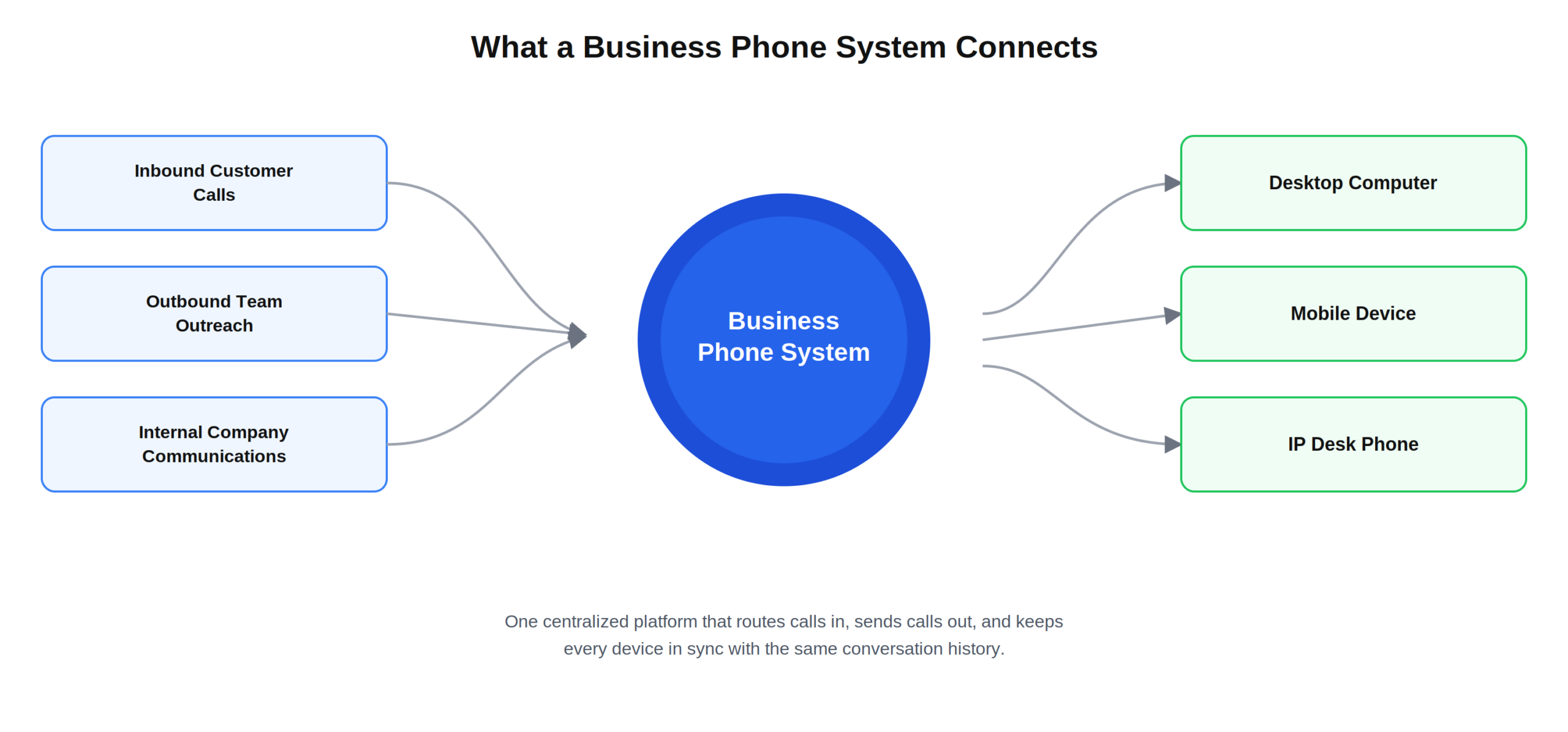
What are the Types of Business Phone Systems?
Organizations select from three primary architectural models depending on physical infrastructure, existing equipment, and technical resources:
1. Cloud-Hosted VoIP (UCaaS)
The telephone system resides entirely off-site in secure cloud data centers. Calls route over broadband internet, features update automatically, and employees connect via softphone apps or plug-and-play IP desk phones without local server upkeep.
2. On-Premises IP-PBX Systems
Physical PBX server appliances are installed directly inside a company’s server room. While this offers total on-site data governance and internal routing control, it requires significant upfront hardware investment and dedicated IT personnel to maintain.
3. Hybrid Phone Systems
A blended infrastructure that links existing analog lines or on-premise PBX switches to cloud-hosted SIP trunks. This enables businesses to retain functional desk hardware while gaining modern cloud benefits like mobile calling, remote extensions, and video conferencing.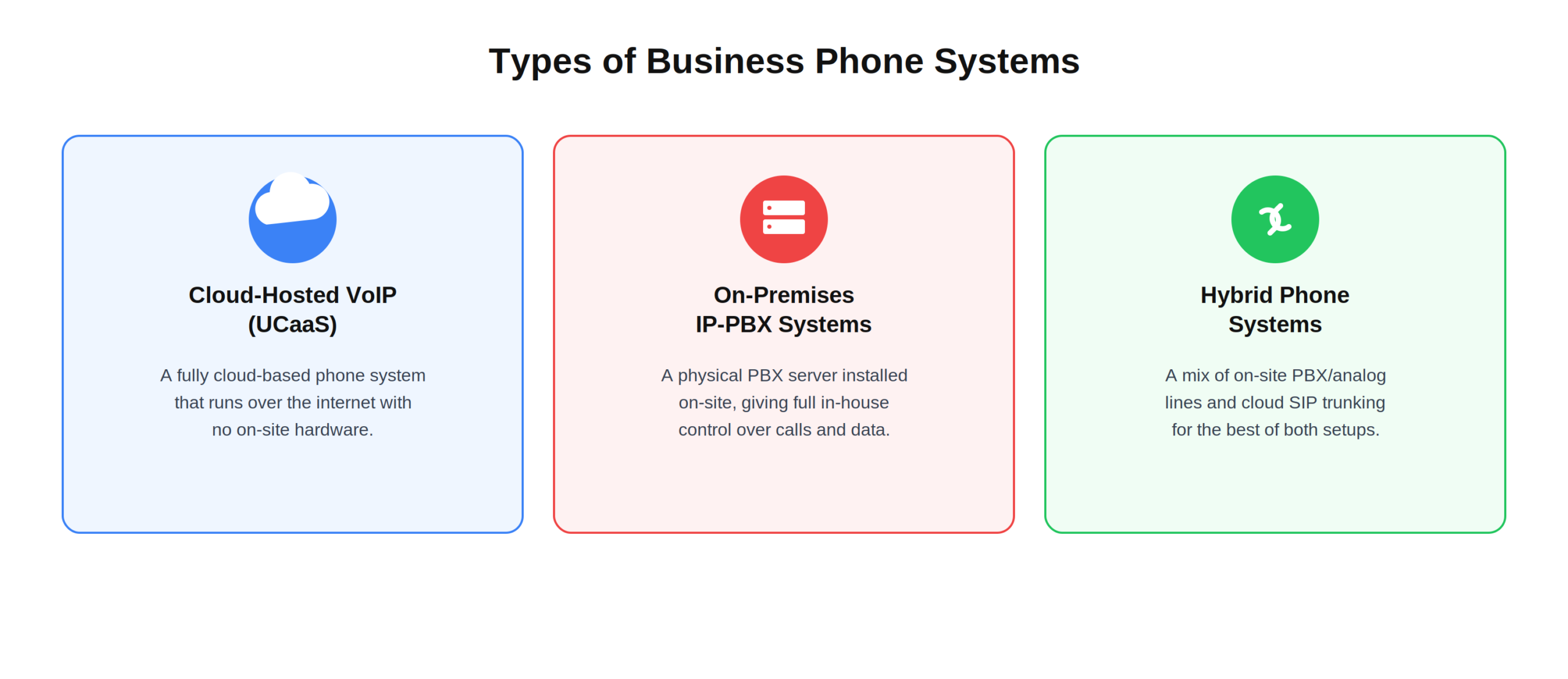
Why Do Businesses Need a Modern Phone System?
Modern organizations need adaptable communication infrastructure to manage hybrid workforces, present a polished brand, and eliminate communication silos:
- Professional Customer Presentation: Auto attendants, customized greetings, and department extensions ensure inbound callers reach the right representative without endless transfers.
- Hybrid and Remote Flexibility: Softphone apps allow employees to make and receive business calls or SMS from smartphones, laptops, or home setups while keeping personal numbers private.
- Telecom Cost Reduction: Cloud VoIP eliminates expensive on-premise PBX hardware purchases, routine telecom technician maintenance fees, and traditional copper line leases.
- Automated Workflow and CRM Integrations: Connecting phone channels directly to your CRM software automates call logging, caller-ID screen-pops, and customer record synchronization.
- AI Productivity Tools: Built-in artificial intelligence generates live call transcriptions, post-call action summaries, and automated voicemail notes to reduce manual data entry for staff.
What Matters When Reviewing Business Phone Systems
When comparing business phone systems, focus on the features that affect daily communication, management, and long-term costs.
Setup and Call Management
Choose a system with easy administration, IVR, ring groups, call queues, forwarding, and simple extension management. A straightforward setup also reduces technical work and makes it easier for teams to manage their phone system.
AI, Recording, and Analytics
Look for call recording, AI transcripts, summaries, and reports that help monitor call quality, missed calls, and customer interactions. These tools can also help managers identify common issues and improve customer service over time.
Collaboration and Apps
Business SMS, team chat, video meetings, and reliable desktop and mobile apps can keep communication organized across the entire team. Employees can stay connected whether they are working from the office, remotely, or on the move.
Integrations and Security
CRM integrations with tools such as Salesforce and HubSpot are valuable, while US businesses should also consider 10DLC, STIR/SHAKEN, and E911 compliance. Strong security and compliance features help businesses protect communications while meeting important regulatory requirements.
Hardware Support
If you use desk phones, make sure the provider supports popular SIP hardware such as Poly, Yealink, and Cisco, preferably with automatic provisioning. Good hardware compatibility makes it easier to keep existing equipment while upgrading the phone system.
15 Best Business Phone Systems in USA for 2027
Below is an in-depth breakdown of the top 15 business phone systems in the United States, evaluating their features, usability, operational performance, and real-world deployment value.
1. Nextiva — Best for Most Businesses & All-in-One Customer Experience
Company Overview
| Detail | Information |
| Founded | 2008 |
| Country | Headquartered in United States (Scottsdale, Arizona) |
| Software Type | UCaaS, VoIP & Customer Experience (CX) Software |
| Core Features | Unlimited US/Canada Calling, Multi-level Auto Attendant (IVR), HD Video Conferencing, Team Messaging, Business SMS/MMS, Call Recording, Contact Management |
| Deployment | Cloud-hosted |
| Pricing Model | Subscription / Per-user |
| Free Trial | Guided interactive demo & 30-day money-back guarantee |
| Starting Price | From $15 / user/month (Core Plan) |
| Payment Frequency | Monthly / Annual billing |
| Supported Platforms | Web, Windows, macOS, iOS, Android, and SIP IP Desk Phones |
Nextiva is widely recognized as one of the best business phone systems in the USA for organizations seeking an all-in-one communications platform. The NextivaONE interface consolidates business voice, team chat, SMS/MMS, and video meetings so teams do not have to juggle multiple disconnected apps. For office administrators, adding extensions, assigning local or toll-free numbers, building multi-level auto attendants, and setting customized after-hours routing takes only a few clicks inside an intuitive management portal.
As a leading cloud business phone system, Nextiva delivers 99.999% network uptime backed by georedundant North American data centers for crystal-clear voice clarity. Built-in call transcription and timeline history give representatives immediate caller context on every inbound ring. Enterprise-grade encryption, SOC 2 compliance, and available HIPAA-eligible plans ensure businesses in legal, medical, and financial industries stay fully protected.
Key Features
- Call Handling & Routing: Multi-level auto attendants (IVR), custom ring groups, automatic call distribution (ACD), and visual voicemail-to-email routing.
- Collaboration & Messaging: HD video meetings for up to 250 participants, persistent team messaging channels, screen sharing, and nationwide business SMS/MMS.
- AI & Voice Analytics: Built-in AI speech transcription, automated post-call summaries, sentiment analysis, and real-time supervisor call wallboards.
- Software & CRM Integrations: Bi-directional syncing with major business platforms including Salesforce, HubSpot, Microsoft 365, Google Workspace, and Zendesk.
- Administration & Hardware Support: Centralized web console with zero-touch auto-provisioning for Yealink, Poly Edge/VVX, and Cisco IP hardware.
Pricing
- Core Plan: $15 / user/month
- Engage Plan: $25 / user/month
- Scale Plan: $75 / user/month
2. RingCentral — Best for Enterprise Collaboration & Deep CRM Integrations
Company Overview
| Detail | Information |
| Founded | 1999 |
| Country | Headquarter in United States (Belmont, California) |
| Software Type | Enterprise UCaaS, Cloud PBX & CCaaS Software |
| Core Features | Cloud Telephony, Global Voice Calling, Video Meetings, RingSense AI Analytics, Team Chat, SMS/MMS, 300+ Pre-built App Connectors, Cloud Faxing |
| Deployment | Cloud-hosted |
| Pricing Model | Subscription / Per-user |
| Free Trial | 14-day free trial (up to 5 users) & enterprise demo |
| Starting Price | From $20 / user/month (Core Plan) |
| Payment Frequency | Monthly / Annual billing |
| Supported Platforms | Web, Windows, macOS, iOS, Android, and SIP IP Desk Phones |
RingCentral is widely recognized as one of the best business phone systems in the USA for mid-sized organizations and large enterprises. The flagship RingEX platform bundles enterprise-grade telephony, AI-assisted video conferencing, whiteboarding, and team messaging into a resilient cloud ecosystem. It is particularly valued by IT directors who need to unify geographically dispersed branch offices under a standardized corporate PBX network with single sign-on (SSO) and fine-grained administrative controls.
Operating as a premier enterprise business phone system, RingCentral delivers 99.999% reliability alongside an extensive application marketplace featuring more than 300 certified integrations. Advanced conversational intelligence tools transcribe calls in real time, extract action items, and detect caller sentiment. With built-in support for global calling across dozens of countries and smooth migration paths to the RingCX contact center stack, RingCentral easily adapts to evolving enterprise demands.
Key Features
- Call Handling & Routing: Multi-level visual IVR, automatic call recording, advanced call queues, shared line appearance, and whisper/barge supervisor controls.
- Collaboration & Messaging: RingCentral Video for up to 200 participants, persistent team messaging, cloud faxing, and business SMS/MMS.
- AI & Voice Analytics: RingSense AI conversational insights, automated meeting summaries, real-time call transcriptions, and advanced QA analytics.
- Software & CRM Integrations: Native integration with Salesforce, Microsoft Teams, Google Workspace, ServiceNow, NetSuite, and Zendesk.
- Administration & Hardware Support: Enterprise administrative portal with bulk user CSV uploads, audit logs, and zero-touch hardware provisioning.
Pricing
- Core Plan: $20 / user/month
- Advanced Plan: $25 / user/month
- Ultra Plan: $35 / user/month
3. Quo (formerly OpenPhone) — Best for Shared Numbers & Heavy Texting
Company Overview
| Detail | Information |
| Founded | 2018 |
| Country | Headquartered in United States (San Francisco , California) |
| Software Type | Collaborative Cloud Phone & Shared Messaging Software |
| Core Features | Shared Phone Numbers, Unified Call & SMS Inbox, Sona AI Call Agent, Internal Threads/Mentions, Auto-replies, Call Recording, CRM Sync |
| Deployment | Cloud-hosted |
| Pricing Model | Subscription / Per-user |
| Free Trial | 7-day full-access free trial |
| Starting Price | From $15 / user/month (Starter Plan) |
| Payment Frequency | Monthly / Annual billing |
| Supported Platforms | Web, Windows, macOS, iOS, and Android |
Quo (formerly OpenPhone) is widely recognized as one of the best business phone systems in the USA for agile startups, creative agencies, and client-facing teams. Rather than forcing teams into rigid desk phone structures, Quo redesigns business calling around a shared workspace where multiple team members can view, assign, and reply to calls and texts from the same phone number. The intuitive desktop and mobile applications eliminate phone silos, enabling staff to tag colleagues and leave private internal notes directly within customer conversation threads.
As an agile cloud business phone system, Quo incorporates built-in conversational AI to optimize routine communications. Its Sona AI assistant answers missed calls after business hours, collects caller inquiries, and schedules callbacks to ensure new sales leads never slip away. Built-in carrier 10DLC registration, automatic call recording, and seamless contact syncing make it an efficient communication hub for distributed remote businesses that communicate primarily via smartphone and computer apps.
Key Features
- Call Handling & Routing: Simultaneous multi-device ringing, shared line distribution, custom ring orders, warm call transfers, and business-hours scheduling.
- Collaboration & Messaging: Shared team inboxes, unified SMS/MMS threads, internal team mentions, canned text snippets, and auto-replies.
- AI & Voice Analytics: Sona AI conversational call assistant, automated call transcripts, AI call summaries, and basic response-time reporting.
- Software & CRM Integrations: Direct native integrations with HubSpot, Salesforce, Slack, Gong, and webhook connections via Zapier.
- Administration & Hardware Support: Browser-based user administration, rapid number porting, and softphone deployment without physical IP PBX hardware.
Pricing
- Starter Plan: $15 / user/month
- Business Plan: $23 / user/month
- Enterprise Plan: Custom quote
4. Dialpad — Best for Built-In AI Voice Intelligence & Live Call Coaching
Company Overview
| Detail | Information |
| Founded | 2011 |
| Country | Headquartered in United States (San Ramon, California) |
| Software Type | AI-Powered Unified Communications & Contact Center Software |
| Core Features | Real-Time Voice AI Transcription, Live Sentiment Tracking, Real-Time Assist (RTA) Cards, Auto Attendants, Team Messaging, HD Video Conferencing |
| Deployment | Cloud-hosted |
| Pricing Model | Subscription / Per-user |
| Free Trial | 14-day full-access free trial |
| Starting Price | From $15 / user/month (Standard Plan) |
| Payment Frequency | Monthly / Annual billing |
| Supported Platforms | Web, Windows, macOS, iOS, Android, and select SIP IP Phones |
Dialpad is widely recognized as one of the best business phone systems in the USA for organizations focused on conversational intelligence and real-time sales coaching. Built from the ground up on Google Cloud architecture, Dialpad replaces dated PBX infrastructure with an AI-native softphone client. The platform captures spoken dialogue with high accuracy, generating live closed captions and highlighting relevant company talking points directly on an agent’s screen during active client calls.
As an innovative cloud business phone system, Dialpad optimizes workflow productivity by automatically summarizing every phone conversation into action items and customer sentiment scores. Managers can monitor multiple live calls simultaneously via a visual dashboard, using whisper and barge tools to support junior reps during complex discussions. Reliable HD voice, built-in international SMS, and zero-downtime architecture make Dialpad an effective choice for forward-thinking distributed teams.
Key Features
- Call Handling & Routing: Dynamic IVR voice menus, intelligent ring groups, call park, executive assistant routing, and custom hold music.
- Collaboration & Messaging: HD audio/video calling, in-app team messaging, file sharing, and carrier-compliant business SMS/MMS.
- AI & Voice Analytics: Proprietary Dialpad Ai live call transcription, Real-Time Assist (RTA) trigger cards, sentiment tracking, and automated recap emails.
- Software & CRM Integrations: Direct syncing with Salesforce, HubSpot, Google Workspace, Microsoft 365, and Zendesk.
- Administration & Hardware Support: Web-based admin dashboard with instant user provisioning, license management, and desk phone auto-configuration.
Pricing
- Standard Plan: $15 / user/month
- Pro Plan: $25 / user/month
- Enterprise Plan: Custom quote
5. Ooma Office — Best for Quick Setup & Small Teams Under 10 Users
Company Overview
| Detail | Information |
| Founded | 2003 |
| Country | Headquartered in United States (Sunnyvale, California) |
| Software Type | Small Business Cloud Phone (VoIP) Software |
| Core Features | Virtual Receptionist (IVR), Ring Groups, Extension Dialing, Voicemail-to-Email, Music on Hold, Video Conferencing, Pre-configured Hardware Provisioning |
| Deployment | Cloud-hosted / Plug-and-Play Hybrid |
| Pricing Model | Subscription / Per-user |
| Free Trial | 30-day risk-free money-back guarantee |
| Starting Price | From $19.95 / user/month (Essentials Plan) |
| Payment Frequency | Monthly billing (no annual contract required) |
| Supported Platforms | Web, Windows, macOS, iOS, Android, and Pre-configured IP Desk Phones |
Ooma Office is widely recognized as one of the best business phone systems in the USA for small business owners, medical clinics, law offices, and local retail operations. The platform is engineered to remove technical friction, allowing non-technical staff to set up a commercial phone system in under twenty minutes. Companies purchasing hardware directly through Ooma receive pre-programmed IP desk phones that register immediately upon being connected to an office router.
As a dependable small-business phone system, Ooma Office delivers clear voice communication alongside practical everyday business features like virtual receptionists, extension dialing, and music on hold. Employees can manage calls from desk phones or the Ooma Office mobile app, keeping personal mobile numbers private while working offsite. Transparent per-user pricing, flat-rate calling across North America, and responsive customer support make Ooma a stable option for small teams.
Key Features
- Call Handling & Routing: Multi-level virtual receptionist, ring groups, call transfer, call forwarding, and voicemail audio delivery to email.
- Collaboration & Messaging: Ooma Meetings video conferencing (up to 100 participants on upper tiers), team chat, and business two-way SMS.
- AI & Voice Analytics: Voicemail-to-text transcription, call recording capabilities, and simplified call detail logging.
- Software & CRM Integrations: Native integration with Microsoft 365, Google Contacts, Salesforce, and HubSpot on higher tiers.
- Administration & Hardware Support: Simple web portal management, analog telephone adapter (ATA) support for legacy fax machines, and pre-configured hardware.
Pricing
- Essentials Plan: $19.95 / user/month
- Pro Plan: $24.95 / user/month
- Pro Plus Plan: $29.95 / user/month
6. Zoom Phone — Best for Video-First Teams & Low-Cost Add-On Calling
Company Overview
| Detail | Information |
| Founded | 2011 (Parent Zoom Video Communications) |
| Country | Headquartered in United States (San Jose, California) |
| Software Type | Cloud VoIP & Unified Collaboration Software |
| Core Features | Click Call-to-Video Escalation, Intelligent Call Routing, Auto Attendants, Zoom AI Companion Summaries, Team Chat, SMS/MMS, Zoom Rooms Integration |
| Deployment | Cloud-hosted |
| Pricing Model | Subscription / Per-user (Metered or Unlimited) |
| Free Trial | Guided product demo & monthly subscription flexibility |
| Starting Price | From $10 / user/month (US & Canada Metered) |
| Payment Frequency | Monthly / Annual billing |
| Supported Platforms | Web, Windows, macOS, iOS, Android, and Certified SIP Desk Phones |
Zoom Phone is widely recognized as one of the best business phone systems in the USA for organizations seeking to streamline communications within a familiar desktop interface. Operating on the same unified client as Zoom Meetings and Team Chat, it allows users to place voice calls, check voicemails, and send text messages without opening external programs. Its flagship capability lets an employee elevate a 1-on-1 audio call into a full-featured video conference with screen sharing in a single click.
As a flexible modern business phone system, Zoom Phone provides budget-friendly metered and unlimited calling plans designed for businesses with varying call frequencies. Administrators can oversee domestic and global offices through the centralized Zoom admin console, establishing routing schedules, auto attendants, and emergency E911 dispatch zones. Supported by global data centers and low per-extension pricing, it offers high value for distributed remote and hybrid organizations.
Key Features
- Call Handling & Routing: Auto attendants with visual routing trees, shared line groups, call park, warm/blind transfer, and call monitoring (listen/whisper/barge).
- Collaboration & Messaging: Zoom Team Chat integration, SMS/MMS messaging, instant video escalation, and Zoom Rooms appliance pairing.
- AI & Voice Analytics: Zoom AI Companion automated call summaries, next-step generation, and voicemail transcription.
- Software & CRM Integrations: Deep integrations with Salesforce, Google Workspace, Microsoft 365, HubSpot, Zendesk, and ServiceNow.
- Administration & Hardware Support: Centralized Zoom Admin Portal, zero-touch provisioning for Poly, Yealink, and AudioCodes hardware, and native SIP trunking.
Pricing
- US & Canada Metered: $10 / user/month
- US & Canada Unlimited: $15 / user/month
- Pro Global Select: $20 / user/month
7. Vonage — Best for Softphone-First Teams & Budget Flexibility
Company Overview
| Detail | Information |
| Founded | 2001 |
| Country | Headquartered in United States (Holmdel, New Jersey) |
| Software Type | Cloud VoIP, UCaaS & CPaaS Communications Platform |
| Core Features | Virtual Receptionist, Simultaneous Ringing, Call Flip, Vonage Meetings Video, Business SMS, Programmable Voice/SMS APIs, App Center CRM Integrations |
| Deployment | Cloud-hosted |
| Pricing Model | Subscription / Per-line |
| Free Trial | 14-day free trial on select business plans |
| Starting Price | From $13.99 / line/month (Mobile Plan) |
| Payment Frequency | Monthly / Contract-based |
| Supported Platforms | Web, Windows, macOS, iOS, Android, and VoIP Desk Phones |
Vonage is widely recognized as one of the best business phone systems in the USA for remote teams that rely on mobile and desktop softphones. The Vonage Business Communications (VBC) platform provides business calling, SMS, and video meetings within an interface engineered for laptops and smartphones. It serves as an accessible entry point for small businesses seeking to establish a professional phone identity without investing in physical office telephony hardware.
As a versatile cloud business phone system, Vonage distinguishes itself through its developer-friendly architecture, allowing companies to integrate voice, video, and messaging APIs directly into custom applications. Its proprietary App Center enables businesses to connect their phone lines with standard productivity suites, while bundled international calling plans offer dependable connectivity for companies managing overseas supply chains.
Key Features
- Call Handling & Routing: Multi-level virtual receptionist, dynamic call forwarding, simultaneous ringing, call flip between active devices, and call park.
- Collaboration & Messaging: Vonage Meetings video conferencing (up to 200 participants), team messaging, file sharing, and business SMS.
- AI & Voice Analytics: AI-powered virtual assistant, automated voicemail transcription, and call center sentiment scoring modules.
- Software & CRM Integrations: Vonage App Center connectors for Salesforce, Microsoft Teams, HubSpot, Zoho, and Google Workspace.
- Administration & Hardware Support: Intuitive admin portal, BYOD mobile onboarding, and auto-provisioning for certified IP desk hardware.
Pricing
- Mobile Plan: $13.99 / line/month
- Premium Plan: $20.99 / line/month
- Advanced Plan: $27.99 / line/month
8. GoTo Connect — Best for Multi-Site Management & Visual Call Flow Routing
Company Overview
| Detail | Information |
| Founded | 2003 (LogMeIn / GoTo brand group) |
| Country | Headquartered in United States (Boston, Massachusetts) |
| Software Type | Cloud Phone System & Unified Communications Software |
| Core Features | Drag-and-Drop Visual Dial Plan Editor, Ring Groups, Custom Queues, GoTo Meeting Video, Team Chat, Business SMS/MMS, Multi-Site Admin Console |
| Deployment | Cloud-hosted |
| Pricing Model | Subscription / Per-user |
| Free Trial | 14-day full-access free trial |
| Starting Price | From $24 / user/month (Basic Plan) |
| Payment Frequency | Monthly / Annual billing |
| Supported Platforms | Web, Windows, macOS, iOS, Android, and SIP Desk Phones |
GoTo Connect is widely recognized as one of the best business phone systems in the USA for multi-branch organizations, educational institutions, and healthcare clinics. Its defining asset is the drag-and-drop Visual Dial Plan Editor, which lets office managers map out call flows, IVR auto attendants, time-based schedules, and voicemail boxes visually. Modifying routing logic during holidays or weather emergencies takes seconds and requires no networking expertise.
As an all-in-one business phone system, GoTo Connect packages cloud voice calling, video conferencing, shared team inboxes, and multi-channel customer messaging into a unified platform. Administrators can manage several office locations and hundreds of extensions from a single screen. With built-in international calling to over 50 countries included on upper tiers, GoTo Connect remains an adaptable option for growing American businesses.
Key Features
- Call Handling & Routing: Visual drag-and-drop dial plan editor, smart call queues, ring groups, auto attendants, and customizable music on hold.
- Collaboration & Messaging: GoTo Meeting video conferencing (up to 250 participants), unified team chat, file sharing, and business SMS/MMS.
- AI & Voice Analytics: Real-time queue reporting, historical call performance analytics, call recording, and supervisor queue wallboards.
- Software & CRM Integrations: Pre-built connectors for Salesforce, Zoho CRM, Microsoft Teams, Zendesk, and Google Workspace.
- Administration & Hardware Support: Centralized multi-site administrative console, remote endpoint management, and plug-and-play hardware provisioning.
Pricing
- Basic Plan: $24 / user/month
- Standard Plan: $29 / user/month
- Connect CX Plan: Custom quote
9. 8×8 — Best for Global Presence & Flat-Rate International Calling
Company Overview
| Detail | Information |
| Founded | 1987 |
| Country | Headquartered in United States (Campbell, California) |
| Software Type | Unified UCaaS & Contact Center (CCaaS) Software |
| Core Features | Unlimited Global Calling (up to 48 countries), Enterprise Auto Attendants, HD Video Meetings, Team Messaging, Speech Analytics, PCI-DSS Compliant Security |
| Deployment | Cloud-hosted |
| Pricing Model | Subscription / Per-user |
| Free Trial | 30-day cloud trial for select plans |
| Starting Price | From $24 / user/month (X2 Plan) |
| Payment Frequency | Monthly / Annual billing |
| Supported Platforms | Web, Windows, macOS, iOS, Android, and SIP IP Desk Phones |
8×8 is widely recognized as one of the best business phone systems in the USA for organizations managing operations, clients, and remote personnel across international borders. While many competitors charge variable per-minute rates for overseas dials, 8×8 includes unlimited calling to dozens of global destinations on its primary tiers. This makes it a cost-effective choice for import/export firms, international consulting groups, and distributed workforces.
Operating as a unified enterprise business phone system, 8×8 bridges UCaaS and CCaaS by providing voice, video, team chat, and inbound contact center queues within a single ecosystem. Its global network architecture utilizes localized data centers to maintain call quality across continents. Integrated conversational analytics, PCI-DSS compliant payment processing, and supervisor monitoring ensure security across all company communications.
Key Features
- Call Handling & Routing: Global auto attendants, skill-based routing queues, visual call park, ring groups, and supervisor listen/whisper/barge.
- Collaboration & Messaging: 8×8 Meet HD video conferencing for up to 500 participants, persistent team messaging, and business SMS.
- AI & Voice Analytics: Speech analytics, automated interaction transcription, agent performance scorecards, and customer sentiment evaluation.
- Software & CRM Integrations: Deep native connectors for Salesforce, Microsoft Teams, Zendesk, NetSuite, and HubSpot.
- Administration & Hardware Support: Centralized global user administration, role-based access permissions, and zero-touch hardware provisioning.
Pricing
- X2 Plan: $24 / user/month
- X4 Plan: $44 / user/month
- X6 / Contact Center Plan: $85 / user/month
10. Aircall — Best for Cloud Call Centers & Dedicated Sales CRM Workflows
Company Overview
| Detail | Information |
| Founded | 2014 |
| Country | Headquartered in United States (New York) |
| Software Type | Cloud Call Center & CRM Voice Integration Software |
| Core Features | Two-way CRM Screen-pops, Power Dialer, Inbound IVR, Shared Call Inbox, Live Supervisor Whispering, Automated Post-call Logging, Aircall AI Summaries |
| Deployment | Cloud-hosted |
| Pricing Model | Subscription / Per-user (3-seat minimum) |
| Free Trial | 7-day full-feature free trial (no credit card required) |
| Starting Price | From $30 / user/month (Essentials Plan) |
| Payment Frequency | Monthly / Annual billing |
| Supported Platforms | Web, Windows, macOS, iOS, and Android (Softphone-first) |
Aircall is widely recognized as one of the best business phone systems in the USA for customer-facing sales and support organizations. Built specifically to eliminate call center hardware, Aircall functions as a voice layer integrated into existing help desks and CRMs. When an inbound call rings, Aircall displays relevant customer history via an on-screen pop, allowing reps to answer inquiries with complete conversational context.
As a purpose-built business phone system for sales, Aircall includes tools like Power Dialer to help reps work through outbound call lists quickly. Every call, voicemail, and recording logs to the matched CRM record automatically, eliminating manual post-call notes. Real-time agent monitoring, warm call transfers, and call tagging make Aircall an efficient asset for teams scaling their customer service infrastructure.
Key Features
- Call Handling & Routing: Smart IVR menus, skills-based call routing, call cascading, shared call inboxes, and warm transfer capabilities.
- Collaboration & Messaging: In-call team comments, shared call assignments, call tagging, and business two-way SMS messaging.
- AI & Voice Analytics: Aircall AI call transcription, automated key takeaway summaries, sentiment analysis, and live agent wallboards.
- Software & CRM Integrations: Seamless integrations with HubSpot, Salesforce, Zendesk, Intercom, Pipedrive, and Gorgias.
- Administration & Hardware Support: Cloud-based admin dashboard with instant number generation in 100+ countries, no desk phone setup required.
Pricing
- Essentials Plan: $30 / user/month (3-user minimum)
- Professional Plan: $50 / user/month (3-user minimum)
- Custom Plan: Custom quote (25-user minimum)
11. Grasshopper — Best for Solopreneurs & Simple Secondary Number Routing
Company Overview
| Detail | Information |
| Founded | 2003 |
| Country | Headquartered in United States (Needham, Massachusetts) |
| Software Type | Virtual Business Phone System & Call Forwarding Software |
| Core Features | Virtual Business Numbers, Multi-digit Extensions, Custom Welcome Greetings, Incoming Call Screening, Business SMS/MMS, Read-your-Voicemail Transcription |
| Deployment | Cloud-hosted (Virtual Softphone) |
| Pricing Model | Flat Account Subscription (Unlimited user access on higher tiers) |
| Free Trial | 7-day free trial with instant number setup |
| Starting Price | From $14 / month flat (True Solo Plan) |
| Payment Frequency | Monthly / Annual billing |
| Supported Platforms | Web, Windows, macOS, iOS, and Android |
Grasshopper is widely recognized as one of the best business phone systems in the USA for solopreneurs, independent consultants, and very small business owners. Rather than replacing existing cellular providers, Grasshopper acts as a virtual routing layer that sits on top of personal mobile devices. When a customer dials the business number, Grasshopper routes the call to the owner’s mobile phone while displaying a clear business caller-ID tag, keeping business and personal calls distinct.
As an accessible entry-level business phone system, Grasshopper provides small operations with a professional presence through customizable greeting menus, department extensions, and automated text responses for missed calls. Setup takes only a few minutes through an online portal without technical configurations. Flat-rate account pricing—rather than per-user fees—makes it an affordable option for micro-teams with predictable communication requirements.
Key Features
- Call Handling & Routing: Custom automated greetings, department extensions, simultaneous call forwarding, and incoming call screening.
- Collaboration & Messaging: Business SMS/MMS from business numbers, automated text responses to missed callers, and virtual faxing.
- AI & Voice Analytics: Read-your-voicemail transcription delivery to email or mobile notifications and call history logs.
- Software & CRM Integrations: Basic integration with Google Voice, Zapier, and mobile calendar appointment tools.
- Administration & Hardware Support: Simplified web portal, native iOS and Android apps, zero hardware equipment dependencies.
Pricing
- True Solo Plan: $14 / month flat (1 user, 1 number, 1 extension)
- Solo Plus Plan: $25 / month flat (unlimited users, 1 number, 3 extensions)
- Small Business Plan: $55 / month flat (unlimited users, 4 numbers, unlimited extensions)
12. Google Voice — Best for Google Workspace Users & Basic Virtual Calling
Company Overview
| Detail | Information |
| Founded | 2009 (Parent Alphabet / Google) |
| Country | Headquartered in United States (Mountain View, California) |
| Software Type | Cloud VoIP & Google Workspace Extension Software |
| Core Features | Google Speech-to-Text Voicemail Transcription, Multi-level Auto Attendants, Call Forwarding, Business SMS, Native Gmail & Calendar Sync, Spam Filtering |
| Deployment | Cloud-hosted |
| Pricing Model | Subscription / Per-user (Requires Google Workspace) |
| Free Trial | 14-day free trial via Google Workspace |
| Starting Price | From $10 / user/month (Starter Plan) |
| Payment Frequency | Monthly billing |
| Supported Platforms | Web Browser, iOS, Android, and Certified Poly IP Desk Phones |
Google Voice is widely recognized as one of the best business phone systems in the USA for organizations that rely on Google Workspace. Designed to integrate into Google’s productivity ecosystem, Google Voice operates directly within the Gmail desktop interface and mobile apps. Users can place calls, send SMS messages, and review voicemail transcriptions alongside their daily emails and calendar appointments, minimizing the need to adopt new standalone tools.
Operating as a streamlined business phone system, Google Voice leverages Google’s speech recognition technology to deliver accurate voicemail-to-text transcriptions. Team members can establish custom call forwarding rules to ensure calls reach them whether they are at their desks or traveling. With predictable tiered pricing and minimal administrative maintenance, it offers a practical communication solution for Workspace-centric operations.
Key Features
- Call Handling & Routing: Multi-level auto attendants (Standard and Premier tiers), ring groups, call forwarding, and spam call filtering.
- Collaboration & Messaging: Business SMS, native Google Meet video conferencing integration, and Gmail contact synchronization.
- AI & Voice Analytics: Google speech-to-text voicemail transcription, real-time spam call blocking, and Google Workspace usage reporting.
- Software & CRM Integrations: Tight native integration with Google Workspace, Google Calendar, and Google Drive.
- Administration & Hardware Support: Centralized Google Workspace Admin Console and support for certified Poly OBi IP desk hardware.
Pricing
- Starter Plan: $10 / user/month (up to 10 users)
- Standard Plan: $20 / user/month (unlimited users)
- Premier Plan: $30 / user/month (advanced multi-site)
13. Phone.com — Best for Sporadic, Seasonal, or Low-Volume Calling
Company Overview
| Detail | Information |
| Founded | 2007 |
| Country | Headquartered in United States (Newark, New Jersey) |
| Software Type | Small Business VoIP & Communications Software |
| Core Features | Pooled Minute Bundles, Auto Attendant (IVR), Dial-by-Name Directory, Voicemail-to-Email, Video Conferencing, HIPAA-Compliant Voice/Fax Options |
| Deployment | Cloud-hosted |
| Pricing Model | Subscription / Per-user (Mix-and-Match Metered & Unlimited) |
| Free Trial | 30-day money-back guarantee |
| Starting Price | From $15 / user/month (Basic Users Plan) |
| Payment Frequency | Monthly / Annual billing |
| Supported Platforms | Web, Windows, macOS, iOS, Android, and SIP Desk Phones |
Phone.com is widely recognized as one of the best business phone systems in the USA for micro-businesses, professional practices, and seasonal operations with fluctuating call volumes. Unlike platforms that require every employee to subscribe to identical, expensive enterprise tiers, Phone.com permits mix-and-match billing. Organizations can place light phone users on low-cost pooled minute tiers while reserving unlimited calling plans for high-volume sales reps, reducing overall monthly telecommunications expenses.
As a practical business phone system, Phone.com provides essential corporate telephony capabilities, including automated greetings, voice menus, and hold music, even on entry-level plans. It also offers HIPAA-compliant communication packages for medical offices handling protected health information. With options for local, toll-free, and vanity numbers, Phone.com provides cost-conscious businesses with a professional phone presence tailored to their actual usage.
Key Features
- Call Handling & Routing: Automated greetings, multi-level IVR menus, dial-by-name directories, call transfer, and call queues.
- Collaboration & Messaging: Video conferencing (up to 100 participants on Pro), team messaging, and business SMS/MMS.
- AI & Voice Analytics: Voicemail-to-text audio transcription, call recording, and downloadable call detail reporting.
- Software & CRM Integrations: Zapier integration connecting with Zoho, Salesforce, and Google Contacts.
- Administration & Hardware Support: Self-service administrative portal, softphones, and support for SIP desk phones and analog adapters.
Pricing
- Basic Users Plan: $15 / user/month (500 pooled minutes)
- Plus Users Plan: $21 / user/month (unlimited minutes)
- Pro Users Plan: $31 / user/month (call recording & analytics)
14. Verizon Business — Best for Combined Fiber Internet & On-Premise Bundles
Company Overview
| Detail | Information |
| Founded | 2006 |
| Country | Headquartered in United States (New York) |
| Software Type | Telecom Carrier Cloud VoIP & Unified Communications Software |
| Core Features | One Talk Simultaneous Mobile/Desk Ringing, Multi-tier Auto Attendants, Hunt Groups, Business Fiber Bundling, Mobile App Calling, SLA Guarantee |
| Deployment | Cloud-hosted / Carrier Network Hybrid |
| Pricing Model | Subscription / Per-line |
| Free Trial | Enterprise consultation and live demo |
| Starting Price | From $15 / line/month (One Talk Mobile Line) |
| Payment Frequency | Monthly / Contract-based |
| Supported Platforms | Windows, macOS, iOS, Android, and Enterprise SIP Desk Phones |
Verizon Business is widely recognized as one of the best business phone systems in the USA for organizations that value network reliability from a major Tier-1 carrier. Through its One Talk and Business Digital Voice solutions, Verizon combines cloud VoIP telephony with its national cellular and fiber network infrastructure. This setup allows companies to route voice traffic across dedicated business broadband lines, minimizing voice packet loss and jitter during peak operational hours.
Operating as an enterprise-grade business phone system, Verizon provides a bridge between mobile devices and physical office desks. Its One Talk technology allows a single corporate phone number to ring simultaneously across mobile devices, tablets, and physical desk phones, keeping field employees connected to the central office. Backed by carrier-grade service level agreements (SLAs), 24/7 technical support, and nationwide coverage, Verizon Business remains a dependable choice for multi-site organizations.
Key Features
- Call Handling & Routing: Multi-tier auto attendants, hunt groups, simultaneous mobile ringing, call park, and music on hold.
- Collaboration & Messaging: Video conferencing options, business mobile messaging, and mobile office integrations.
- AI & Voice Analytics: Carrier-grade call analytics, automated voicemail delivery, and real-time usage monitoring.
- Software & CRM Integrations: Core integration with Microsoft 365, Cisco Webex, and select enterprise CRM databases.
- Administration & Hardware Support: Centralized enterprise billing portal, direct carrier hardware leasing, and certified on-site technician deployment.
Pricing
- One Talk Mobile Line: $15 / line/month
- Business Digital Voice Starter: $20 / line/month
- Business Digital Voice Premium: $35 / line/month
15. 1-VoIP — Best for Reusing Legacy IP Phones & Low Per-Extension Rates
Company Overview
| Detail | Information |
| Founded | 2005 |
| Country | Headquartered in United States (Oklahoma City, Oklahoma) |
| Software Type | Voice-First Cloud PBX & SIP Trunking Software |
| Core Features | Legacy IP Phone Provisioning, Nomorobo Spam Call Blocking, Digital Receptionist, Custom Call Queues, Ring Groups, Voicemail-to-Email, Virtual Fax |
| Deployment | Cloud-hosted |
| Pricing Model | Subscription / Per-extension |
| Free Trial | 30-day money-back guarantee (no contract) |
| Starting Price | From $8.97 / extension/month (Metered Plan) |
| Payment Frequency | Monthly billing |
| Supported Platforms | Web, Windows, Android, iOS, and Open-SIP Legacy IP Desk Phones |
1-VoIP is widely recognized as one of the best business phone systems in the USA for cost-conscious companies that want to upgrade to cloud VoIP without replacing their functional SIP desk phones. While many cloud providers require customers to purchase their proprietary hardware, 1-VoIP accommodates a broad selection of third-party SIP phones from manufacturers such as Cisco, Grandstream, Poly, and Yealink. This open-hardware approach helps organizations avoid large upfront capital expenditures.
As a voice-focused business phone system, 1-VoIP concentrates on high call availability, responsive US-based customer support, and essential call routing features. The platform includes built-in spam call filtering powered by Nomorobo to keep lines clear of unsolicited telemarketing calls. With flexible metered and unlimited calling plans available without long-term contracts, 1-VoIP provides practical, voice-centric telecommunications for small professional offices.
Key Features
- Call Handling & Routing: Auto attendants (digital receptionists), custom call queues, ring groups, call forwarding, and music on hold.
- Collaboration & Messaging: Virtual electronic faxing, basic SMS texting capabilities, and voicemail audio delivery to email.
- AI & Voice Analytics: Built-in Nomorobo spam call detection, call detail reporting, and call recording storage.
- Software & CRM Integrations: Direct SIP trunking connections and basic softphone dialer integration.
- Administration & Hardware Support: Web-based account control center, open SIP credentials, and manual configuration support for legacy IP desk hardware.
Pricing
- Metered Plan: $8.97 / extension/month (plus 2¢ per minute)
- Corporate Plan: $14.97 / extension/month (unlimited incoming, pooled outgoing)
- Unlimited Plan: $19.97 / extension/month (unlimited calling across North America)
Comparison of the Best Business Phone Systems in USA
| Business Phone System | Best For | Starts At | Free Trial / Demo | Standout Feature | Primary Trade-off |
| Nextiva | Most businesses & all-in-one CX | $15 / user/mo | Guided demo & 30-day money-back guarantee | Scales seamlessly from small offices to contact centers on one stack | Base pricing is higher than bare-bones virtual forwarders |
| Quo (formerly OpenPhone) | Shared numbers & heavy texting | $15 / user/mo | 7-day free trial | Shared team inboxes unify calling, SMS threads, and mentions | Lacks traditional IP desk phone auto-provisioning |
| RingCentral | Enterprise collaboration & integrations | $20 / user/mo | 14-day free trial (up to 5 users) | Over 300 pre-built enterprise connectors and AI analytics | Steeper administrative learning curve for non-technical teams |
| Dialpad | Built-in AI voice intelligence & coaching | $15 / user/mo | 14-day free trial | Proprietary Dialpad Ai transcribes and coaches active calls live | Full CRM integrations and multi-office routing require Pro tier |
| Ooma Office | Fastest setup & small teams under 10 | $19.95 / user/mo | 30-day risk-free money-back guarantee | Pre-configured IP desk phones deploy with zero manual setup | Basic analytics and lacks native omnichannel contact center tools |
| Zoom Phone | Video-first teams & low-cost add-on calling | $10 / user/mo | Guided demo & flexible monthly terms | 1-click call escalation into collaborative Zoom Video meetings | Advanced CCaaS analytics and global dial plans require add-ons |
| Vonage | Softphone teams & API customization | $13.99 / line/mo | 14-day free trial on select tiers | Extensive developer CPaaS ecosystem backed by Ericsson | Several standard features (e.g., call recording) are paid add-ons |
| GoTo Connect | Multi-site setups & visual call flows | $24 / user/mo | 14-day full-access free trial | Drag-and-drop Visual Dial Plan Editor simplifies routing updates | Mobile softphone app can lag under heavy network traffic |
| 8×8 | Global presence & flat-rate international | $24 / user/mo | 30-day trial on select cloud plans | Flat-rate unlimited calling to up to 48 countries included on base tiers | Administrative menus feel dense and complex for beginner admins |
| Aircall | Cloud call centers & CRM workflows | $30 / user/mo | 7-day free trial (no card required) | Bi-directional CRM screen-pops and automated call logging | Higher starting price point with a mandatory 3-user minimum |
| Grasshopper | Solopreneurs & simple secondary routing | $14 / mo flat | 7-day free trial with instant setup | Keeps business caller ID clean and separate on personal phones | No built-in video meetings, team chat, or IP desk phone support |
| Google Voice | Google Workspace users & basic calling | $10 / user/mo | 14-day trial via Google Workspace | Tight native workflow integration across Gmail, Meet, and Calendar | Basic call handling with no multi-level auto attendant on Starter |
| Phone.com | Sporadic, seasonal, or light calling | $15 / user/mo | 30-day money-back guarantee | Mix-and-match pooled minutes and unlimited plans on one bill | Outbound SMS requires higher tier plans and 10DLC registration |
| Verizon Business | Combined fiber internet & physical offices | $15 / line/mo | Enterprise consultation & live demo | Carrier-grade reliability bundled with Verizon business fiber lines | Requires contract commitments and slower hardware provisioning |
| 1-VoIP | Reusing legacy IP phones & spam blocking | $8.97 / ext/mo | 30-day money-back guarantee | Open SIP hardware compatibility paired with Nomorobo filtering | No native video collaboration or modern team messaging workspace |
How to Choose the Right Business Phone System
Selecting the right phone system requires evaluating several factors.
Assess Your Business Size
Small businesses should focus on affordability and simplicity, while larger enterprises typically need advanced features and centralized management tools.
Choosing the right fit ensures you don’t overpay for unnecessary features or outgrow the system too quickly.
Consider Remote Work Needs
If your team is distributed, prioritize cloud-based access and mobile apps to ensure smooth communication anywhere.
This helps maintain productivity and connectivity regardless of location.
Evaluate Integration Requirements
Make sure the system connects easily with your CRM, help desk, and collaboration tools to streamline workflows.
Strong integrations reduce manual work and improve overall efficiency.
Review Security Features
Look for strong protections like encryption, multi-factor authentication, and compliance certifications to safeguard data.
A secure system protects both business communication and customer information.
Compare Customer Support
Reliable support is essential for quick issue resolution during setup, training, and daily operations.
Good customer service minimizes downtime and improves user experience.
Analyze Scalability
Choose a platform that can expand with your business as your team size and communication needs grow.
Scalable systems save costs and prevent future migration issues.
Frequently Asked Questions (FAQs)
What is the best business phone system overall?
Nextiva and RingCentral lead the market as the best overall business phone systems for US enterprises. Both deliver 99.999% uptime reliability, unified desktop and mobile applications, extensive desk phone compatibility, and deep CRM integration ecosystems that scale smoothly from small offices to complex enterprise contact centers.
What is the cheapest business phone system?
For micro-teams and budget-conscious operations, 1-VoIP ($8.97/extension/mo), Zoom Phone ($10/user/mo), and Google Voice ($10/user/mo) deliver the lowest per-seat entry costs. Solopreneurs seeking flat account billing without individual user fees often select Grasshopper, which starts at a flat $14 per month.
Are VoIP phone systems better than traditional landlines?
Yes. Cloud VoIP systems route communications over high-speed broadband rather than copper public switched telephone networks (PSTN), eliminating expensive on-premise PBX hardware, technician wiring fees, and recurring copper line maintenance. They also natively support hybrid work, mobile softphones, auto attendants, and CRM syncing within a single predictable monthly plan.
Can I keep my existing business phone number?
Yes. Under Federal Communications Commission (FCC) rules, US companies retain full legal ownership of their business numbers and can port existing local, toll-free, and vanity numbers to any VoIP or cloud provider. Most platforms process number transfers directly through their online administrative portal during initial onboarding.
Do business phone systems work on mobile devices?
Yes. Modern cloud phone systems offer native iOS and Android softphone applications that allow employees to make and receive business calls, check visual voicemails, participate in video meetings, and send 10DLC-registered text messages. The app displays the company caller ID on outbound dials, ensuring personal cell phone numbers stay private.
Conclusion
Upgrading to a modern cloud business phone system has become a necessity for American companies navigating hybrid work, rising telecom costs, and higher customer expectations. Replacing legacy copper landlines with flexible, software-driven VoIP architecture unlocks professional voice routing, business texting, video conferencing, and automated CRM record-keeping on a single platform.
Whether your team prioritizes the all-in-one customer experience tools of Nextiva, the extensive software integration catalog of RingCentral, the shared-number simplicity of Quo, or the fast, pre-configured setup of Ooma Office, the ideal choice depends on your headcount, daily call frequency, and software workflows. By aligning your communication goals with the right call routing rules, mobile softphones, and compliance standards, you establish a reliable telecommunications foundation that keeps your business responsive, connected, and scalable.
